
Master Capacity Planning: A 6-Step Guide for Teams

Capacity planning is the process of aligning team workload with available resources to ensure balanced productivity and timely delivery.
It helps managers avoid overloading employees, eliminate idle capacity, and make better decisions using real workload data instead of assumptions.
Tools like Desklog support this process by providing clear insights into actual work hours, productivity patterns, and team availability, enabling more accurate and data-driven planning.
In this guide we will learn:
- What Is Capacity Planning?
- Capacity Planning in Workforce Management: Definition, Purpose, and Importance
- Why Capacity Planning Matters for Modern Teams
- Types of Capacity Planning
- How to Do Capacity Planning in 6 Steps
- Capacity Planning vs Resource Planning
- Common Capacity Planning Challenges and How to Fix Them
- Capacity Planning Best Practices
What Is Capacity Planning?
| Capacity planning is the process of matching team workload to available resources so no one is overloaded and no capacity goes wasted. It involves assessing current bandwidth, forecasting demand, and distributing work based on real availability data to keep projects on track and teams balanced. Modern teams rely on visibility tools like Desklog to understand real workload patterns and improve planning accuracy using actual time data instead of assumptions. |
Capacity Planning in Workforce Management: Definition, Purpose, and Importance
What Capacity Planning Means in Workforce Management
Capacity planning in workforce management is the process of determining how much work a team can realistically handle within a given time period and aligning that capacity with incoming work demand. It helps organizations maintain a balanced workload distribution, ensure deadlines are achievable, and prevent employee burnout caused by overcommitment or poor workload estimation.
Capacity Planning vs Resource Planning
A common misconception is that capacity planning is the same as resource planning. While both are related, they serve different purposes. Resource planning focuses on assigning specific people to tasks or projects, whereas capacity planning evaluates whether the team has sufficient time, bandwidth, and availability to complete the assigned work effectively in the first place. In other words, resource planning answers who does what, while capacity planning answers how much work can actually be done.
Example of Capacity Planning in Action
For example, a manager may assign five projects to a team based on headcount availability. However, capacity planning goes a step further by analyzing whether those five projects can realistically fit into the team’s working hours after accounting for meetings, support tasks, administrative work, and other ongoing responsibilities. This prevents overcommitment and helps maintain realistic delivery timelines.
Why Capacity Planning Matters
Without capacity planning, teams often operate on assumptions about availability and productivity, which can lead to missed deadlines, bottlenecks, and uneven workload distribution. With proper capacity planning, decisions are driven by actual data rather than guesswork, improving both efficiency and predictability.
How Desklog Improves Capacity Planning
Modern tools like Desklog enhance this process by providing real-time insights into work hours, productivity trends, and employee availability. By using accurate time tracking and workload data, Desklog helps managers make informed planning decisions and align capacity with demand more effectively in real-world work environments.
Why Capacity Planning Matters for Modern Teams
Capacity planning plays a direct role in productivity, employee satisfaction, and project success.
When capacity is ignored, teams experience:
- Uneven workload distribution
- Employee burnout due to overwork
- Missed deadlines and rushed delivery
- Poor visibility into actual team bandwidth
- Inefficient use of skills and time
On the other hand, structured capacity planning ensures:
- Balanced workload across teams
- Predictable project timelines
- Better decision-making for managers
- Reduced stress and burnout
- Improved utilization rate of resources
This is especially important in remote and hybrid environments where managers cannot physically observe workload distribution. Workforce intelligence tools like Desklog provide real-time visibility into how time is actually spent, helping leaders make informed decisions.
Types of Capacity Planning
Capacity planning helps organizations balance workload, resources, and delivery expectations by aligning them with actual team availability. It ensures smoother execution across people, projects, and product goals while preventing overload and delays.
Workforce Capacity Planning
Focuses on employee availability and workload distribution to ensure balanced productivity across the team. It considers working hours, leave schedules, meetings, and other non-productive time to understand real capacity. This helps managers prevent burnout and make fair task allocations. It also improves visibility into how effectively the workforce is being utilized.
Project Capacity Planning
Focuses on determining whether a team has enough bandwidth to complete specific projects within set deadlines. It helps managers evaluate resource availability before committing to timelines. By analyzing ongoing workloads and priorities, it reduces the risk of overloading teams. This ensures projects are delivered on time without compromising quality.
Product Capacity Planning
Used in product and engineering environments to align development capacity with roadmap requirements. It helps teams assess whether they can realistically deliver planned features and releases. This type of planning improves sprint accuracy and long-term planning reliability. It also ensures development teams are not stretched beyond sustainable limits.
Capacity planning often overlaps across these areas in real-world scenarios, especially in growing organizations managing multiple priorities at once.
How to Do Capacity Planning in 6 Steps
Effective capacity planning requires a structured approach that balances available resources with workload demand. By following a clear process, managers can improve resource utilization, prevent bottlenecks, and ensure projects stay on track.
-
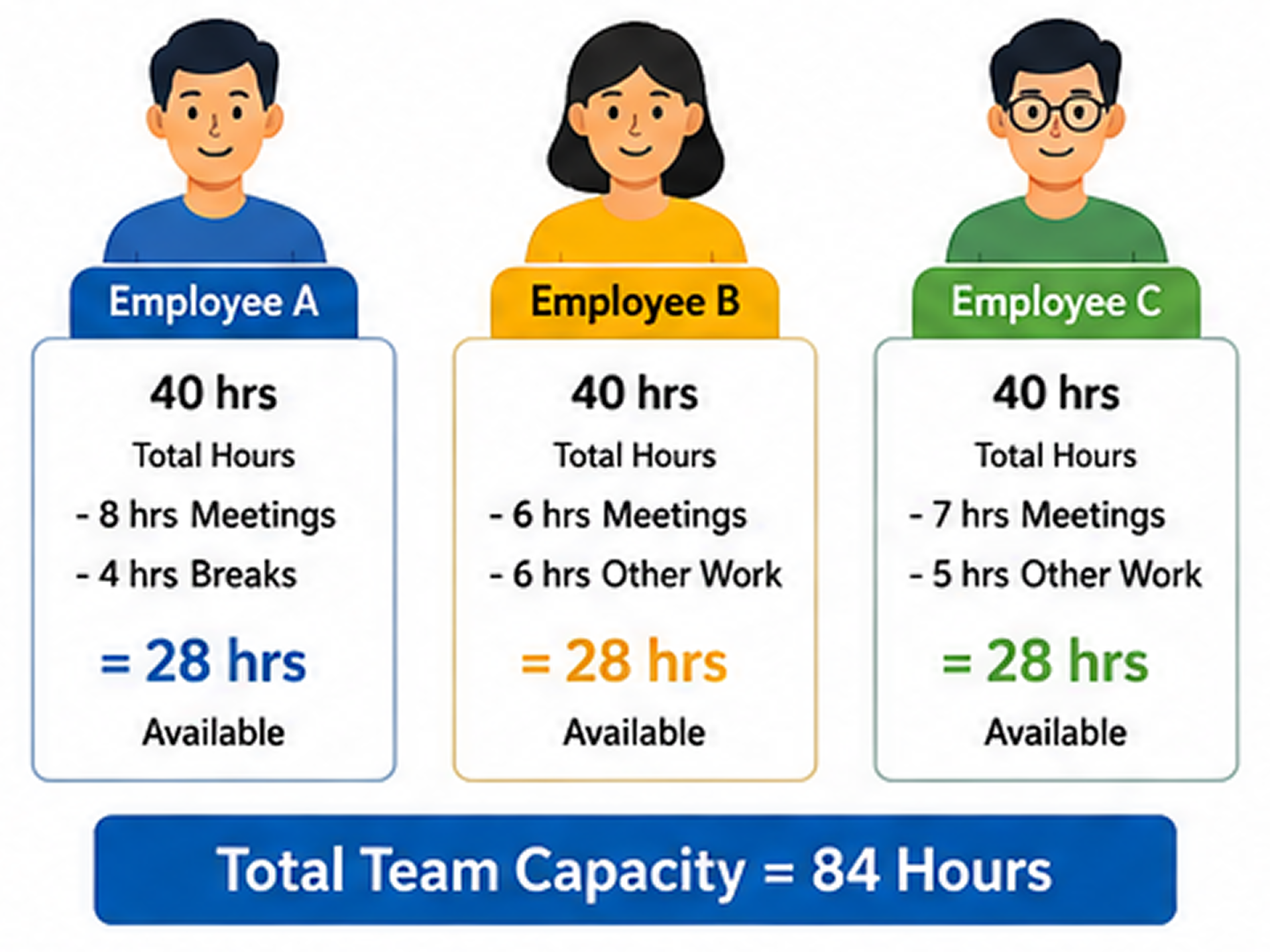
Step 1 – Assess Current Capacity
Calculate total available working hours per employee, excluding meetings, breaks, leave, and non-project activities. This provides a realistic view of the team’s actual capacity.
-
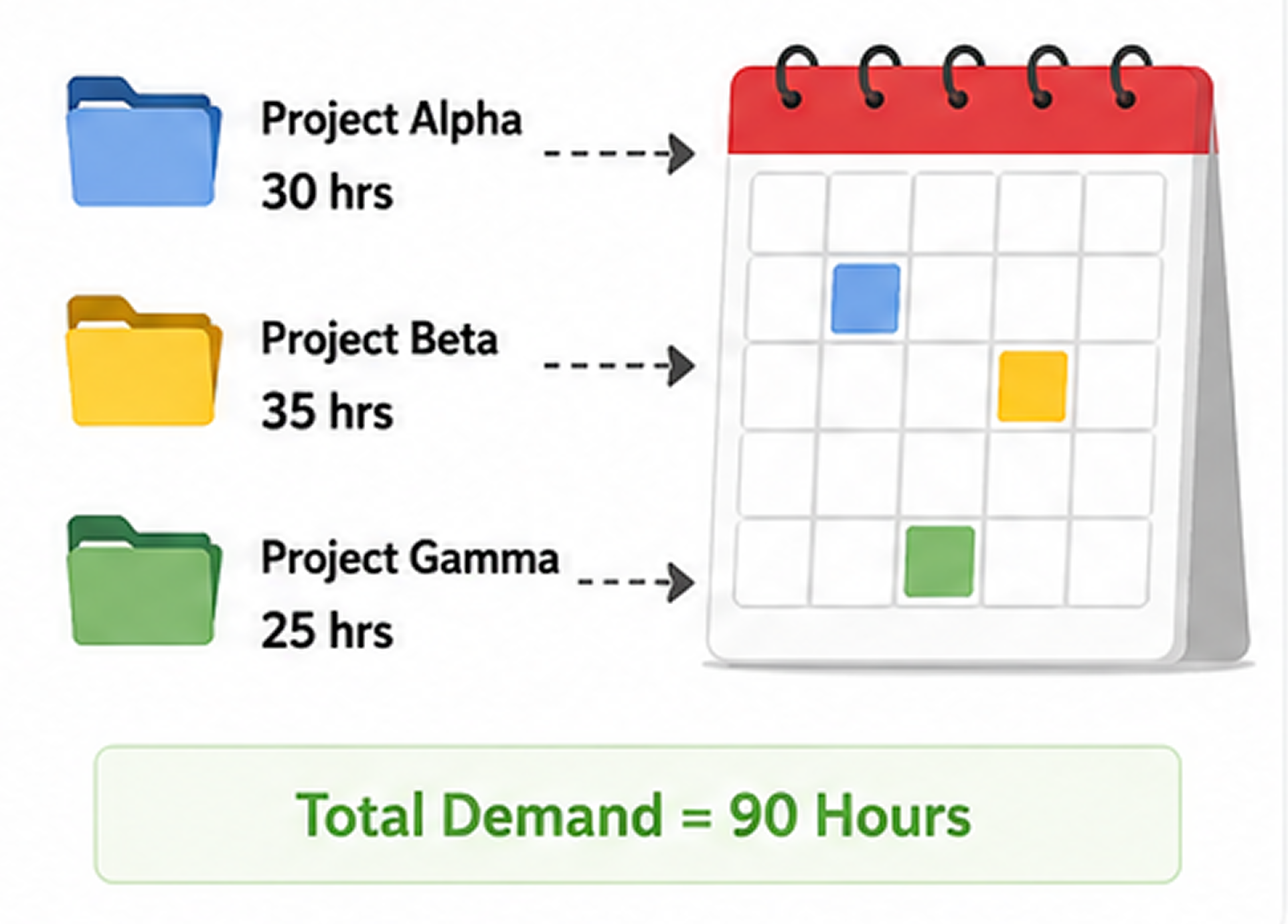
Step 2 – Forecast Demand
List all upcoming tasks, projects, and expected workload for the planning period. Estimating future demand helps teams prepare resources in advance and avoid last-minute scheduling issues.
-
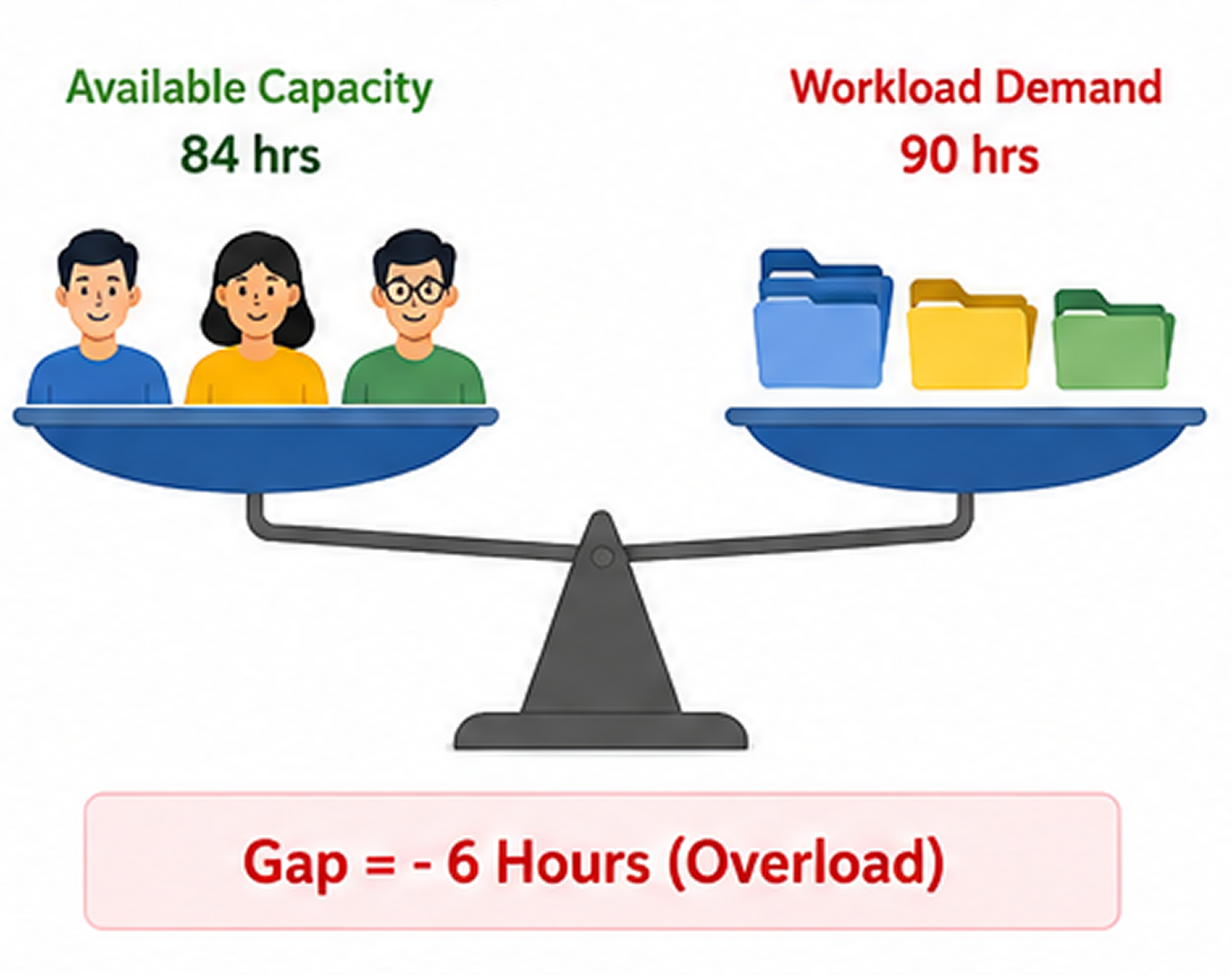
Step 3 – Identify Capacity Gaps
Compare available capacity with projected workload to identify areas of overload or underutilization. This helps managers spot potential risks before they affect project delivery.
-
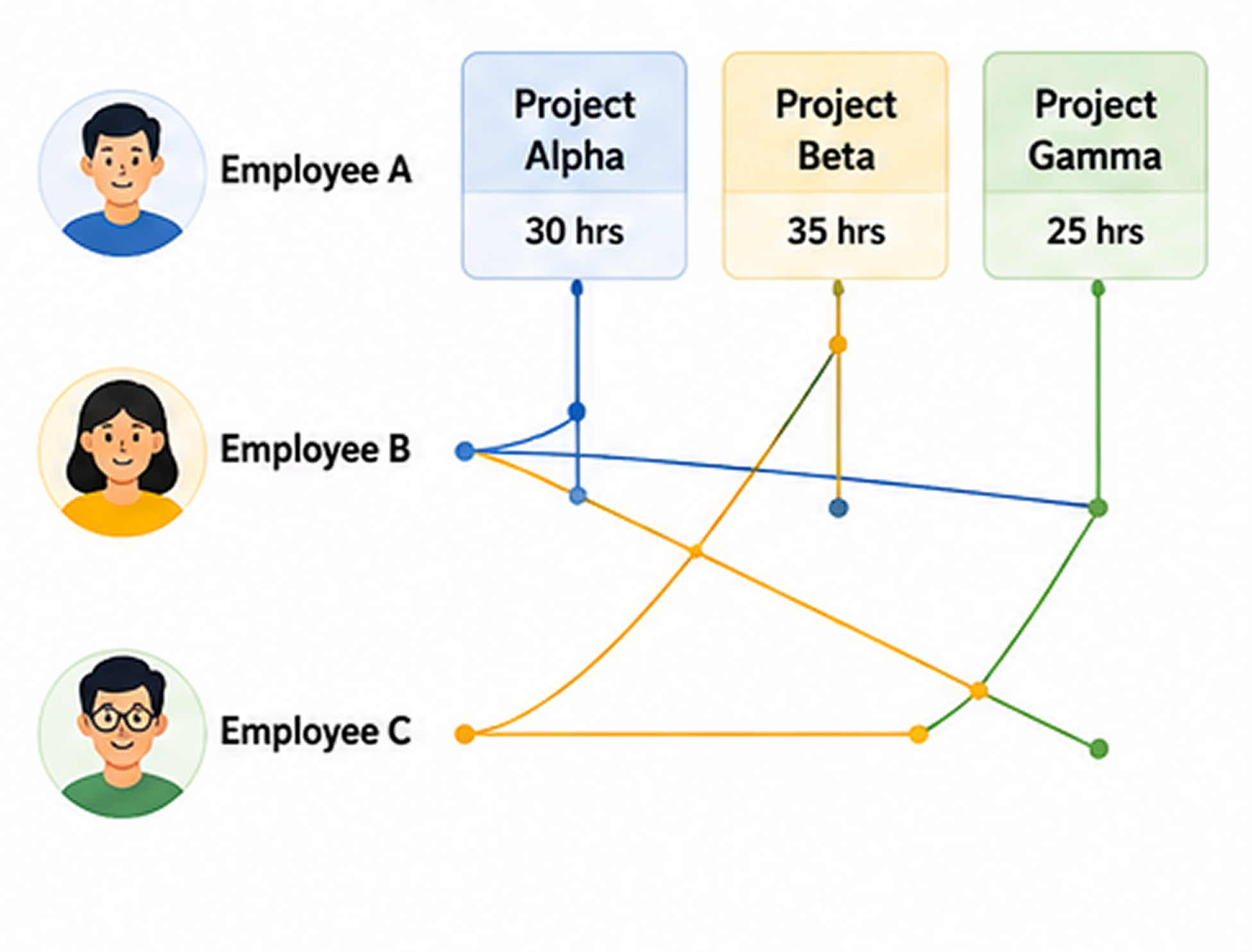
Step 4 – Allocate Resources
Assign tasks based on employee skills, availability, and project priorities rather than assumptions. Proper allocation improves efficiency and ensures work is distributed fairly.
-
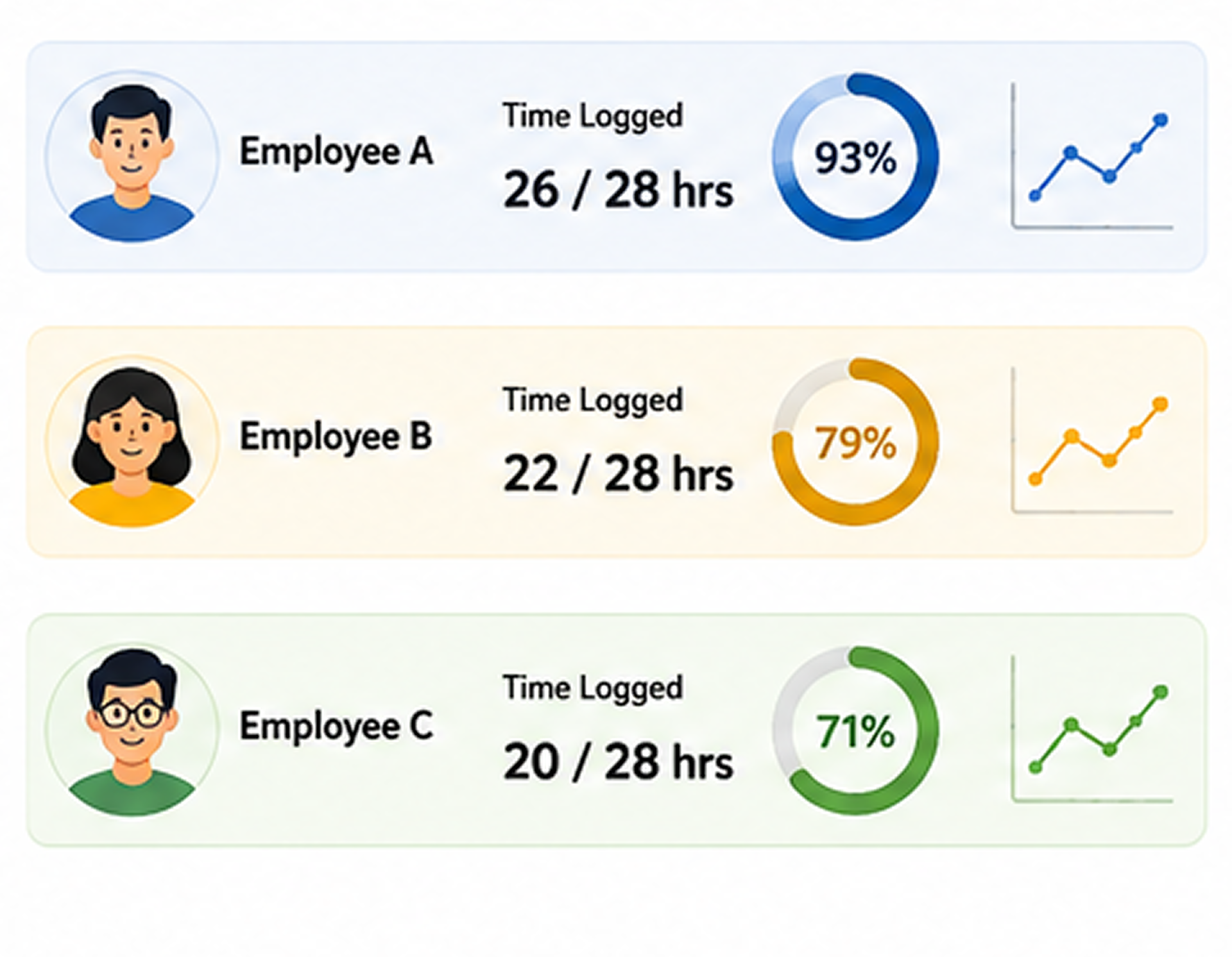
Step 5 – Monitor in Real Time
Track actual work progress, productivity, and time usage using tools like Desklog. Real-time visibility helps managers understand whether plans are being executed as expected.
-
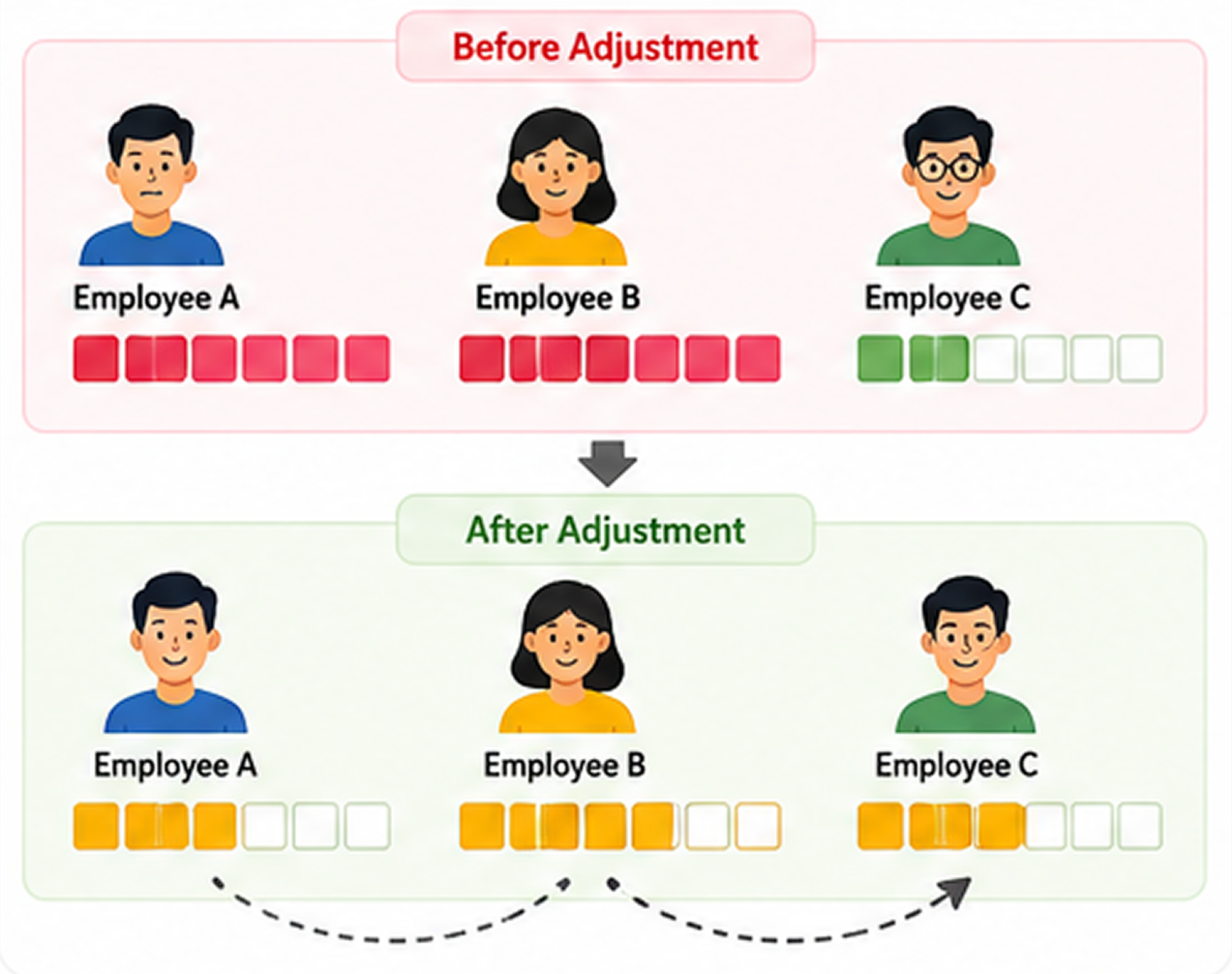
Step 6 – Adjust Continuously
Review workloads regularly and make adjustments as priorities, deadlines, or resource availability change. Continuous optimization keeps capacity plans aligned with business needs.
Capacity Planning vs Resource Planning
Capacity planning and resource planning are closely related workforce management practices, but they serve different purposes. Capacity planning focuses on determining whether a team has enough time and bandwidth to handle incoming work, while resource planning focuses on assigning the right people to specific tasks. Together, they help organizations balance workloads and ensure projects are executed efficiently.
| Factor | Capacity Planning | Resource Planning |
|---|---|---|
| Focus | Total team bandwidth | Task assignment |
| Goal | Prevent overload or idle time | Assign people to tasks |
| Timing | Before and during execution | During execution |
| Data Used | Availability + workload trends | Skills and availability |
| Outcome | Balanced workload system | Task allocation system |
Capacity planning ensures the workload fits the team, while resource planning ensures the right people are assigned to that workload. Organizations achieve the best results when both processes work together to support efficient project execution and sustainable workforce utilization.
Common Capacity Planning Challenges and How to Fix Them
While capacity planning helps organizations optimize workload distribution and resource utilization, it is not without challenges. Many teams struggle with limited visibility, inaccurate estimates, and changing priorities, making it difficult to maintain an accurate view of available capacity. Identifying these common issues and addressing them proactively can significantly improve planning accuracy and team performance.
Lack of Visibility
Managers often lack a clear understanding of how work is distributed across team members. Without real-time visibility, it becomes difficult to identify overloaded employees or available capacity.
Fix: Use tools that provide visibility into employee workloads and work patterns. Desklog’s activity tracking, project time tracking, and performance insights help managers understand where time is being spent and how work is distributed across the team.
Manual Planning Errors
Many organizations still rely on spreadsheets for capacity planning, which can quickly become outdated as workloads and priorities change. This often results in inaccurate planning and resource allocation.
Fix: Replace manual spreadsheets with automated systems that continuously capture work data. Desklog’s automatic time tracking and automated timesheets reduce manual effort and ensure planning decisions are based on up-to-date information.
Inaccurate Forecasting
Workload estimates are frequently based on assumptions rather than actual performance data. As a result, teams may underestimate or overestimate the effort required to complete projects.
Fix: Improve forecasting by analyzing historical work patterns and project effort. Desklog’s project time tracking, automatic time tracking, and performance insights provide the data needed to make more realistic workload estimates.
Workload Imbalance
Some employees may become overloaded with work while others remain underutilized. This imbalance can reduce productivity, affect morale, and increase the risk of burnout.
Fix: Regularly review workload and productivity data to identify uneven task distribution. Desklog’s performance insights, activity tracking, and kanban view make it easier to balance workloads and allocate tasks more effectively.
Remote Team Coordination Issues
Managing distributed teams can be challenging due to reduced visibility into employee activities, availability, and progress. This often makes capacity planning more complex.
Fix: Centralize workforce visibility with tools designed for distributed teams. Desklog’s mobile app, offline time tracking, attendance management, and project time tracking help managers maintain accurate capacity planning regardless of where employees are working.
Capacity Planning Best Practices
Successful capacity planning is not just about estimating workloads, it requires continuous monitoring, realistic forecasting, and data-driven decision-making. Following proven best practices helps organizations improve resource utilization, maintain balanced workloads, and adapt quickly to changing business demands.
-
Use Real Data Instead of Assumptions
Capacity planning should be based on actual work patterns rather than guesswork. Using real productivity and time data provides a more accurate understanding of team availability and workload capacity, leading to better planning decisions.
-
Review Capacity Weekly or Per Sprint
Team availability and project priorities can change quickly. Regularly reviewing capacity on a weekly basis or at the end of each sprint helps managers identify issues early and make necessary adjustments before they affect project delivery.
-
Avoid Overloading Top Performers Repeatedly
High-performing employees often receive more work because they consistently deliver results. However, relying too heavily on the same individuals can lead to burnout and reduced long-term productivity. Distribute responsibilities fairly across the team whenever possible.
-
Separate Deep Work and Meeting Time
Not all working hours are available for focused project work. Capacity calculations should account for meetings, administrative tasks, and interruptions separately to create a realistic picture of productive work time.
-
Track Historical Workload Trends
Past workload data can reveal patterns that improve future planning. Analyzing historical trends helps managers forecast demand more accurately, identify recurring bottlenecks, and prepare for peak workload periods.
-
Align Planning with Project Cycles
Capacity planning should be synchronized with project milestones, sprint schedules, and delivery timelines. Aligning planning activities with project cycles helps ensure resources are available when they are needed most.
-
Balance Tasks Based on Skill Levels
Work should be assigned according to both employee capacity and expertise. Matching tasks to appropriate skill levels improves efficiency, maintains quality standards, and prevents unnecessary delays.
-
Adjust Plans Continuously Instead of Locking Them Early
Capacity planning should be treated as an ongoing process rather than a one-time activity. Regular adjustments based on changing priorities, team availability, and actual progress help organizations remain flexible and maintain realistic workloads.
Conclusion
Capacity planning is essential for building balanced, productive, and efficient teams. Without it, organizations face overload, missed deadlines, and wasted resources. A structured approach helps managers align workload with real capacity instead of assumptions. When combined with workforce intelligence tools like Desklog, capacity planning becomes more accurate, predictable, and scalable.
Ready to Improve Capacity Planning Across Your Team?
Replace assumptions with real workforce data. Desklog helps managers optimize capacity, balance workloads, and make informed resource planning decisions.
FAQs
Meet The Author