
Time Tracking Software for Developers
Desklog automatically captures coding activity, tracks time across projects and sprints, and converts developer effort into actionable insights. No manual timers. No workflow interruptions. Just accurate, real‑time data that helps engineering teams plan better, deliver faster, and stay focused on the work that matters.
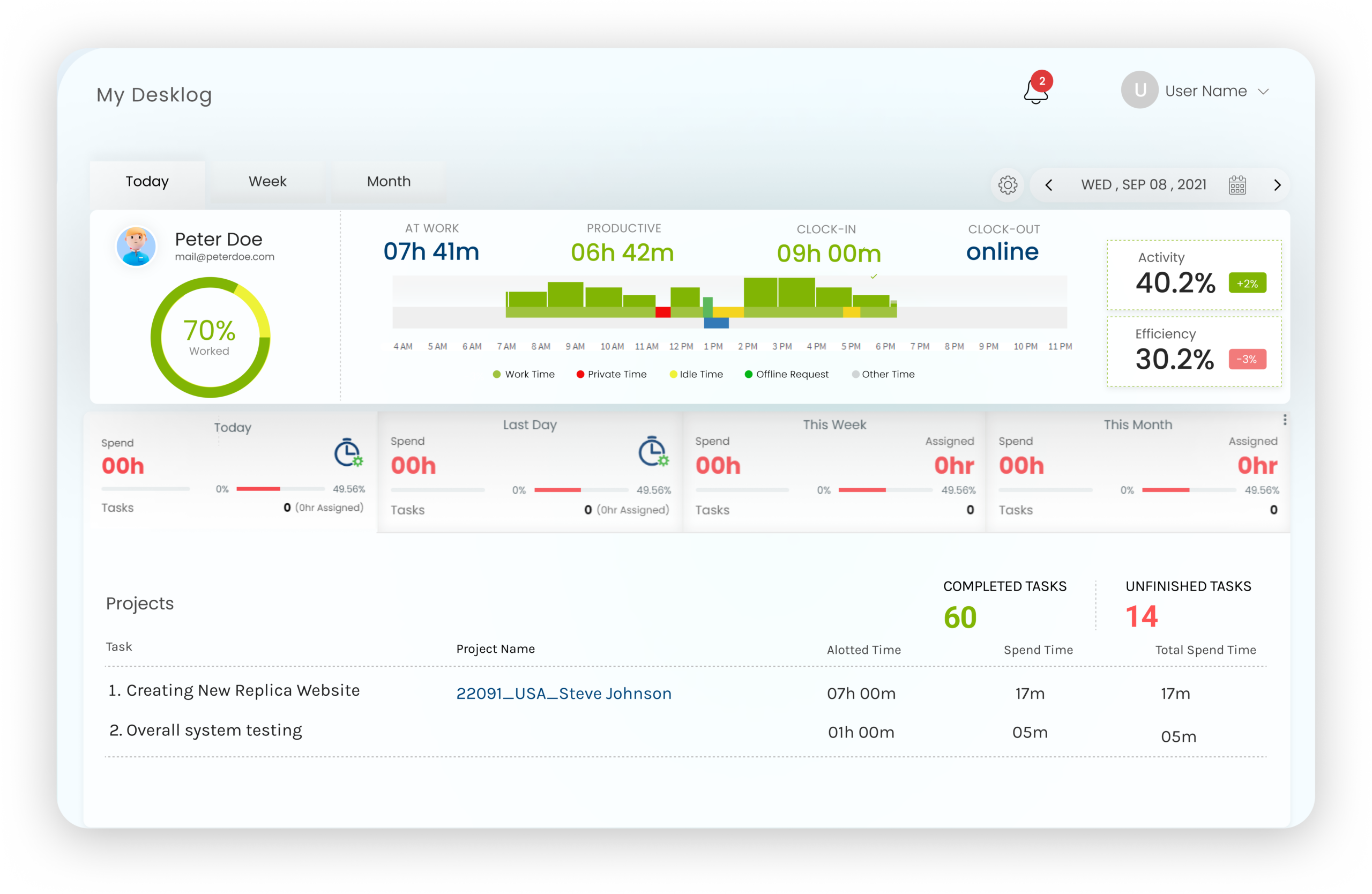








What Is Time Tracking Software for Developers?
Time tracking software for developers is a tool that automatically records how engineering teams spend their work hours across coding, debugging, code reviews, meetings, and project tasks. Unlike generic time trackers that require manual input, developer‑focused time tracking captures work patterns in the background and structures them into insights that support sprint planning, workload balancing, and accurate project estimation.
Desklog is built for this purpose. It runs silently alongside development workflows, tracks time across tools and tasks without interrupting focus, and delivers real‑time dashboards that give developers and engineering managers complete visibility into where effort goes every day.
Why Developers Lose Productive Hours Every Week
Development work is fragmented by nature. Without structured time tracking, that fragmentation becomes invisible and invisible time loss compounds.
Fragmented Workdays
Devs juggle coding, debugging, code reviews, stand‑ups, Slack, and context switching between projects often in a single day.
Invisible Time Loss
Without structured tracking, fragmentation becomes invisible compounding into missed deadlines, bad estimates, and burnout.
Unreliable Manual Logs
Starting and stopping timers breaks focus. End‑of‑day timesheets rely on memory. The result is data that doesn't reflect reality.
✦ Solution
Desklog The Best Automated Time Tracking Software
A smarter way to track time, without breaking focus. Built for developers who'd rather ship than babysit a timer.
Try Free Automated Tracking →How Desklog Tracks Developer Time Without Breaking Flow
Silent Background Tracking
Runs in the background and automatically records work hours, active coding time, idle periods, and clock‑in/out without manual timers or workflow interruptions.
Activity to Insight Conversion
Raw activity data is transformed into structured dashboards showing time distribution across projects, tasks, and tools so managers see where effort actually goes.
Real‑Time Project & Sprint Visibility
Track time against active sprints, monitor task progress in real time, and compare estimated vs. actual effort improving sprint estimation every cycle.
Workload & Wellness Monitoring
Tracks overtime patterns and workload distribution, surfacing early warning signs of overwork. Managers can rebalance assignments based on actual capacity.
Join High‑Performing Teams Using Desklog
"We outgrew Toggl Track once our team hit 12 people. Desklog gave us automated tracking, real productivity insights, and built‑in attendance — three tools in one. The free plan was a genuine starting point, not a teaser."
"Migrating from Toggl took an afternoon. Desklog imported our project history and within a week our managers were spotting workload imbalances we'd been missing for months. The attendance + time tracking combo replaced two SaaS subscriptions."
"As a solo freelancer who bills hourly, Desklog's automated billable‑hour tracking and one‑click invoicing was an instant win. I was undercharging on Toggl because I'd forget to start the timer. Desklog just captures everything."
"Toggl's reports told us how many hours got logged. Desklog tells us where the productive hours actually went — which apps, which projects, which times of day. That alone changed how we plan sprints and assign work."
"We run support shifts across 4 time zones. Toggl couldn't handle shift management at all. Desklog's clock‑in/clock‑out plus attendance reporting gave us compliance documentation our previous setup never produced."
Key Features of Desklog for Developer Teams
Everything an engineering team needs to track effort, deliver predictably, and avoid burnout all in one platform.
Automated Time Tracking for Coding Sessions
Automatically records work hours, active time, idle periods, and clock‑in/out without manual input, so you can focus entirely on coding instead of tracking time.
Learn More on Automated Time Tracking →Real‑Time Project Visibility
Get live insights into project progress, track ongoing work, and identify potential delays early to keep development timelines on track.
Learn More on Project Time Tracking →Task & Deadline Management
Organize tasks, assign priorities, and align work with sprint goals through structured tracking that keeps development workflows clear and manageable.
Learn More on Task Management →Smart Project Billing & Cost Tracking
Calculate project costs based on actual time spent, ensuring accurate billing, better budget control, and complete transparency for clients and teams.
Learn More on Project Billing →Attendance & Leave Management
Manage attendance, track absences, and handle leave requests seamlessly across remote, hybrid, and in office teams without added complexity.
Learn More on Leave Management →App and Tool Usage Insights
See which development tools, environments, and platforms consume the most time. Identify distractions and optimize the developer toolchain based on real usage data.
Learn More on App and Tool Usage →Overtime Alerts & Wellness Insights
Track extended work hours and workload patterns while encouraging breaks, helping teams maintain balance and prevent burnout.
Learn More on Wellness Module →Looking for a complete overview of Desklog's time tracking capabilities? Visit our main Time Tracking Software page.
How Time Tracking Software Benefits Developers?
Desklog focuses on outcomes that directly improve developer productivity and overall team efficiency.
Eliminate Time Leakage
Identify exactly where time is lost across tasks, tools, and activities, and reduce unproductive patterns with clear, data‑backed visibility.
Improve Sprint Planning
Use real‑time and historical work data to estimate tasks more accurately, plan sprints with confidence, and consistently meet delivery timelines.
Boost Coding Productivity
Minimize time spent on manual tracking and status updates, allowing developers to focus more on meaningful coding and problem‑solving work.
Prevent Burnout
Gain clear visibility into working hours and workload distribution, helping teams balance effort effectively and maintain a sustainable pace.
Why Developers Choose Desklog Over Manual Tracking?
Manual tracking is time‑consuming and unreliable. Desklog eliminates these challenges by automating the entire process.
Developer Teams That Use Desklog
Desklog is designed to support different development environments from agile pods to global agencies.
Agile and Sprint‑Based Teams
Track sprint progress with real‑time insights into story completion, task durations, and developer contributions. Compare estimated vs. actual time to refine planning, improve velocity, and deliver predictably every iteration.
Remote & Distributed Engineering Teams
Maintain complete visibility across teams working in different time zones without constant check‑ins. Desklog ensures accountability through transparent tracking while enabling seamless collaboration.
Freelance Developers, Multi‑Client
Easily switch between projects while accurately tracking billable and non‑billable hours. Generate clear, client‑ready reports for transparent invoicing and better time management.
SaaS Product Development Teams
Monitor every stage of the product lifecycle, from feature development to testing and release readiness. Prioritize effectively and ensure smooth, timely launches.
Development Agencies, Multi‑Project
Manage multiple client projects simultaneously with better control over timelines, budgets, and team allocation. Desklog provides a centralized view of all activities to optimize resources.
How to Start Using Time Tracking for Your Developer Team
-
01
Step 1 : Install & Configure
Set up Desklog in under 2 minutes. Configure tracking preferences aligned with your team's workflow and compliance requirements.
-
02
Step 2 : Track Automatically
Desklog begins capturing developer activity in the background immediately. No manual timers. No training required.
-
03
Step 3 : Analyze Insights
Access real‑time dashboards showing time distribution, sprint progress, and productivity patterns across your team.
-
04
Step 4 : Optimize Performance
Use data to rebalance workloads, improve sprint estimates, and help developers focus on high‑impact coding work.
Frequently Asked Questions
How do developers use time tracking effectively?
1. Why do developers need dedicated time tracking software?
Developers often juggle multiple tasks like coding, debugging, meetings, and reviews, making it difficult to understand where time is actually spent. Time tracking software provides clear visibility into daily work patterns, helping developers and teams improve focus, prioritize tasks better, and optimize productivity. Tools like Desklog make this easier by automatically capturing work activity without requiring manual input.
2. How does time tracking software for developers improve workflows?
Time tracking software highlights inefficiencies such as time lost in context switching, delays in task completion, or repetitive processes. By analyzing this data, teams can streamline workflows, remove bottlenecks, and improve delivery timelines. With solutions like Desklog, these insights are presented in a structured way, making it easier to take action and continuously refine development processes.
3. Is automated time tracking better for developers than manual tracking?
Yes automated time tracking removes the need for manual timers and reduces human error. Developers can stay focused on coding instead of logging hours, while the software captures accurate data in the background. Platforms such as Desklog ensure that tracking is seamless and does not interrupt the natural flow of work.
4. Can time tracking software help with sprint planning and estimation?
Accurate sprint planning depends on understanding how long tasks actually take. Time tracking software provides historical data that helps teams estimate effort more realistically and avoid overcommitting. By using tools like Desklog, teams can compare planned vs. actual timelines and continuously improve sprint accuracy over time.
5. How does time tracking software support remote development teams?
For remote and distributed teams, visibility can be a challenge. Time tracking software bridges this gap by offering real‑time insights into team activity, progress, and workload without constant check‑ins. Desklog, for example, helps managers maintain transparency while allowing developers to work independently without feeling micromanaged.
6. Does time tracking software slow down developer productivity?
When implemented correctly, it actually improves productivity rather than hindering it. Modern tools operate silently in the background, eliminating interruptions and reducing administrative tasks. Solutions like Desklog focus on non‑intrusive tracking, ensuring developers can concentrate fully on their work while still generating meaningful insights.
7. Can time tracking software help prevent developer burnout?
Yes one of the key benefits is identifying workload imbalances. By analyzing how time is distributed across tasks and team members, managers can detect overwork early and redistribute responsibilities. Desklog supports this by providing clear workload insights, helping teams maintain a healthier and more sustainable work pace.
8. What features should developers look for in time tracking software?
Developers should look for features like automated tracking, real‑time reporting, project and task tracking, productivity analytics, and integrations with development tools. A solution like Desklog combines these capabilities to deliver both accurate tracking and actionable insights, making it suitable for modern development environments.
9. Can Desklog track time for freelance developers working with multiple clients?
Yes. Desklog allows freelance developers to track time across multiple projects and clients simultaneously. Billable and non‑billable hours are captured automatically, and detailed time reports can be generated for each client. This ensures accurate invoicing, transparent billing, and better time management across concurrent engagements.
10. What integrations does Desklog offer for developer workflows?
Desklog integrates with project management tools including Jira and ClickUp, allowing teams to sync tasks and link tracked hours directly to projects. API support is also available for custom integrations with internal tools or third‑party platforms, making it adaptable to existing engineering workflows.
11. Is developer activity data private and secure in Desklog?
Yes. Desklog does not capture keystrokes, personal files, or private communications. All tracked data is encrypted and access is controlled through role‑based permissions. Developers can view their own productivity data, ensuring transparency. Desklog is designed to provide work visibility without invasive surveillance.
12. How quickly can a developer team start using Desklog?
Setup takes under 2 minutes. Install the application, configure tracking preferences, and Desklog begins capturing time automatically. No complex onboarding, no training sessions, and no manual configuration required. Teams start receiving productivity insights from day one.
13. How is Desklog different from generic time tracking tools?
Generic time trackers record hours but do not provide developer‑specific context. Desklog is built for engineering workflows with features like sprint time tracking, automated task linking, productivity analytics, and workload monitoring. It converts raw time data into structured insights that help developer teams plan better, deliver faster, and maintain healthy work patterns.
Stop Guessing Where Developer Time Goes
Desklog gives engineering teams complete visibility into how time is spent across coding, sprints, and projects — without manual tracking, without interrupting focus, and without guesswork.
Start Free Trial →