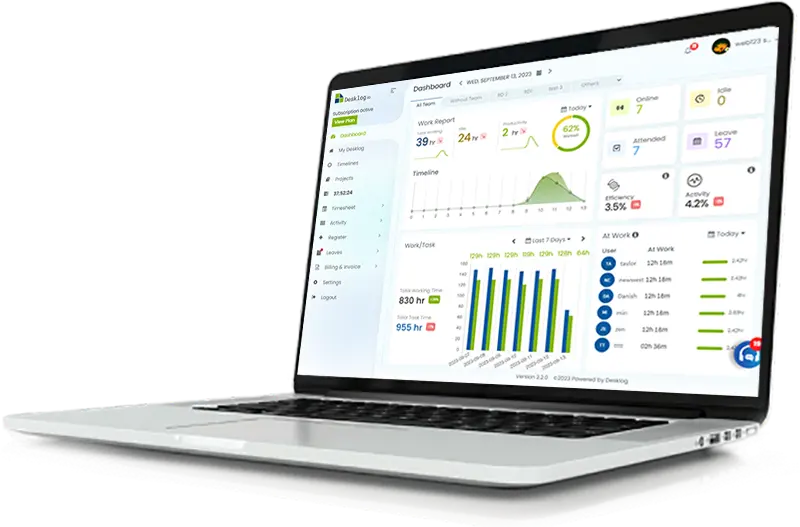
Freelance Time Tracking
Time Tracking Software for Freelancers
Track Every Minute. Bill Every Hour. Grow Your Freelance Business.
Whether you're a freelance designer, developer, writer, consultant, marketer, virtual assistant, photographer, or contractor, Desklog Time Tracking Software for Freelancers automatically tracks your work so you never lose billable time. Track projects, generate professional invoices, calculate project profitability, and understand exactly where your workday goes.



Built for Every Type of Freelancer
No matter what kind of freelance work you do, Desklog's freelance time tracking software features help you stay productive and get paid accurately.
Freelance Developers
Track coding hours across sprints, feature branches, and client projects. Log time per repository and turn commits into billable hours.
UI/UX Designers
Measure exactly how long wireframes, prototypes, and design revisions really take so you can quote future projects with confidence.
Graphic Designers
Capture time spent on logos, illustrations, and brand assets. Separate concept work from revisions and bill each phase transparently.
Writers & Copywriters
Track drafting, editing, and research per article or client. See which content types are truly profitable versus underpriced.
Digital Marketers
Log campaign planning, ad management, SEO work, and analytics time across multiple clients from a single dashboard.
Consultants
Track advisory calls, research, and deliverables per retainer. Justify your hourly rate with detailed, defensible work records.
Virtual Assistants
Automatically log inbox management, scheduling, and admin tasks across multiple clients without switching timers manually.
Accountants & Bookkeepers
Track hours per client file, reconciliation, and reporting period so every minute of financial work is accounted for.
Video Editors
Log editing, color grading, and revision rounds per project. Know your true cost-per-minute of finished video.
Photographers
Track shoots, culling, editing, and delivery time. Understand which packages actually make you money.
Architects
Log design phases, revisions, and client meetings across projects. Bill accurately and monitor project profitability.
Agencies Managing Multiple Freelancers
Coordinate a bench of freelancers with unified time tracking, project budgets, and consolidated client invoicing.
Never Miss Another Billable Minute.
Every forgotten timer can mean lost income. Desklog's automatic work hours tracker records your freelance work in the background so you can focus on clients, not timesheets.
Automatic Time Tracking That Never Misses Billable Hours
Desklog's automated time tracking feature records your working hours in the background while tracking:
- Project time
- Task duration
- Application usage
- Website activity
- Productive & non-productive time
- Idle time detection
Capture every billable minute and spend more time delivering work instead of managing timesheets.
Know Exactly Where Your Time Goes
See how long each project, client, and task actually takes. Detailed reports help you:
- Estimate future projects more accurately
- Avoid underpricing your services
- Identify time-consuming tasks
- Improve daily productivity
- Track billable vs. non-billable work
With better visibility into your work patterns, you can make smarter business decisions.
Bill Clients with Confidence
Turn tracked work hours into professional invoices without manual calculations. Desklog helps you:
- Track billable hours automatically
- Assign hourly rates to projects
- Generate accurate invoices
- Eliminate billing errors
- Maintain complete transparency with clients
Spend less time on paperwork and more time earning.
| Task | Hours | Rate | Amount |
|---|---|---|---|
| Homepage redesign | 14.5 | $75 | $1,087.50 |
| Component library | 9.25 | $75 | $693.75 |
| Design QA & handoff | 4.0 | $65 | $260.00 |
| Client review calls | 2.5 | $65 | $162.50 |
More Reasons Freelancers Choose Desklog
Project Profit & Loss Analysis
Beyond tracking time, Desklog helps freelancers understand project profitability. Monitor:
- Revenue vs. project cost
- Profit & loss per project
- Time invested compared to earnings
- Resource utilization
- Overall project performance
Understand which clients and projects generate the highest returns.
Advanced Reports That Help You Improve
Desklog provides detailed reports that help you improve productivity and grow your freelance business. Generate reports for:
- Daily and weekly timesheets
- Productivity trends
- Project summaries
- Employee or personal activity
- Attendance history
- Billable hours
- Project profitability
Export reports whenever you need accurate records for clients or internal review.
Activity Tracking with Complete Visibility
Desklog provides a detailed overview of your daily activities by automatically tracking:
- Applications used
- Websites visited
- Keyboard and mouse activity
- Productive and idle time
- Timeline history
- Optional screenshot capture for work verification
These insights help freelancers stay focused, improve workflows, and provide transparent work records to clients when required.
Assign Rates & Get Paid Fairly
Apply per-project or per-task hourly rates and let Desklog do the math. Every tracked minute becomes revenue you can defend with a full audit trail:
- Custom hourly rates per client
- Automatic billable calculations
- Currency-aware totals
- Exportable timesheet PDFs
- Full audit trail of every entry
Never argue about hours again — the numbers speak for themselves.
Manage Clients, Projects, and Billable Hours in One Place.
From project time tracking to freelancer invoicing and project profitability analysis, Desklog gives freelancers everything needed to run a successful business.
All The Features You Need In A Freelance Time Tracker
Desklog helps freelancers recover valuable billable hours that often go untracked. With automated tracking, detailed productivity insights, and accurate project analytics, many users discover hidden work time that can significantly increase monthly earnings.
Automatic Time Tracking
Track work automatically without manually starting or stopping timers.
User & Task Timeline
Visual timelines show productive, idle, offline, and active work hours.
Project Profit & Loss
Measure project profitability with detailed financial insights.
Tasks, Subtasks & Sequential Workflows
Break large projects into manageable tasks for better organization.
Attendance & Leave Management
Track attendance, working hours, and leave in one place.
Shift Scheduling
Manage flexible work schedules across different time zones.
Productivity Tracking
Track productive time, idle time and daily activity automatically.
Screenshot Capture
Optional screenshot monitoring provides transparent proof of work for client projects.
Powerful Integrations
Connect Desklog with Jira and ClickUp to automatically sync projects, tasks, and work logs.
Stop Losing Billable Hours. Start Growing Your Freelance Business.
Desklog's automatic time tracking software for freelancers captures every billable hour, tracks project time, and generates accurate invoices.
From Signup To Tracking Your First Project In Six Simple Steps
Getting started with Desklog takes just a few minutes. Create your account, complete the quick setup, and start automatically tracking your work without complicated configuration.
Create Your Desklog Account
Click start free and register using your email address. Complete the sign-up process to create your Desklog workspace.
Complete Your Organization Setup
Enter your company name, mobile number, and industry to personalize your workspace. Once registration is complete, you'll be redirected to your Desklog dashboard.
Set Up Your Workspace
Customize your onboarding preferences, create projects and tasks, invite team members if needed, and configure your workspace to match your freelance workflow.
Start Automatic Time Tracking
Install the Desklog desktop application and let it automatically track your working hours, project time, application usage, website activity and productivity in the background.
Track Projects & Productivity
View real-time timelines, productivity reports, activity logs, optional screenshots and project analytics to understand where your time is spent and keep projects on track.
Generate Reports & Bill Clients
Review billable hours, analyze project profitability, generate detailed reports and create professional invoices directly from your tracked work to ensure accurate client billing.
Works Wherever You Work
Whether you're working from your office, home, coworking space, or while traveling, Desklog keeps your work synchronized across devices.
Available on:
Start Tracking Your Freelance Success Today
Capture every billable hour, improve productivity, generate accurate invoices, and understand your project profitability, all from a single platform.
Reviews
View our rating in top platform





Loved by 0+ Teams Worldwide
See what our customers have to say about Desklog
Manager
Manager
Manager
Manager
Manager
Sr. System Administrator, Heckyl Technologies Pvt Ltd
Manager
Director, Focuz Line Shipping Co Ltd, Saudi Arabia
Manager
Sr. System Administrator, Mantra Softech India Pvt Ltd
Managing Director, Sanesquare Technologies
CEO, RedTeam Hacker Academy Pvt Ltd
Frequently Asked Questions
How does Desklog track my freelance working time?
Desklog tracks your freelance working time automatically, running quietly in the background once you start a task or project. It records the time you spend across activities like emails, document creation, client calls, and project work, and detects active work hours so nothing gets missed.
Can I track multiple projects at once?
Yes. Desklog lets you track multiple projects and clients simultaneously from a single platform. You can switch between projects throughout the day, and Desklog automatically logs the time spent on each task within them. This gives you a clear, separated view of your hours per project, so you can manage several clients and deadlines without losing track of where your time actually went.
Why should I use a time tracking app as a freelancer?
A time tracking app gives you accurate, defensible records of the hours you've worked, which makes client billing easier and disputes less likely. It also helps you spot where your time actually goes so you can identify inefficiencies, price future projects more realistically, and keep all your tasks and projects organized in one place instead of juggling spreadsheets or memory.
How does Desklog help with invoicing?
Desklog turns your tracked time directly into invoices. As you work, it builds a real-time, detailed record of hours spent per project or client, complete with assigned billing rates. When it's time to bill, you can convert that tracked data into a professional invoice in a few clicks, removing the manual calculations and back-and-forth that usually slow down freelance billing.
Is Desklog easy to use?
Yes. Desklog is built to require minimal setup, since most of the tracking runs automatically in the background. You don't need to manually log or adjust hours unless you want to. Reports and dashboards are presented clearly, so you can see your productivity and time breakdown without digging through complicated menus.
How can I track my freelance working hours?
You have a few options. Dedicated tools like Desklog handle this automatically, tracking project time, application usage, and billable hours without manual input. You could also build your own timesheet in Excel or Google Sheets, or track manually with a notebook and a timer, noting start and end times yourself. Manual methods work, but they're more time-consuming and prone to gaps, especially when you're switching between multiple projects in a day.
Does Desklog work if I'm offline or don't have an internet connection?
Desklog's desktop application continues tracking your activity even when you lose internet connectivity, and syncs your data automatically once you're back online. This means you won't lose tracked time during outages or while working in low-connectivity environments.
Can I see how productive I am, not just how much time I've logged?
Yes. Desklog tracks productive versus non-productive time, idle periods, application usage, and website activity alongside your raw hours. This gives you a more complete picture of your workday than a simple timer would, helping you identify where focus drops off and where you can improve.
Does Desklog show me which projects are actually profitable?
Yes. Beyond time tracking, Desklog includes project profit and loss analysis, comparing the revenue from a project against the time and resources invested. This helps you see which clients and projects are genuinely worth your time, rather than just how many hours you logged.
Is there a free trial, and do I need a credit card to sign up?
Yes! Desklog offers a 14-day free trial with no credit card required, so you can explore premium features like automatic time tracking, project tracking, advanced reports, and invoicing. You can also choose Desklog's Free Forever Plan, which includes advanced time tracking, automated timesheets, project time tracking and more, making it an excellent free time tracking software for freelancers and small teams.