
Remote Employee Time Tracking Software
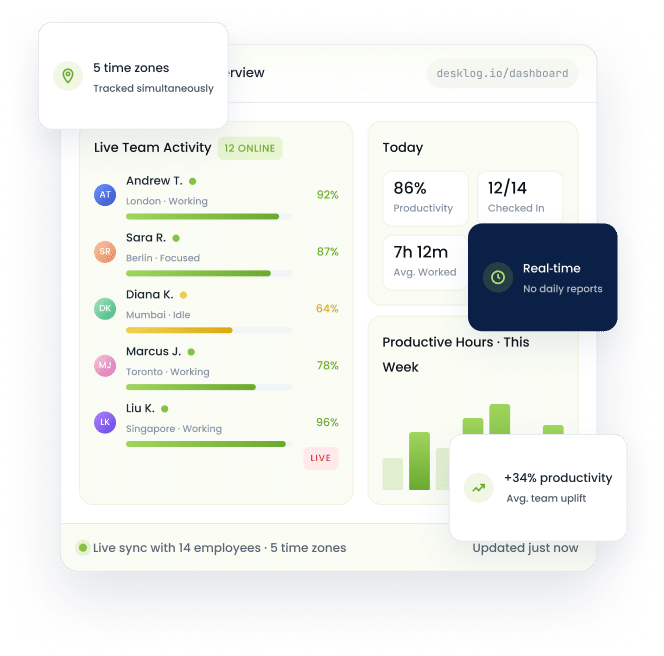
Stop guessing how your remote team spends their workday. Monitor employee work hours, track productivity, manage projects, and improve accountability with Desklog remote employee time tracking software. Gain real time visibility into work activity, attendance, productivity trends, and project progress without relying on manual reporting.








Why Remote Work Visibility Breaks Down And How to Fix It
When you can't see how work happens, you can't fix what slows it down. Here's the gap most remote teams hit and the visibility that closes it.
Managing Remote Employees Is Hard Without the Right Data
Blind spots compound. Without structured visibility, small inefficiencies turn into missed deadlines, payroll disputes, and silent disengagement.
- !Lack of visibility leading to reduced operational control and oversight
- !Workflow delays causing missed project deadlines and slow execution
- !Inaccurate records creating payroll inconsistencies and reporting errors
- !Productivity gaps impacting business performance and team efficiency
Desklog Gives You Complete Visibility Into How Your Remote Team Works
Automated tracking, live dashboards, and workforce analytics turn raw activity into decisions managers can actually act on.
- ✓Real-time visibility improving operational transparency across remote teams
- ✓Workflow tracking ensuring timely project execution and task completion
- ✓Automated time tracking delivering accurate records and reliable payroll data
- ✓Productivity analytics enhancing workforce efficiency and resource management
Everything You Need to Run a
High-Performing Remote Team
Four pillars of remote workforce visibility, working together inside one platform.
Gain Visibility & Make Better Decisions
Monitor how your remote employees spend every work hour from active application usage to project progress with real-time dashboards built for managers, not just HR.
- ✓Track applications, websites, and active work hours more accurately.
- ✓Identify disengaged, overworked, or underutilized employees.
- ✓Understand productive workflows and improve operational efficiency.
- ✓Gain live visibility into projects, attendance, and workforce performance.
Simplify Remote Workforce Management
Replace scattered spreadsheets and manual processes with automated time tracking software built for remote teams. From shift scheduling to payroll ready timesheets, Desklog handles workforce operations in one place.
- ✓Automatically track employee work hours without manual updates.
- ✓Improve attendance visibility across remote and hybrid teams.
- ✓Organize employee schedules and shift assignments efficiently.
- ✓Maintain accurate timesheets for payroll and reporting.
- ✓Monitor project timelines and workload distribution more effectively.
Foster Accountability Across Distributed Teams
Real accountability comes from visibility, not surveillance. Desklog helps remote managers stay informed on project status, work progress, and team activity without disrupting how employees work.
- ✓Create transparent workflows with real-time work visibility.
- ✓Improve employee accountability without micromanagement.
- ✓Track project progress and remove workflow bottlenecks faster.
- ✓Maintain operational consistency across locations and schedules.
- ✓Encourage better time management through activity insights.
Improve Resource Planning & Workforce Utilization
Go beyond basic hour tracking. Desklog's workforce analytics give managers the data to allocate resources better, track billable time accurately, and measure project profitability with confidence.
- ✓Identify workload imbalances and support overwhelmed employees.
- ✓Improve workforce allocation using productivity data.
- ✓Track billable and non-billable project hours accurately.
- ✓Analyze project profitability and operational efficiency.
- ✓Improve resource utilization using workforce analytics.
Core Features of Desklog Remote
Employee Time Tracking Software
Eight pillars of remote workforce intelligence — built to track, measure, and improve every aspect of how your distributed team works.
Automated Time Tracking
Records work hours automatically without manual entries or timers. Improve attendance accuracy, reduce reporting errors, and maintain complete visibility into remote workforce productivity and daily work activity.
Project & Task Tracking
Monitor project progress, task completion, and billable work hours from one platform. Improves workload management, maintains project transparency, and ensures accurate tracking across remote workflows.
App & URL Tracking
Track remote employee activity, application usage, and website engagement in real time. Identify productive work patterns, reduce distractions, and improve accountability across remote teams.
Performance Insights
Measure productivity trends and employee performance using detailed analytics and reports. Identify workflow inefficiencies, optimize team performance, and improve operational efficiency across remote environments.
Automated Timesheets
Generates accurate timesheets based on employee activity and tracked work hours. Reduces manual reporting effort, improves payroll accuracy, and simplifies attendance management for remote workforce operations.
Integrated Workforce Reporting
Productivity reports, attendance summaries, and workforce insights from one centralized dashboard. Improve operational visibility, monitor employee performance, and make smarter workforce management decisions.
Shift Management
Manage employee schedules, attendance, and workforce availability with flexible planning tools. Improves team coordination, streamlines workforce scheduling, and supports better operational efficiency.
Geo Tracking
Track location-based workforce activity for remote and field employees with better visibility. Improve operational transparency, strengthen workforce accountability, and manage distributed employee operations more effectively.
Why Desklog Is Better Than Traditional Time Tracking Tools
Generic timers were built for office desks. Desklog was built for distributed work where visibility, accountability, and trust have to come from data, not check-ins.
| Category | Traditional Tools | Desklog |
|---|---|---|
| Time Capture | ×Manual timers · forgotten entries | ✓Automatic background tracking |
| Remote Visibility | ×End-of-day status updates | ✓Live activity & attendance feed |
| Productivity Insight | ×Hours only — no context | ✓App & URL-level work patterns |
| Payroll & Timesheets | ×Spreadsheet reconciliation | ✓Auto-generated, audit-ready |
| Workload Balance | ×Invisible until burnout | ✓Capacity alerts & overload flags |
| Project Profitability | ×Billable hours guesswork | ✓Billable / non-billable + P&L |
Built for Every Remote Work Environment
From client-driven agencies to support operations to scaling startups Desklog adapts to how distributed teams actually work.
Service Providers & Agencies
Manage client projects, monitor billable hours, improve team productivity, and streamline remote collaboration efficiently.
Software & IT Teams
Track development workflows, manage sprint timelines, monitor productivity, and improve distributed project execution efficiently.
BPO & Support Operations
Maintain workforce accountability, monitor attendance visibility, improve operational consistency, and manage support teams effectively.
Consultants & Freelancers
Track work hours, improve productivity, manage multiple client projects, and generate invoices with better accuracy.
Startups & Distributed Businesses
Scale remote operations, improve workforce visibility, manage attendance efficiently, and monitor productivity across distributed teams.
How Remote Employees Use Desklog
to Work More Productively
240+ verified reviews across G2, Capterra, Software Advice and GoodFirms. Here's what real managers say about visibility, onboarding, and outcomes.
Desklog helped us gain complete visibility into how our remote teams work. Productivity improved significantly once we started tracking projects, work hours, and workflows from one platform.
Desklog made it easy to track attendance, productivity, and employee activity across distributed teams. The insights helped us improve operational efficiency and decision-making.
We now clearly see how employees spend their work hours, including apps and websites used. It has made productivity tracking simple and highly effective.
The demo experience was extremely simple and intuitive. Our teams were able to start using Desklog without any training or complexity.
The software is very simple and customizable. We can configure it exactly the way we need for our operations.
Frequently Asked Questions
Everything you need to know about Desklog remote employee time tracking software.
What is remote employee time tracking software?
Remote employee time tracking software is a tool that automatically records work hours, monitors employee activity, and provides managers with real-time visibility into how distributed teams spend their workday. It replaces manual timesheets with automated tracking of active work time, applications used, websites visited, and project progress. Managers can use the data to improve productivity, ensure accurate payroll, and maintain accountability across remote and hybrid teams — without requiring employees to submit daily reports manually.
Why do businesses need time tracking software for remote employees?
Remote employee monitoring software helps businesses maintain operational visibility, improve accountability, track productivity, manage attendance accurately, and ensure projects stay on schedule across distributed and geographically separated teams.
How does Desklog track remote employee work hours?
Desklog tracks employee activity, work hours, productivity patterns, attendance, applications used, and project progress through automated time tracking and real-time workforce monitoring tools that provide actionable insights.
Does Desklog work for hybrid teams as well as fully remote teams?
Yes. Desklog is designed for remote, hybrid, and distributed team environments. Whether employees work from home, the office, or a mix of both, Desklog tracks work activity consistently and gives managers a unified view of team productivity and attendance across all work locations.
Does Desklog include project and task tracking?
Yes, Desklog includes project time tracking, Kanban-based task management, billing management, and project profitability tracking to help teams manage work efficiently and measure performance accurately.
Does Desklog support offline work tracking?
Yes, Desklog supports offline time tracking and automatically syncs all recorded work data once internet connectivity is restored, ensuring no productivity data is lost.
Can businesses use Desklog without intrusive employee surveillance?
Yes, Desklog focuses on productivity visibility and operational transparency, offering performance insights while supporting privacy-conscious and balanced monitoring practices.
Can remote employee time tracking software help with payroll accuracy?
Yes. Desklog automatically generates timesheets based on tracked work hours, eliminating the manual timesheet reconciliation that leads to payroll errors. Finance and HR teams get clean, audit-ready records of hours worked, attendance, and project time reducing disputes and ensuring employees are paid accurately for the hours they work.
Does Desklog support project tracking alongside time tracking?
Yes. Desklog includes built-in project and task tracking with Kanban views, project billing, and profit and loss tracking. Teams can log time directly against projects and tasks, giving managers visibility into project progress, billable hour allocation, and delivery timelines all within the same platform.
Is there a free trial available for Desklog's remote employee time tracking software?
Yes, businesses can get started with Desklog through a free trial, allowing them to explore features, test workflows, and evaluate productivity improvements before committing.
Start Tracking Your Remote Team's Productivity Today
Desklog is the remote employee time tracking software built to give managers complete visibility, improve workforce accountability, and turn daily work data into decisions that drive team performance.