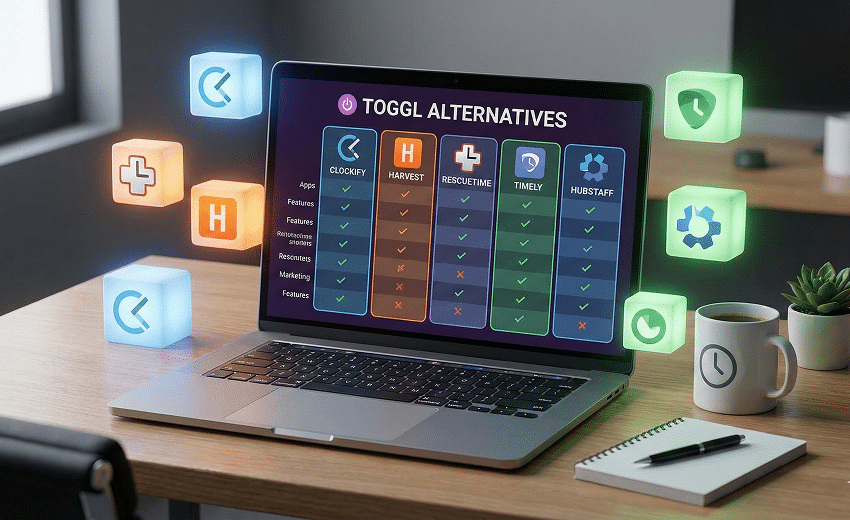

Built around simplicity, Toggl Track is a trusted choice for logging work hours. But as projects and teams grow, many users begin searching for more advanced project management software that also includes project management, automated insights, and built-in collaboration.
Exploring Toggl alternatives can help you find a solution that supports both accurate time tracking and end-to-end workflow management.
What Is Toggl Track?
Toggl Track is a cloud-based time-tracking platform. It's especially recommended for small teams that need custom reports to analyze time data. It allows users to track work in real time or log hours manually, organize entries by project or client, and generate reports for better productivity insights.
The platform includes features such as automatic time tracking, timesheets, invoicing, and a built-in Pomodoro timer to support focus and accurate time recording. It works across web, desktop, and mobile apps, making it easy to track work from anywhere. Users can also track billable and non-billable hours, assign rates to projects or team members, and create invoices based on tracked time.
Toggl Track focuses on simplicity and privacy. It does not include employee surveillance tools like screenshots or activity monitoring, making it a preferred choice for teams that value transparency and trust.
How Does Toggl Track Work?
Toggl Track records time by letting users start a timer when they begin a task or manually enter time later. Each time entry can be linked to a specific project, task, or client, helping teams organize work and monitor progress.
Users can edit, delete, or adjust time entries if they forget to start or stop tracking. The software automatically converts tracked time into timesheets, reports, and invoices, giving teams a clear overview of billable hours and productivity.
The platform also supports integrations with tools like Google Calendar, Asana, GitHub, and QuickBooks, allowing teams to connect their existing workflow with time tracking.
With customizable reports and dashboards, businesses can analyze time data and make informed decisions about project planning and resource management.
Advantages and Disadvantages of Toggl Track
Toggl Track is widely recognized for its simple and flexible approach to time tracking. While it works well for individuals and small teams that need an easy way to log hours and monitor productivity, it may not fully meet the needs of more complex workflows.
Here's a quick overview of its main advantages and disadvantages:
| Advantages | Disadvantages |
|---|---|
| Simple interface with quick setup for individuals and teams | Limited project management features for complex workflows |
| Available on web, desktop, and mobile platforms | Reporting features may lack depth for advanced analysis |
| Supports real-time timers and manual time entries | Advanced capabilities are restricted to paid plans |
| Tracks billable and non-billable hours with invoicing | Not ideal for large organizations with complex needs |
| Integrates with many productivity and business tools | Some integrations require additional setup effort |
| Privacy-focused approach without employee monitoring | Lacks built-in automation compared to all-in-one tools |
Best Toggl Alternatives by Use Case (2026)
| Use Case | Recommended Tools | Why They Fit |
|---|---|---|
| Best for Remote & Hybrid Teams | Desklog, Hubstaff, Time Doctor | Strong team productivity insights, scheduling, payroll & collaboration |
| Best Free Time Tracking Software | Clockify, TimeCamp | Generous free plans with essential tracking and reports |
| Best Automatic/Background Tracking | Timely, RescueTime, DeskTime | Auto capture activity, productivity scoring, minimal manual input |
| Best for Project Management + Time Tracking | ClickUp, Harvest, Desklog | Combines time tracking with task/project workflows |
| Best for Freelancers & Small Teams | Harvest, Clockify, TimeCamp | Simple billing, invoicing, and time reporting |
| Best for Detailed Productivity Insights | RescueTime, Timely, Desklog | Deep analysis of focus, distractions, and work patterns |
| Best for Field & Mobile Workforce | Hubstaff, Desklog | GPS tracking, attendance, shift schedules, mobile support |
| Best for Billing & Invoicing | Harvest, TimeCamp, Desklog | Built-in invoicing tied to tracked time and project costs |
| Best for Enterprise & Large Teams | Time Doctor, Hubstaff, ClickUp | Advanced monitoring, reporting, automations, and security |
| Best for Integrated Workflow Ecosystems | ClickUp, Timely, Clockify | Strong integrations with calendars, PM tools, accounting, etc. |
10 Best Toggl Alternatives for 2026
- 1.Desklog
- 2. Clockify
- 3. Timely
- 4. ClickUp
- 5. RescueTime
- 6. Hubstaff
- 7. Harvest
- 8. TimeCamp
- 9. DeskTime
- 10. Time Doctor
10 Best Toggl Alternatives for 2026 (Detailed Comparison)
1. Desklog
Desklog is an advanced time & project time tracking and employee productivity platform designed to help businesses improve efficiency, transparency, and employee accountability.
Unlike manual timer-based tools, Desklog runs in the background to capture real-time work activity, generate accurate timesheets, and provide detailed productivity insights. Desklog goes beyond basic project and task tracking by offering built-in workforce management tools.
It provides performance analytics, shift scheduling, an employee wellness module, and real-time insights that help managers optimize productivity and distribute workloads effectively. The platform also supports flexible billing, attendance tracking, and leave management, making daily operations smoother while promoting a healthier work–life balance.
Key Features
- Automated real-time time tracking
- Project & task management (Kanban view)
- Payroll-ready automated timesheets
- App & URL tracking with productivity metrics
- Attendance, shift & leave management
- Billing, invoicing & profitability tracking
Platforms
Windows, Mac, Linux, iOS, Android
Pricing
- Free – $0
- Business – $3.50/user/month
- Enterprise – $4.80/user/month
Desklog Key Features In Detail
- Automated Time Tracking: Desklog offers Automated Time Tracking that records work hours in the background without manual input. It captures time across tasks and apps in real time, ensuring accurate data, fewer errors, and clear visibility into team productivity.
- Automated Timesheets: Using real-time activity data, Automated Timesheets generate ready-to-use records without manual input. This reduces reporting errors, simplifies approvals, and supports accurate payroll and performance evaluation.
- Project Time Tracking & Kanban View: With Project Time Tracking, teams can monitor time spent on tasks while the Kanban View visually organizes workflows. Together, they provide clear progress visibility, improve scheduling decisions, and strengthen team collaboration.
- Project Billing, Invoicing & Profitability Analysis: Project Billing & Invoicing converts tracked billable hours into accurate client invoices, while Project Profit & Loss Calculation evaluates financial performance by comparing costs with revenue. Combined, these features give businesses full control over billing accuracy and project profitability.
- Employee Performance Insights: Employee Performance Insights analyze productivity trends, time usage, and work patterns to identify improvement opportunities. Managers can use these insights to balance workloads and enhance overall efficiency.
- Employee Wellness Module: The Employee Wellness Module monitors work intensity and patterns to help detect overwork and encourage healthier schedules. This supports sustainable productivity and promotes a balanced work environment.
- Attendance and Leave Tracking: With Attendance and Leave Tracking, organizations can manage check-ins, check-outs, and leave requests from a single system. Mobile tracking also records time and location data, making workforce management easier for remote and field teams.
Pros
- Offers fully automated tracking, eliminating manual timer errors and improving data accuracy.
- Combines productivity monitoring, attendance, billing, and reporting in one unified system.
- Provides detailed analytics that help managers identify bottlenecks and improve team efficiency.
- Affordable pricing compared to competitors offering similar enterprise-grade features.
Cons
- Does not currently offer a browser-based Chrome extension for quick time logging.
Unlock automated productivity insights and real-time workforce analytics.
Schedule Demo2. Clockify
Clockify is a widely used time tracking solution known for its generous free plan that supports unlimited users and projects. It allows teams to track time through manual entry or live timers across web, desktop, and mobile platforms.
With built-in dashboards, reports, and team management tools, Clockify is particularly attractive for freelancers and small businesses looking for a scalable yet cost-effective alternative to Toggl.
Key Features
- Timer & manual time entry
- Timesheets & reporting dashboards
- Team & project management
- Idle detection & Pomodoro timer
- Integrations & admin controls
Platforms
Windows, Mac, Linux, iOS, Android, Web
Pricing
- Free: $0
- Basic: $4.99
- Standard: $6.99/User/Month
- Pro: $9.99/User/Month
- Enterprise: $14.99/User/Month
- Cake Bundle: $15.99/User/Month
Pros
- Free plan allows unlimited users, making it highly scalable for growing teams.
- Easy-to-use interface suitable for beginners and non-technical users.
- Strong integration ecosystem with popular project management and accounting tools.
Cons
- Requires manual timer usage for accurate tracking, which can lead to missed entries.
- Advanced reporting and management features are limited to higher-tier plans.
Track your team and unlimited projects with complete flexibility.
Get The Best Project Tracker3. Timely
Timely stands out with its AI-powered automatic time capture system called Memory Tracker. Instead of relying on manual timers, it records activity across apps, websites, and documents, then intelligently organizes the data into timesheets.
Designed with privacy in mind, Timely gives users control over what gets logged while delivering accurate project tracking and team visibility insights.
Key Features
- AI-powered automatic time tracking
- Smart timesheet generation
- Project & task organization
- Budget tracking & reporting
- Team capacity insights
Platforms
Windows, Mac, iOS, Android, Web
Pricing
- Starter – $11/user/month
- Premium – $20/user/month
- Unlimited – $28/user/month
Pros
- Eliminates manual entry through intelligent automation.
- Clean and modern user interface with strong usability.
- Strong privacy-first approach compared to monitoring-heavy tools.
Cons
- No free plan available for small teams or freelancers.
- Higher pricing compared to traditional timer-based solutions.
Let Ai Automatically Capture And Organize Your Team’s Time & Work.
Start Tracking Smarter4. ClickUp
ClickUp is an all-in-one productivity and project management platform that includes built-in time tracking. It allows teams to manage tasks, collaborate on documents, automate workflows, and track time within a single customizable environment.
For businesses wanting more than just time tracking, ClickUp provides a unified workspace to centralize operations.
Key Features
- Native time tracking & estimates
- Custom task & workflow views
- Automation & AI tools
- Collaboration & document sharing
- Reporting dashboards
Platforms
Windows, Mac, iOS, Android, Web
Pricing
- Free – $0
- Paid plans from $10/user/month
Pros
- Combines project management and time tracking in one ecosystem.
- Highly customizable workflows adaptable to different industries.
- Offers automation features that reduce repetitive tasks.
Cons
- Interface can feel overwhelming due to feature depth.
- Performance may slow down for very large workspaces.
Centralize Work, Manage Tasks, And Track Time Easily.
Try Smart Work Management5. RescueTime
RescueTime focuses on productivity improvement through automatic background tracking. It monitors app and website usage to provide detailed insights into work habits. Rather than emphasizing project billing, it prioritizes distraction management, focus sessions, and goal tracking for individuals and small teams.
Key Features
- Automatic activity tracking
- Focus sessions & alerts
- Goal tracking
- Productivity reports
- Offline time logging
Platforms
Windows, Mac, iOS, Android
Pricing
- Free plan available
- Solo: $9/user/month
- Solo+: $15/user/month
- Team: $12/user/month
- Team+: $18/user/month
Pros
- Excellent for identifying distractions and improving focus.
- Generates detailed weekly productivity summaries.
- Requires minimal manual effort once installed.
Cons
- Limited project management and billing capabilities.
- Reporting dashboard can feel complex for new users.
Build Better Work Habits With Automatic Productivity Insights.
Discover Productivity Insights6. Hubstaff
Hubstaff is a workforce management and time tracking solution built for remote, hybrid, and field-based teams that require structured oversight. It goes beyond simple timers by combining automatic time tracking with productivity monitoring, GPS tracking, payroll automation, and scheduling tools.
This makes it particularly suitable for businesses managing distributed teams, contractors, or on-site employees who need accurate time data and operational transparency.
Key Features
- Automatic time tracking & detailed timesheets
- Optional screenshots & activity level monitoring
- GPS tracking & geofencing for field teams
- Payroll & invoicing automation
- Scheduling & attendance management tools
Platforms
Windows, Mac, Linux, iOS, Android
Pricing
- Starter: $7/Month/Seat
- Grow: $9/Month/Seat
- Team: $12/Month/Seat
- Enterprise: $25/Month/Seat
Pros
- Combines time tracking, payroll, invoicing, and scheduling in one centralized system.
- GPS and geofencing features are ideal for mobile and field service teams.
- Activity insights and reporting help improve accountability and operational efficiency.
- Reduces administrative workload through payroll automation.
Cons
- Monitoring features may feel intrusive in teams that value high autonomy.
- Setup and policy configuration may require time, especially for larger teams.
Gain Full Workforce Visibility, Simplify Payroll, And Manage Project Billing.
Simplify Payroll & Billing7. Harvest
Harvest is a well-established time tracking and invoicing platform built primarily for freelancers, consultants, and service-based teams that bill clients by the hour or project. While Toggl focuses mainly on time tracking, Harvest extends the workflow by connecting tracked time directly to invoices, expenses, and payments.
This makes it especially valuable for agencies and businesses that need to move easily from tracking hours to billing clients and collecting payments without switching systems.
Key Features
- Time & expense tracking
- Budget monitoring & cost control
- Client invoicing & online payments
- Visual reporting & analytics
- Integration with accounting & payment tools
Platforms
Windows, Mac, iOS, Android, Web
Pricing
- Free: $0 Forever
- Teams: $11/Seat/Month
- Enterprise: Custom
Pros
- Strong invoicing capabilities allow users to convert tracked time directly into professional invoices, reducing administrative work.
- Excellent integration ecosystem including accounting and payment platforms, making financial workflows smoother.
- Clean and intuitive interface that simplifies daily time logging and reporting.
- Great fit for agencies managing multiple clients and billable projects simultaneously.
Cons
- The free plan is limited to one user and a small number of projects, which restricts team scalability.
- Higher pricing compared to basic time trackers that don't include invoicing features.
- Advanced project management features are not as robust as full-scale PM platforms.
From Time Tracking To Client Payments, Manage Everything In One Workflow.
Manage Billable Expenses8. TimeCamp
TimeCamp is a feature-rich yet affordable time tracking solution that blends automation with billing and attendance management. Unlike purely manual timer tools, TimeCamp offers automatic background tracking, allowing teams to capture time with minimal effort.
It is particularly appealing to small and mid-sized businesses looking for cost-effective automation combined with reporting, budgeting, and invoicing features.
Key Features
- Automatic background time tracking
- Project & task monitoring
- Built-in invoicing & billing
- Attendance & approval workflows
- Detailed productivity reports
Platforms
Windows, Mac, iOS, Android, Web
Pricing
- Free: $0
- Starter: $3.49/User/Month
- Premium: $4.99/User/Month
- Ultimate: $6.99/User/Month
- Enterprise: Custom
Pros
- Extremely competitive pricing compared to similar tools offering automation and invoicing.
- Built-in billing systems make it easier for agencies and consultants to manage client payments.
- Automatic tracking reduces reliance on manual timers and improves accuracy.
- Attendance tracking and approval workflows add HR value beyond time logging.
Cons
- Task management capabilities are not as advanced as dedicated project management platforms.
- Mobile app and offline tracking may occasionally experience sync delays.
- Interface may require a short learning curve for first-time users.
Automate Tracking, Manage Attendance, And Simplify Billing, All In One Platform.
Start Simple Time Tracking9. DeskTime
DeskTime is an automatic time tracking and productivity monitoring solution built for organizations that prioritize transparency and workflow optimization. Unlike manual time loggers, DeskTime automatically records application and website usage in real time, helping managers understand how time is actually spent.
With productivity scoring, shift scheduling, and a built-in Pomodoro timer, it supports both operational oversight and employee focus improvement.
Key Features
- Fully automatic time tracking
- Real-time productivity analytics
- Pomodoro timer for focus sessions
- Shift scheduling & absence calendar
- Project billing & reporting
Platforms
Windows, Mac, Linux, iOS, Android
Pricing
- Lite: Free for 1 user only
- Pro: $5/User/Month
- Premium: $7/User/Month (Billed Annually)
- Enterprise: Custom plan
Pros
- Automatic tracking eliminates human error and improves reporting accuracy.
- Real-time productivity metrics help identify inefficiencies and workload imbalances.
- Scheduling and absence tracking support better workforce planning.
- Suitable for remote teams needing visibility without complex setup.
Cons
- Limited customization options for businesses requiring highly tailored workflows.
- Some advanced features such as detailed analytics are locked behind higher-tier plans.
- Monitoring-focused approach may not align with all company cultures.
Gain Real-Time Visibility Into Team Productivity And Workflow Patterns.
See Productivity Levels10. Time Doctor
Time Doctor is a complete time tracking and workforce monitoring platform designed for organizations that require detailed accountability and performance measurement. It goes beyond simple timers by offering automatic tracking, optional screenshots, in-depth reports, payroll integration, and productivity analytics.
For remote teams, outsourcing firms, and enterprises, Time Doctor provides structured oversight and measurable performance data to support operational efficiency.
Key Features
- Automatic time tracking
- Screenshot & activity monitoring
- Project & task management
- Payroll & invoicing integration
- Advanced performance reporting
Platforms
Windows, Mac, Linux, iOS, Android
Pricing
- Basic: $8/Month/User
- Standard: $14/Month/User
- Premium: $20/Month/User
- Enterprise: Customized Plan
Pros
- Provides deep performance analytics that help managers evaluate productivity trends and team accountability.
- Strong integration network (including project management and payroll systems).
- Suitable for remote, outsourced, and distributed workforce environments.
- Advanced reporting tools support data-driven business decisions.
Cons
- Pricing may be high for startups or small teams with limited budgets.
- Monitoring features such as screenshots may raise privacy concerns in certain workplace cultures.
- Mobile app functionality is not as complete as desktop features.
Drive Accountability, Improve Performance, And Gain Full Workforce Transparency.
Capture Work Hours AutomaticallyConclusion
Toggl Track is a great starting point for simple time logging, but growing teams often need more advanced time tracking software with automation, analytics, and workflow management.
From all-in-one platforms like Desklog to specialized tools for productivity, billing, or workforce oversight, the best choice depends on your team's size, workflow complexity, and growth plans.
Choosing the right alternative helps turn time data into smarter decisions and better productivity.