






How to Improve Team Time Management
Updated on March 23rd, 2026



What is Team Time Management?
Team time management is the coordinated process of planning, tracking, and optimizing how a team collectively uses its working hours to achieve shared goals. It goes beyond individual productivity, focusing on alignment, accountability, and collaboration across the entire group.Effective team time management involves:
- Setting clear goals and deadlines for the whole team
- Assigning tasks based on individual strengths and capacity
- Using shared tools to track time, tasks, and progress
- Eliminating bottlenecks that waste collective time
- Regular check-ins to realign priorities and workload
Foundational Principles of Effective Team Time Management
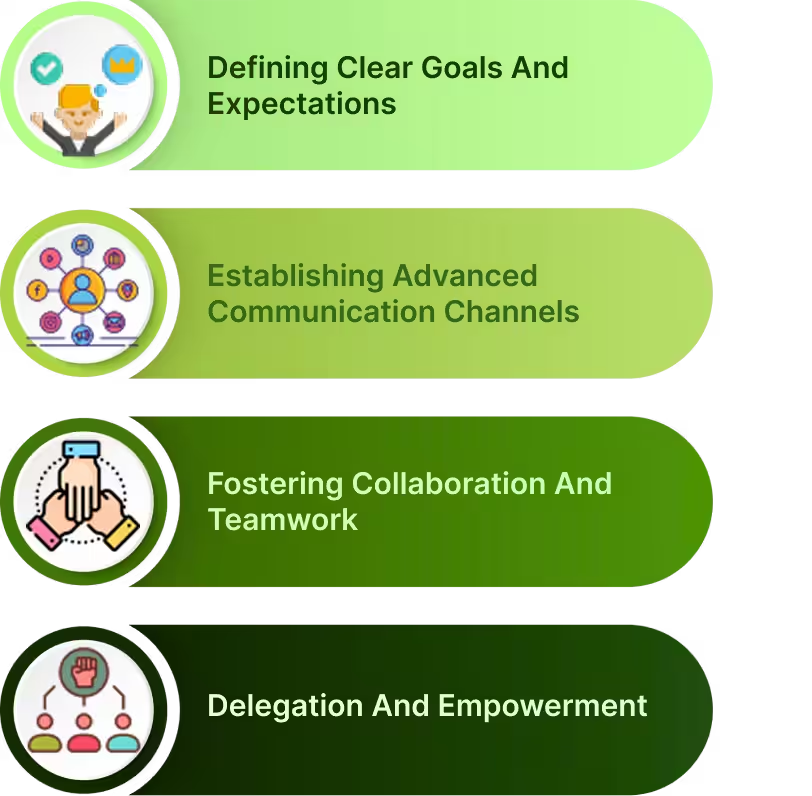

Defining Clear Goals and Expectations
Establishing Advanced Communication Channels
Fostering Collaboration and Teamwork
Delegation and Empowerment
Common Team Time Management Challenges
Managing Remote and Distributed Teams
Managing remote teams brings incredible opportunities for flexibility and access to global talent, but it also introduces unique challenges. From communication barriers to managing productivity across time zones, leaders must be proactive and strategic. Below are key problems faced in remote employee management and practical solutions that reflect current remote employee management insights.Problem 1: Communication Barriers
Remote teams often face communication breakdowns due to the absence of in-person interaction. Without non-verbal cues, real-time feedback, or tone of voice, messages can easily be misinterpreted, leading to confusion and frustration.Solution:
- Diversify Communication Tools Use Slack for quick chats, Zoom for real-time discussions, and email for formal documentation. This mix supports various communication styles and ensures nothing falls through the cracks.
- Set Clear Communication Norms Establish guidelines for when to use each platform and set expectations for response times to reduce ambiguity.
- Use Visual Tools Encourage screen sharing, diagrams, or recorded walkthroughs with tools like Loom or Miro to clarify complex ideas, particularly during async collaboration.
Problem 2: Building Trust and Accountability
Without daily check-ins or visual cues, managers might feel unsure about team progress, while remote employees may feel isolated or micromanaged. Building mutual trust becomes harder in distributed settings.Solution:
-
- Use Transparent Tracking Tools
-
- Provide Autonomy with Clarity
-
- Regular Recognition and Feedback
Problem 3: Collaboration Across Time Zones
Distributed teams often span multiple time zones, complicating meeting schedules and slowing down decision-making due to misaligned working hours.solution
-
- Prioritize Asynchronous Communication
-
- Establish Overlap Hours
-
- Offer Flexible Working Hours
Resolving Team Conflicts and Disputes
Problem 1: Unresolved Conflicts Affecting Team Morale
Conflicts among team members can go unresolved, creating tension, resentment, and a toxic environment that impacts team morale and productivity.Solution:
-
- Address Conflicts Early:
-
- Active Listening:
-
- Neutral Mediation:
Problem 2: Fear of Difficult Conversations
Managers often avoid difficult conversations, such as giving critical feedback, out of fear of confrontation. This avoidance can lead to unresolved issues and a lack of growth.Solution:
-
- Create Psychological Safety:
-
- Use Structured Feedback Models:
-
- Empathy in Conversations:
Maintaining Team Motivation and Engagement
Problem 1: Declining Motivation Over Time
Employees may lose motivation if their contributions are not recognized or if they feel their work is monotonous and unchallenging. This decline in motivation leads to disengagement and decreased performance.Solution:
-
- Recognition Programs:
-
- Varied Work Assignments:
-
- Involve Employees in Decision-Making:
Problem 2: Lack of Career Growth Opportunities
Employees who feel they are not progressing in their careers may become disengaged, leading to high turnover and frustration.Solution:
-
- Develop Career Plans:
-
- Mentorship Programs:
-
- Frequent Career Check-ins:
Managing Performance and Providing Feedback
Problem 1: Inconsistent Performance Reviews
Infrequent or inconsistent performance reviews leave employees unsure about their performance, leading to confusion and stagnation.Solution:
-
- Regular Feedback Loops:
-
- Clear KPIs:
-
- Two-Way Feedback:
Problem 2: Fear of Giving Constructive Feedback
Managers may avoid giving critical feedback, fearing negative reactions or damaging relationships. This results in poor performance going unaddressed and missed opportunities for growth.Solution:
-
- Provide Feedback Training:
-
- Use the “Sandwich” Approach:
-
- Promote a Growth Mindset:
Time Management and Productivity
Problem 1: Poor Time Management Leading to Missed Deadlines
Without effective time management, teams may struggle to meet deadlines, leading to missed targets, delays, and client dissatisfaction along with that managers will struggle to measure employee productivity.Solution:
-
- Time Management Tools:
-
- Daily Stand-ups:
-
- Time Blocking:
Problem 2: Low Productivity Due to Distractions
Remote work and multiple tasks can lead to workplace distractions reducing focus and productivity.Solution:
-
- Minimize Interruptions:
-
- Batch Similar Tasks:
-
- Use the Pomodoro Technique:
Tools and Technologies for Enhanced Team Time Management
Automated Project Time Tracking Tool
Desklog: Advanced Project Time Tracking for Optimal Efficiency
Desklog is an advanced project time tracking tool designed to help teams track time and manage tasks efficiently. It ensures that project timelines and budgets remain on track through a complete approach to task management. Beyond basic time tracking, Desklog will help you to forecast potential project delays and budget overruns. By analyzing historical and real-time data, the tool identifies trends in task completion, project progress, and resource usage, enabling early detection of risks and therefore marking the exact rate of employee efficiency. This data-driven approach empowers teams to make informed decisions, ensuring projects stay on schedule and within budget which will eventually help to avoid project cost overruns. With Desklog, teams gain the insights and tools they need to enhance project efficiency, improve resource allocation, and drive successful outcomes;-
- Maximize Project Efficiency Through Complete Time and Task Tracking
-
- Anticipate and Mitigate Project Delays with Advanced Data Analysis
-
- Empower Strategic Project Planning Through Data-Driven Insights
Project Time Tracking
Desklog provides advanced project time tracking features, enabling teams to track the time spent on every project, task, and subtask. This functionality helps compare estimated versus actual time, offering insights into discrepancies and enabling proactive adjustments to prevent delays or budget overruns. Desklog’s Subtask Management breaks large projects into manageable subtasks, enhancing accountability, collaboration, and efficient workflow tracking.This feature ensures effective team time management by providing granular visibility into how time is allocated across different project components. The Kanban View further improves project management with an intuitive interface that simplifies task visualization, prioritization, and organization. Its drag-and-drop feature makes it easy for teams to manage workflows, track progress, and ensure projects are completed on time, combining the visual efficiency of Kanban with precise time tracking.Project Billing
Desklog’s project billing accommodates a variety of billing models to meet diverse project needs. It accurately tracks both billable and non-billable hours ensuring all project time is properly recorded. This feature automatically generates invoices based on tracked billable hours, simplifying the billing process and minimizing errors. Desklog’s flexible billing options allow businesses to choose the most suitable method for each project, promoting transparency and efficiency:- Flat Rate Billing: Ideal for projects with a fixed cost, allowing easy budget management without focusing on individual time entries
- Hourly Billing Based on Tasks: Tracks time spent on specific tasks and subtasks, generating invoices based on task completion for precise client billing.
- Hourly Billing Based on Users:Tracks time spent by individual team members on tasks and subtasks, offering detailed billing for projects with variable team involvement.
Project Profit & Loss Tracker
Desklog’s Project Profit & Loss Tracker helps teams track the financial performance of projects. By linking task durations, resources, and budgets, it provides clear insights into project profitability. This feature helps project managers identify budget issues early, adjust resource allocations, and maintain financial control and accurate project budgeting hroughout the project lifecycle.Communication and Collaboration Platforms
Effective communication is the backbone of any successful team, and platforms like Slack and Microsoft Teams are designed to facilitate this. These tools help improve team time management by reducing the time spent on emails and face-to-face meetings while enhancing the flow of information across teams. Slack is great for quick, informal communication, allowing real-time message sharing and file exchanges, while integrating with various productivity tools to save time. Microsoft Teams offers a more structured approach with chat, video conferencing, and file sharing, ideal for formal collaboration. It also integrates with project management tools, enhancing time management techniques by centralizing project-related communications. To maximize the benefits of these platforms and improve team time management, it’s essential to follow best practices. Organizing channels based on projects, departments, or topics helps keep conversations focused and reduces clutter, which saves time when searching for information. Setting clear communication norms is another key strategy for effective time management. Defining when to use emails versus instant messaging helps manage expectations regarding response times, reducing unnecessary interruptions. Integrating productivity tools like Trello or Desklog can centralize project updates, ensuring that everyone stays informed without the need for frequent status meetings. For discussions that require deeper engagement, such as complex problem-solving or sensitive issues, opting for video calls can significantly improve clarity and understanding, thus saving time in the long run by reducing misunderstandings.Performance Tracking and Analytics Tools
Performance tracking and analytics tools are indispensable for tracking team productivity, assessing project milestones, and identifying areas for improvement. They play a crucial role in optimizing team time management by providing insights into how time is being utilized and where efficiency can be improved. These tools offer data-driven insights that help managers make informed decisions, enhancing overall team performance. For instance, Desklog offers features like time tracking, productivity monitoring, and performance reports, which help managers identify trends, bottlenecks, and areas needing attention. This data is invaluable for refining time management techniques within teams, while also ensuring that employees aren’t overburdened, promoting a healthier work-life balance. To effectively use analytics tools for performance improvement, it’s important to start by setting clear metrics. Defining key performance indicators (KPIs) such as task completion rates, deadlines met, and productivity hours provides a benchmark for measuring success. This approach not only helps in tracking performance but also highlights how well team members are managing their time. Regularly reviewing performance dashboards helps identify trends, such as recurring delays or areas where team members excel, enabling managers to provide targeted support. Providing data-driven feedback, backed by concrete metrics, ensures that performance discussions are objective and constructive. This feedback loop encourages continuous improvement in employee time management. For example, if analytics show that certain tasks consistently take longer than expected, managers can investigate whether the issue lies in time allocation, resource availability, or unclear task instructions. Finally, using insights from performance data to continuously refine workflows and strategies helps teams become more agile, efficient, and aligned with organizational goals. This process directly contributes to better strategy for time management, as managers can adjust workload distribution, delegate tasks more effectively, and implement best practices that promote productivity. By integrating time management tips into daily workflows based on performance data, teams can work smarter, not harder, leading to sustained success.Time Tracking Tools
Time tracking tools help individuals and teams monitor and manage the time spent on tasks and projects for improved productivity. And let’s meet one of the best time tracking software in the market; Desklog! Desklog is a versatile time tracking software designed to enhance employee productivity and simplify workflows. It automatically tracks time spent on tasks and projects, even offline, eliminating manual entries and ensuring accurate data. With advanced reporting, real-time tracking, and features like activity monitoring, leave, and shift management, Desklog fosters transparency, accountability, and efficient team time management. It helps businesses optimize performance, manage resources effectively, and improve overall time management strategies.Key Features

Automated Time Tracking
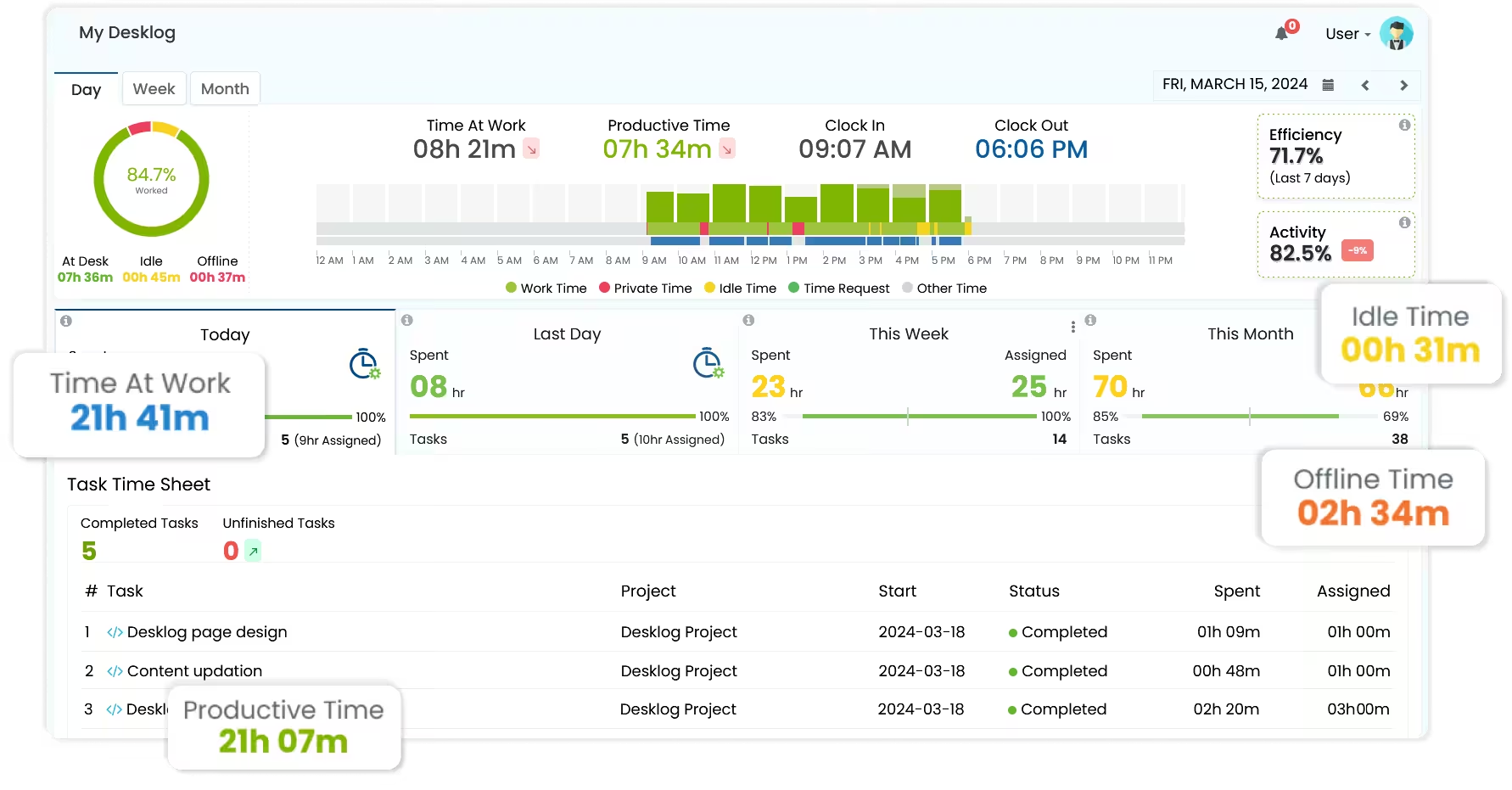 Desklog’s automated time tracking/ simplifies time management by removing the need for manual input and automatically logging work hours. Features like clock in/clock out to capture employee login and logout times, along with offline time tracking and idle time tracking, provide a complete view of the hours worked.
Desklog’s automatic time tracking increases focus time by removing the need for manual time entry, allowing employees to concentrate fully on their tasks without distractions. It tracks productive vs. idle time, providing valuable insights into work patterns. This data helps managers identify inefficiencies and optimize workflows, leading to better task prioritization and time management. As a result, employees experience improved focus and productivity, boosting overall employee efficiency.
Desklog’s automated time tracking/ simplifies time management by removing the need for manual input and automatically logging work hours. Features like clock in/clock out to capture employee login and logout times, along with offline time tracking and idle time tracking, provide a complete view of the hours worked.
Desklog’s automatic time tracking increases focus time by removing the need for manual time entry, allowing employees to concentrate fully on their tasks without distractions. It tracks productive vs. idle time, providing valuable insights into work patterns. This data helps managers identify inefficiencies and optimize workflows, leading to better task prioritization and time management. As a result, employees experience improved focus and productivity, boosting overall employee efficiency.
Automated Timesheets
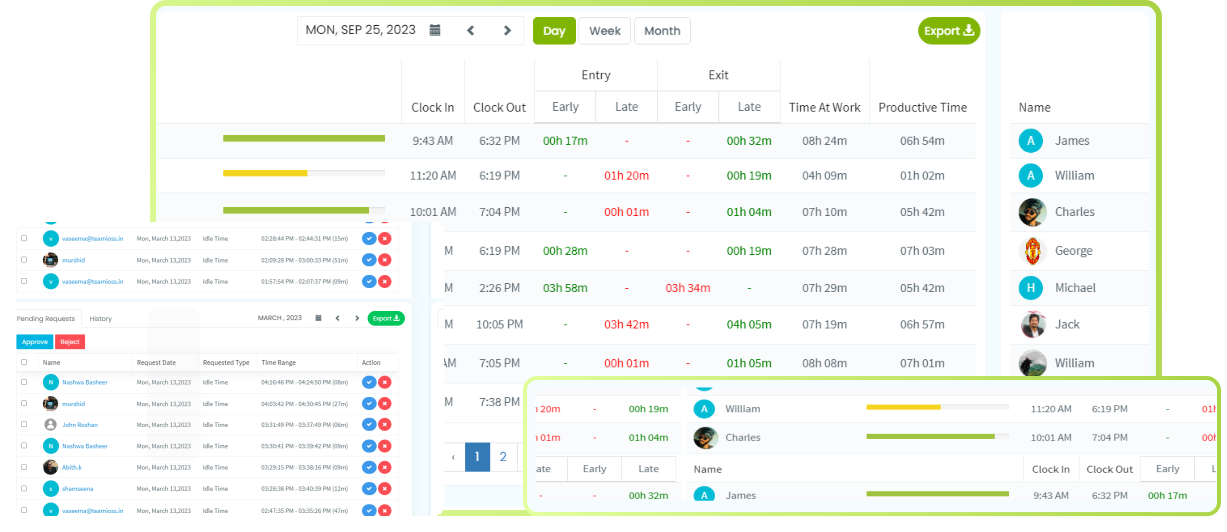 Automated timesheets simplify the tracking of work hours, employee attendance, clock-ins/outs, and leave, improving efficiency, accuracy, and transparency. Desklog’s software eliminates manual data entry, reducing errors and ensuring real-time, precise tracking. It helps organizations cut administrative costs, prevent pay disputes with accurate records, and promote fairness with transparent timesheets.
The system provides easy access to work hours and generates reports for daily, weekly, or monthly periods, supporting employee evaluations, accurate payroll, and efficient resource management. Automated timesheets organize tracked data into reliable records, while the web timer offers the flexibility of manual time tracking when needed. This helps businesses enhance team time management and streamline project budgeting and invoicing processes.
offers the flexibility of manual time tracking when needed. This helps businesses enhance team time management and streamline project budgeting and invoicing processes.
Automated timesheets simplify the tracking of work hours, employee attendance, clock-ins/outs, and leave, improving efficiency, accuracy, and transparency. Desklog’s software eliminates manual data entry, reducing errors and ensuring real-time, precise tracking. It helps organizations cut administrative costs, prevent pay disputes with accurate records, and promote fairness with transparent timesheets.
The system provides easy access to work hours and generates reports for daily, weekly, or monthly periods, supporting employee evaluations, accurate payroll, and efficient resource management. Automated timesheets organize tracked data into reliable records, while the web timer offers the flexibility of manual time tracking when needed. This helps businesses enhance team time management and streamline project budgeting and invoicing processes.
offers the flexibility of manual time tracking when needed. This helps businesses enhance team time management and streamline project budgeting and invoicing processes.
Shift Management
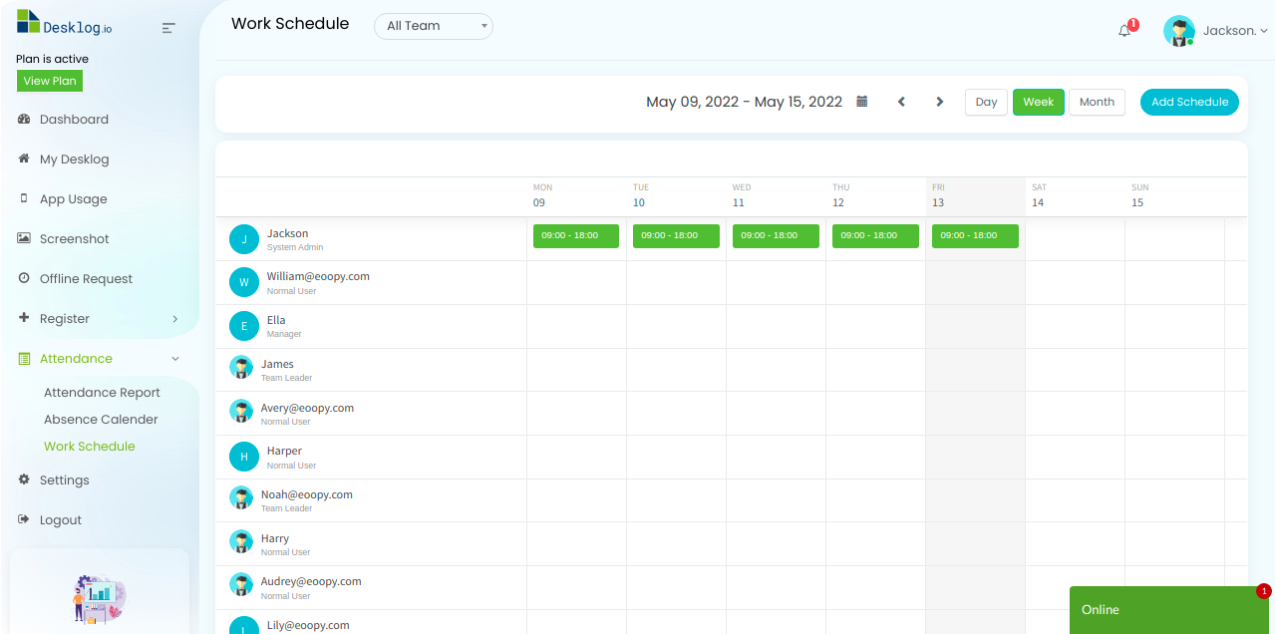 Desklog simplifies shift management by automating shift scheduling. By integrating shift scheduling with time tracking, Desklog provides accurate data to monitor employee productivity during their assigned shifts. This ensures businesses manage their teams efficiently, even across different time zones, maintaining both accuracy and operational efficiency.
Activity Tracking
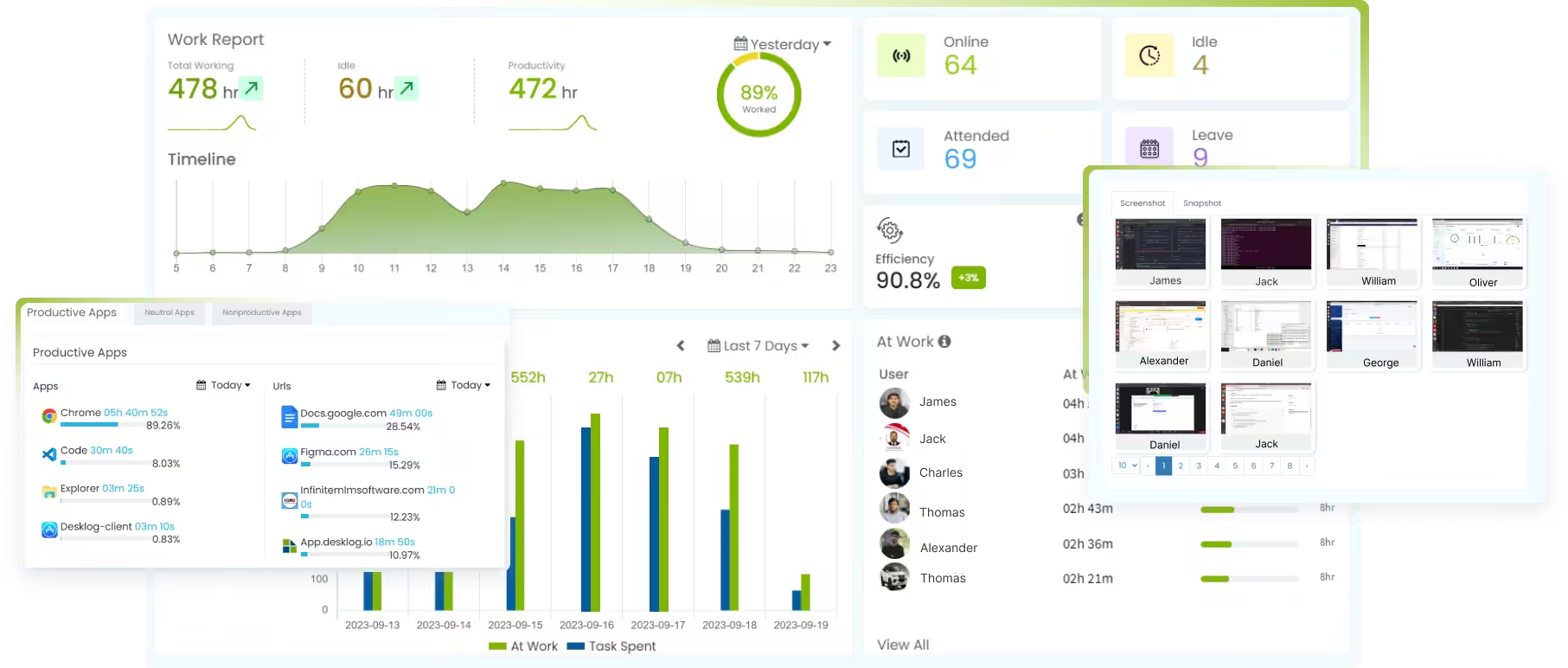 With Desklog’s activity tracking feature, businesses can track employee activities, including keyboard and mouse usage, visits to applications and URLs, and optionally, take screenshots By observing employee activities during work hours, companies can identify peak productivity periods and improve time efficiency. This makes team time management easy and effective, ensuring that employees focus on tasks that contribute to productivity while also respecting privacy.
Leave Management
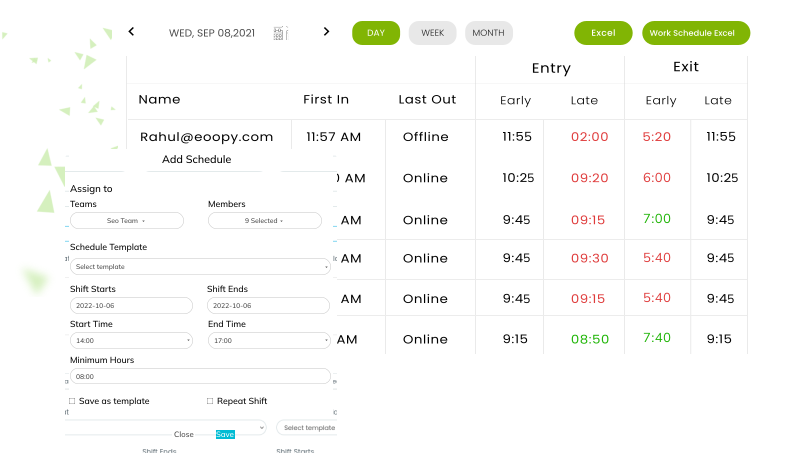 Desklog’s leave management feature precisely tracks and records employee absences. This automated leave tracking helps businesses optimize resource allocation and make data-driven decisions regarding workforce management. Regarding time management, this feature ensures that only actual work time is considered productive, with employee absences accounted for separately. This accuracy prevents inefficiencies when employees take time off and reduces the amount of employee absenteeism in the workplace.
 The End,
In conclusion, effective team time management is essential for enhancing productivity, achieving organizational goals, and fostering a positive work environment. By implementing strategies such as setting clear objectives, utilizing appropriate communication and collaboration tools, empowering team members through delegation, and using performance tracking technologies, teams can optimize their workflows and outcomes. Addressing challenges like remote work and maintaining motivation requires continuous adaptation and commitment to best practices. Embracing these approaches will lead to sustained success and a more engaged, efficient workforce.FAQ
1What is team time management?
Team time management involves coordinating and optimizing the collective time and efforts of a group to achieve specific objectives efficiently. It requires aligning individual schedules, setting shared goals, and fostering collaboration to ensure that tasks are completed effectively and deadlines are met.
2Why is effective time management crucial for teams?
Effective time management improves productivity, ensures timely project completion, reduces stress, and fosters a better work-life balance for team members. It helps in prioritizing tasks, minimizing distractions, and allocating resources efficiently, leading to improved overall performance.
3How can setting clear goals improve team time management?
Setting clear goals provides direction and purpose, helping teams prioritize tasks and align their efforts towards achieving common objectives. Utilizing frameworks like SMART (Specific, Measurable, Achievable, Relevant, Time-bound) goals ensures that objectives are well-defined and attainable, facilitating effective planning and execution.
4What role does communication play in managing team time effectively?
Advanced communication ensures that team members are aligned, aware of expectations, and can collaborate efficiently, reducing misunderstandings and delays. Establishing clear communication channels and guidelines promotes transparency, fosters a collaborative environment, and helps in promptly addressing any issues that may arise.
5How does delegation contribute to better time management within a team?
Poor project planning can lead to cost overruns in several ways:
Delegation distributes tasks based on individual strengths and capacities, preventing overload and ensuring that tasks are completed efficiently and on time. It empowers team members, fosters skill development, and allows leaders to focus on strategic aspects, thereby enhancing overall team productivity.
6 What are some common challenges teams face in managing time, and how can they be addressed?
Challenges include unclear priorities, procrastination, and distractions. Addressing them involves setting clear objectives, maintaining open communication, and creating structured schedules. Implementing techniques like the Eisenhower Matrix can aid in distinguishing between urgent and important tasks, facilitating better prioritization.
7How can technology assist in improving team time management?
- Tools like project management software, communication platforms, and time-tracking applications help organize tasks, monitor progress, and facilitate collaboration. They enable teams to set deadlines, assign responsibilities, and track time spent on various activities, leading to more efficient time management.
8What strategies can be implemented to minimize distractions and maintain focus during work hours?
Implementing strategies such as setting specific work hours, using time-blocking techniques, and minimizing non-essential notifications can help maintain focus. Time-blocking involves scheduling dedicated periods for specific tasks, reducing the temptation to multitask and enhancing concentration.
9How can teams ensure that meetings are productive and time-efficient?
By setting clear agendas, keeping discussions focused, and limiting meeting durations, teams can ensure that meetings contribute positively without consuming excessive time. Utilizing techniques like the Pomodoro Technique, which involves working in focused intervals followed by short breaks, can also enhance productivity during meetings.
10What are the benefits of regularly reviewing and adjusting time management strategies?
Regular reviews allow teams to identify what’s working, address challenges, and adapt strategies to changing circumstances, leading to continuous improvement in productivity. It fosters a culture of adaptability and responsiveness, ensuring that time management practices remain effective and aligned with team goals.