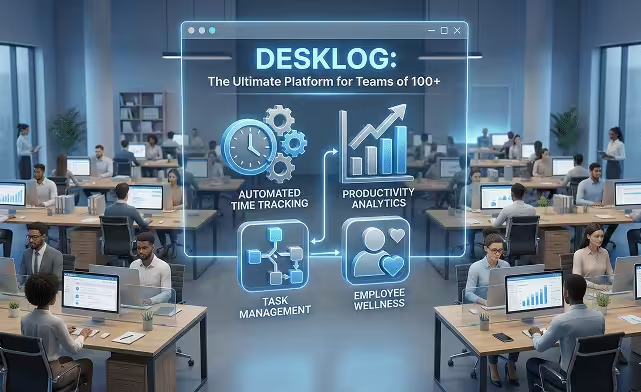

Managing productivity for teams of 100+ employees is no easy task. As organizations expand, traditional tracking methods such as manual timesheets, spreadsheets, or basic time tracking software quickly become inefficient, error-prone, and time-consuming.
This is where Desklog,the best time tracking software with advanced productivity feature steps in, offering a platform designed specifically to handle the unique challenges of large teams.
In this blog, we’ll explore why Desklog is the ideal solution for large teams, its key features, benefits, and real-world use cases.
Specifically, we will look at:
- The Unique Challenges of Managing Large Teams
- How Desklog Solves the Challenges of Large Teams
- Key Features That Make Desklog Ideal for Teams of 100+
- How Desklog Outperforms in High-Volume Environments
The Unique Challenges of Managing Large Teams
Scaling a company beyond 100 employees introduces a series of challenges that many organizations underestimate.
Large teams often encounter difficulties in tracking time and productivity, managing tasks and making data-driven decisions.
Complex Time Tracking
Manual time tracking with spreadsheets or timesheets is cumbersome for large teams and often leads to:
- Errors in reporting and calculations
- Missed billable hours or misallocated resources
- Frustration for managers and payroll teams
Difficulty in Tracking Team Productivity
Understanding productivity across large teams is challenging. Managers may struggle to determine:
- Which employees are underperforming or overburdened
- How different departments contribute to overall output
- Which tasks consume the most time
Task Management Overload
Managing multiple projects across departments often leads to lost, delayed, or duplicated tasks. With diverse roles and responsibilities involved, it becomes challenging to clearly understand:
- Which employees are overburdened or falling behind
- How each department is contributing to overall outcomes
- Which tasks or activities are taking up the most time
Challenges in Data-Driven Decision Making
Large organizations generate massive volumes of data daily. Without proper analytics, it’s difficult to:
- Identify workflow bottlenecks
- Evaluate project profitability
- Optimize resource allocation
Tough Managing Distributed Teams
Remote and hybrid teams introduce unique challenges that can complicate management and reduce overall efficiency:
- Misalignment and slower collaboration across locations
- Hard to account for tasks done without internet or company systems
- Difficult to verify employee locations for field or hybrid teams
How Desklog Solves the Challenges of Tracking Large Teams
Desklog is designed to address these challenges with precision.
Automated Time Tracking
Desklog automatically records work hours and productive activity, eliminating manual timesheets. This ensures:
- Error-Free Time Tracking – Work hours are captured automatically, removing manual entries and calculation errors.
- Accurate Payroll Processing – Reliable and precise time data ensures payroll is processed correctly and on time.
- Transparent Performance Analysis – Managers gain clear visibility into individual and team productivity for fair and data-driven evaluations.
Task & Project Management
Managers can assign, prioritize and track tasks across departments and projects with ease:
- Accurate Project Time Tracking – Track hours spent on each project precisely.
- Effortless Project Billing – Convert tracked time into precise, billable project hours.
- Structured Subtasks – Break larger tasks into smaller, manageable subtasks for better execution.
Customizable Dashboards & Reports
Desklog provides dashboards customized for both managers and employees:
- Real-Time KPIs – Track goals and metrics for faster, data-driven decisions.
- Reports & Analytics – Generate detailed, exportable reports for payroll, billing and audits.
- Desklog Insights – Consolidates project health, financial metrics and timelines for proactive management.
Offline Tracking & Geolocation
Desklog effectively tackles challenges faced by distributed teams with:
- Offline Work Tracking – Captures work hours and task progress even without an internet connection.
- Geolocation Tracking – Tracks employee locations for field or hybrid teams, improving coordination across sites.
- Smooth Syncing – Automatically syncs all offline activity to the cloud once connected, keeping dashboards up-to-date.
Key Features That Make Desklog Ideal for Teams of 100+
Large teams need a platform that is reliable and easy to use. Desklog is designed to meet these requirements, providing advanced tools to track productivity and support employee well-being.
-
Remote & Hybrid Team Support
Desklog is optimized for remote, on-site, and hybrid teams, providing consistent productivity tracking and visibility regardless of location. Managers can track progress, tasks, and attendance across distributed teams effortlessly.
-
Security & Privacy
Desklog prioritizes employee privacy while maintaining transparency. Activities are tracked without keystroke logging or intrusive screenshots, ensuring data security, compliance with privacy standards, and fostering trust between management and employees.
-
Employee Wellness Features
Desklog encourages balanced work habits with built-in wellness tools. Employees are prompted to take breaks, reducing burnout and fatigue, promoting long-term satisfaction, and supporting a healthy, productive work culture.
-
Scalability
Desklog can effortlessly handle large datasets, whether your team has 100 employees or grows to 500+. It maintains high performance even under heavy workloads, ensuring accurate tracking and reporting without lag or delays.
-
Ease of Use
With its intuitive interface and minimal learning curve, Desklog allows employees and managers to start using the platform immediately. Training time is reduced, adoption is faster and teams can focus on work rather than learning new software.
How Desklog Outperforms in High-Volume Environments
Unlike basic tools that struggle under heavy usage, Desklog is built for enterprise readiness:
| Feature | Advantage for Large Teams |
|---|---|
| Unlimited Scalability | Supports 100+ simultaneous sessions, ideal for mid-sized companies. |
| Lag-Free Tracking | Real-time tracking, including remote setups, without disruption. |
| Error-Resistant Data | Automated timesheet validation prevents duplicate entries, ensuring payroll accuracy. |
| Bulk User Management | Easily add, import, or modify hundreds of employee profiles at once. |
| Advanced Role-Based Permissions | Maintain strict access control across departments and multi-level teams. |
Scale Your Team Efficiently
Automate tasks, gain real-time insights, and empower your organization of 100+ employees to work smarter.
Conclusion
Desklog is a complete productivity platform designed for large teams. By automating repetitive tasks, providing real-time insights, and enabling data-driven decisions, Desklog empowers organizations of 100+ employees to work more efficiently.
With features like remote and hybrid support, employee wellness tools, and smooth integrations, Desklog enables organizations to refine workflows, improve productivity, and make smarter operational decisions. For growing companies, it’s a platform that drives efficiency, accountability and long-term success.