
Managing remote, hybrid, and distributed teams requires more than just a basic time tracker. Businesses need visibility into work hours, productivity, attendance, payroll, project progress, and workforce performance. That’s where Hubstaff comes in.

Since its launch in 2012, Hubstaff has evolved from a simple time tracking software into a full workforce management platform used by more than 140,000+ businesses worldwide. Today, it combines employee monitoring, activity tracking, payroll, scheduling, GPS tracking, geofencing, project management, and reporting into a single platform.
But does Hubstaff still deliver enough value in 2026 to justify its growing costs and monitoring-heavy approach? After reviewing its features, pricing, usability, employee monitoring tools, mobile experience, reporting capabilities, and customer feedback, here’s our complete Hubstaff review covering:
📋 Table of Contents
Quick Verdict
Hubstaff remains one of the strongest employee time tracking and monitoring platforms for desk-based teams. Its activity monitoring, screenshots, app tracking, payroll automation, GPS tracking, and reporting tools provide managers with extensive visibility into employee work patterns.
However, several limitations continue to hold it back:
- No free plan
- Essential features locked behind higher tiers and add-ons
- Monitoring tools may feel intrusive
- Limited mobile management capabilities
- Scheduling lacks automation and conflict detection
- Overtime and compliance tools are basic
- Costs increase quickly as teams scale
For organizations prioritizing accountability and monitoring, Hubstaff is a strong option. For teams looking for a more productivity-focused, privacy-friendly, and affordable solution, Hubstaff alternatives like Desklog may provide better long-term value.
Hubstaff Pricing Review (2026)
Hubstaff’s pricing structure is one of its biggest strengths and weaknesses. While entry-level pricing appears affordable, many essential features require upgrades or paid add-ons.
Hubstaff Pricing Plans (Billed Annually)
| Plan | Pricing |
|---|---|
| Starter | $4.99/seat/month |
| Grow | $7.50/seat/month |
| Team | $10/seat/month |
| Enterprise | $25/seat/month |
All plans require a minimum of 2 seats.
Hubstaff Add-On Costs
Hubstaff’s pricing becomes more complicated when add-ons enter the picture. Common add-ons include:
| Add-On | Cost |
|---|---|
| Insights | $2.50/seat/month |
| Tasks | $2.50/seat/month |
| More Screenshots | $2.50/seat/month |
| Silent App | $2.50/seat/month |
| Locations (GPS) | $3.33/seat/month |
| Data Retention | $1.67/seat/month |
Teams relying on GPS tracking should note the Locations add-on is only available on Team and Enterprise plans, meaning some users must upgrade their base plan just to access it. This means businesses often pay substantially more than the advertised plan pricing.
No Free Plan
Unlike many competitors, Hubstaff does not offer a permanent free plan. It does provide:
- 14-day free trial
- 30-day money-back guarantee
However, the signup process may give users the impression that payment information is required before they can try the platform.
Hubstaff Key Features in 2026
1. Time Tracking
Time tracking remains Hubstaff’s strongest feature and the foundation of the platform. Employees can track their work hours through multiple channels, including the desktop application, web timer, mobile app, and Chrome extension. This flexibility makes it suitable for remote, hybrid, and distributed teams.
Managers can also configure automated tracking policies to improve accuracy and reduce manual errors. Features such as break tracking, overtime monitoring, app-specific tracking permissions, and daily or weekly work limits help businesses maintain accurate records.
What we liked:
- Multiple time tracking options
- Accurate timesheets and work-hour records
- Reliable offline tracking
- Automated timer functionality
- Built-in overtime tracking
Where it falls short:
- No kiosk mode for shared devices
- No facial recognition verification
- No biometric authentication
- Supports only weekly overtime tracking
- Limited compliance-focused controls
For desk-based teams and remote employees, Hubstaff delivers a reliable tracking experience. However, organizations requiring strict attendance verification may find its compliance capabilities limited.
2. Employee Monitoring
Employee monitoring is one of Hubstaff’s most recognizable features. The platform provides managers with detailed visibility into employee activity through screenshots, activity tracking, and app monitoring. Hubstaff records employee activity while they are clocked in and compiles the data into productivity reports.
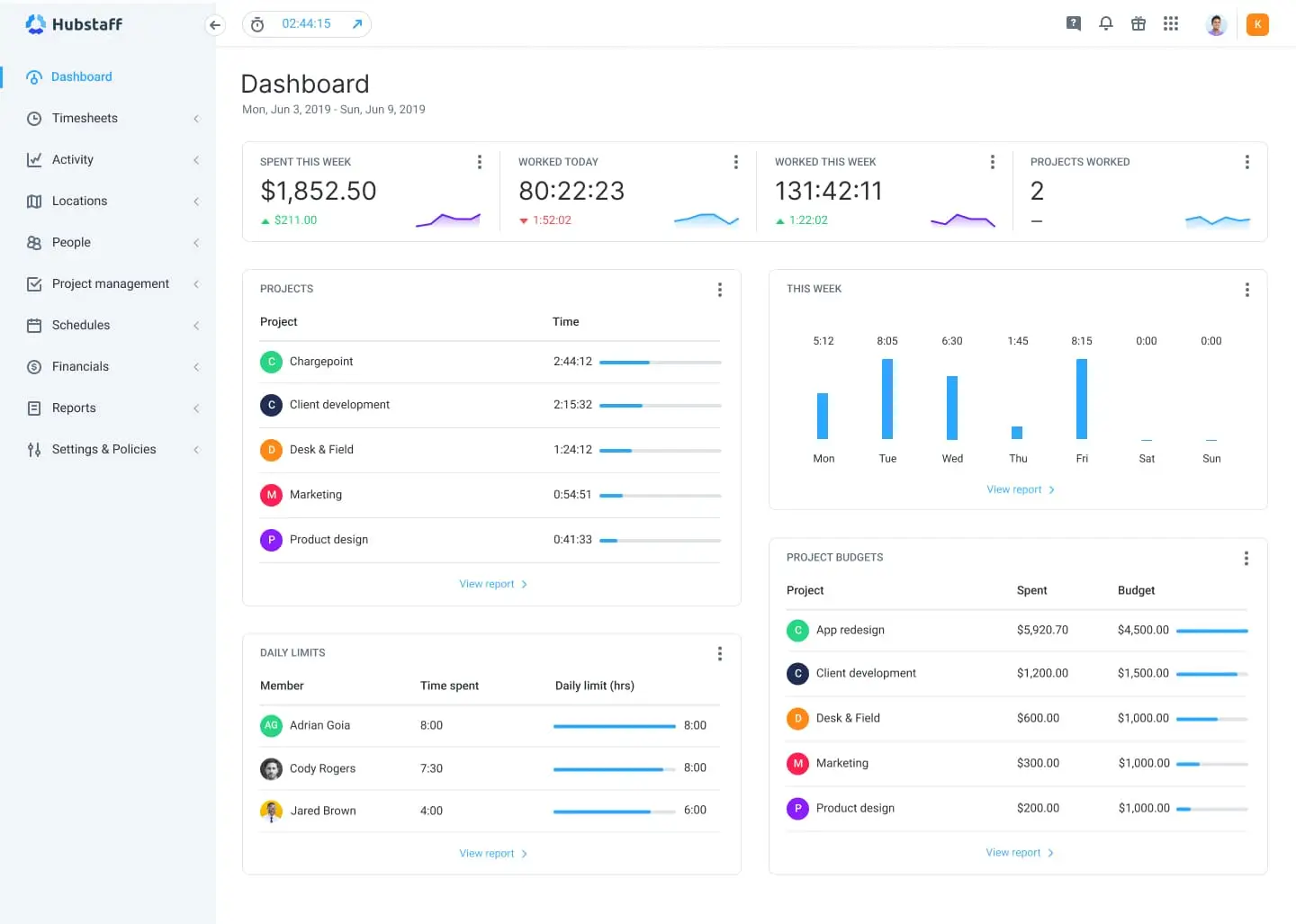
This helps managers understand how work hours are being spent and identify potential productivity trends.
Key monitoring features include:
- Random screenshot capture
- Keyboard activity tracking
- Mouse activity tracking
- Application monitoring
- Website monitoring
- Idle time detection
Managers gain access to reports showing:
- Active work time
- Idle time
- Productive applications
- Non-productive applications
- Screenshot history
- Activity percentages
These monitoring features are only available on the desktop app. Screenshots can optionally be blurred to protect sensitive on-screen data.
Advantages:
- Strong visibility into employee work patterns
- Helps verify billable hours
- Useful for managing remote teams
- Improves accountability
Potential concerns:
- Screenshots may feel invasive to employees
- Activity percentages don’t always reflect actual productivity
- Can create trust concerns in some workplace cultures
While Hubstaff’s monitoring tools are powerful, organizations should consider whether a monitoring-heavy approach aligns with their management style and company culture.
3. GPS Tracking & Geofencing
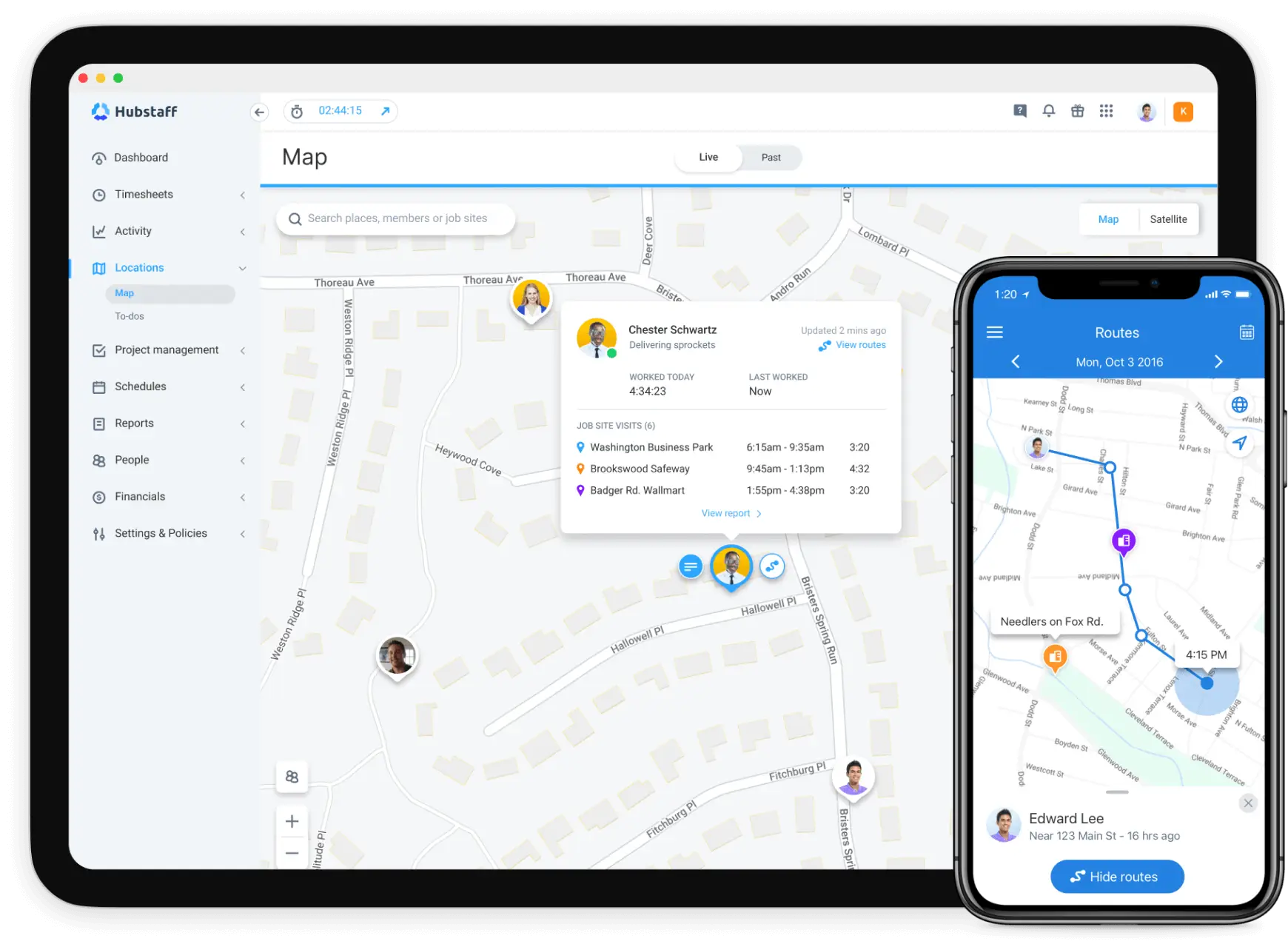
For field teams and mobile workforces, Hubstaff offers GPS tracking and geofencing capabilities that help businesses track employee movements and job-site attendance. Recent improvements have strengthened geofencing functionality, allowing businesses to automate location-based attendance tracking.
Key GPS and geofencing features:
- Live GPS tracking
- Route history
- Geofenced job sites
- Automatic clock-ins
- Automatic clock-outs
- Location-based reminders
Employees can be prevented from clocking in outside designated locations, while managers gain greater visibility into field operations.
Benefits:
- More accurate payroll calculations
- Better accountability for field teams
- Reduced time theft
- Improved attendance accuracy
Limitations:
- Route mapping isn’t always precise
- GPS tracking requires paid add-ons on some plans
- Privacy concerns may arise for some employees
For industries such as construction, logistics, and field services, Hubstaff’s location tools provide significant value despite a few shortcomings.
4. Employee Scheduling
Hubstaff includes a built-in scheduling module that supports basic workforce planning. Managers can create shifts, assign employees, monitor attendance, and receive notifications when workers are late or miss scheduled shifts. The scheduling interface is straightforward and works well for businesses with simple scheduling requirements.
Scheduling capabilities include:
- Shift creation
- Recurring schedules
- Attendance tracking
- Late-arrival notifications
However, compared to dedicated scheduling software, Hubstaff lacks several modern features.
Missing scheduling features:
- Drag-and-drop scheduling
- Schedule templates
- Auto scheduling
- Draft schedules
- Shift conflict detection
During testing, overlapping shifts could be created without warnings, highlighting some limitations in schedule management. For smaller teams, scheduling is sufficient. For larger organizations with complex shift planning requirements, it may feel restrictive.
5. Project & Task Management
Hubstaff goes beyond time tracking by offering lightweight project management functionality. Teams can assign tasks, monitor progress, manage budgets, and track project-related time from within the platform. The project management tools integrate well with Hubstaff’s time tracking features, helping businesses connect productivity data with project performance.
Project management features include:
- Task assignments
- Kanban boards
- Timeline views
- Sprint planning
- Work orders
- Project budgets
- Task dependencies
These tools work particularly well for agencies, software development teams, and service businesses that need visibility into project profitability. However, Hubstaff is not intended to replace dedicated project management platforms such as Jira, ClickUp, or Monday.com, which offer deeper workflow automation and collaboration capabilities.
6. Payroll & Invoicing
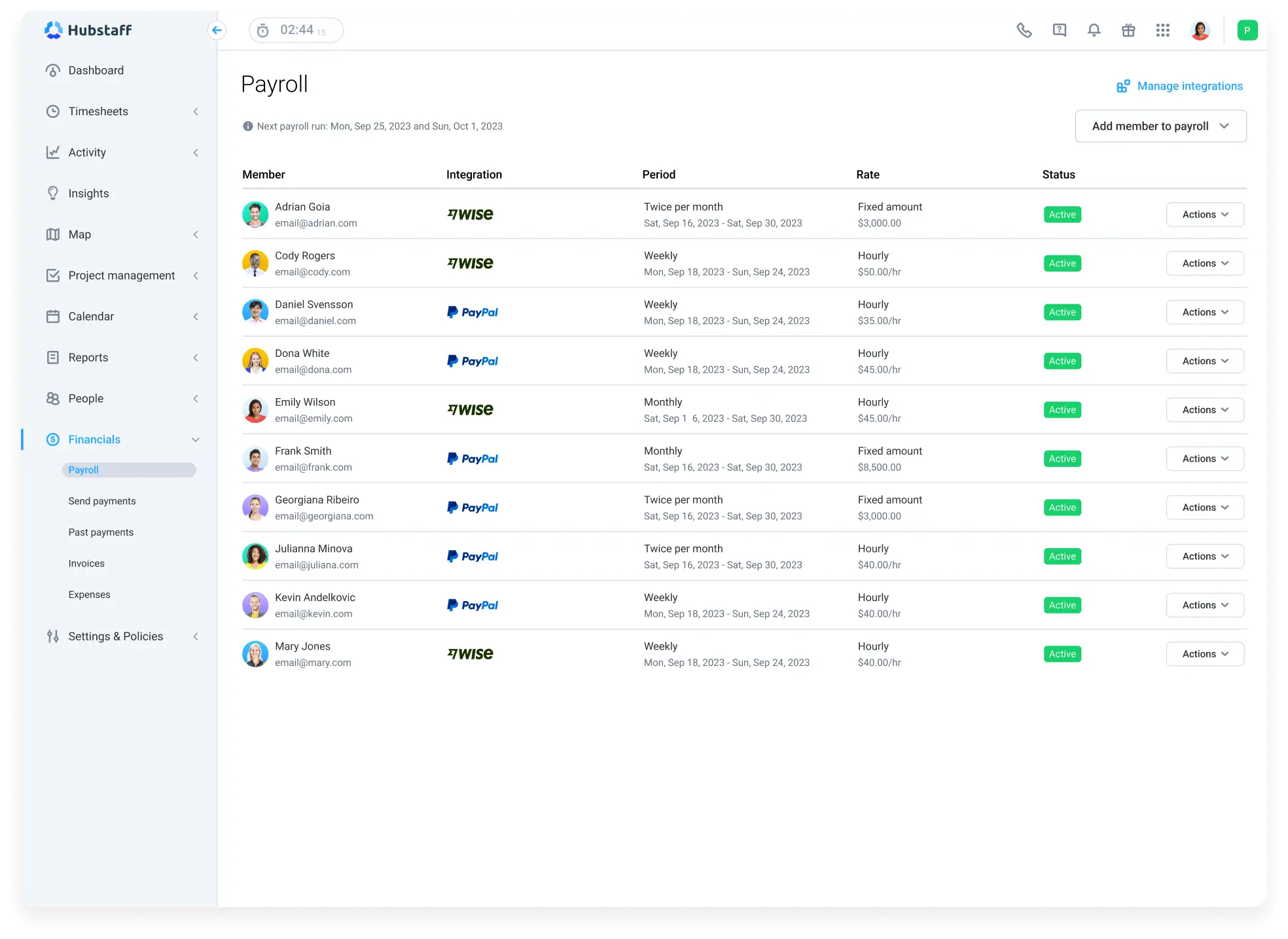
Hubstaff simplifies payroll administration by connecting tracked work hours directly to employee pay rates and invoices. Businesses can automate payroll calculations and process payments through multiple payment providers, reducing administrative effort and improving accuracy.
Payroll and invoicing features include:
- Automated payroll calculations
- Multi-currency support
- Invoice generation
- PayPal integration
- Wise integration
- Payoneer integration
For small and mid-sized organizations, these features can significantly simplify payroll operations. However, larger enterprises may still require dedicated payroll software to manage more advanced compliance, tax, and HR requirements.
7. Reporting & Productivity Insights
Hubstaff provides a wide range of reporting tools designed to help managers understand employee productivity, project performance, attendance, and budget utilization. Reports are easy to generate and can be shared automatically with stakeholders.
Available report categories include:
- Time tracking
- Attendance
- Productivity
- Project performance
- Payroll
- Budgets
- Time off
Report sharing options:
- Scheduled delivery
- CSV exports
- PDF exports
- Email sharing
Hubstaff’s Insights module adds another layer of analysis by identifying unusual activity patterns and productivity trends.
Insights features include:
- Suspicious activity detection
- Fake activity alerts
- Behavioral summaries
- Productivity pattern analysis
While the reporting suite is comprehensive, the platform still relies heavily on managers to interpret the data. Businesses looking for AI-powered recommendations or predictive workforce analytics may find the insights somewhat limited.
Hubstaff Security & Compliance
Security is one of Hubstaff’s strongest areas. The platform follows industry-standard security practices and offers enterprise-grade compliance certifications.
Key security features include:
- TLS 1.2 encryption
- AES-256 data encryption
- Two-factor authentication (2FA)
- Role-based access controls
- GDPR compliance
- HIPAA compliance
- SOC 2 Type II certification
These certifications make Hubstaff a strong choice for organizations handling sensitive business or customer data. For businesses operating in regulated industries such as healthcare, finance, or professional services, Hubstaff provides a solid security and compliance foundation.
Pros & Cons of Hubstaff
Here are the major pros and cons of Hubstaff time tracking software:
| Pros of Hubstaff | Cons of Hubstaff |
|---|---|
| ✅ Accurate time tracking with multiple tracking methods and offline support | ❌ No free plan available for long-term use |
| ✅ Powerful employee monitoring with screenshots, activity tracking, and app/URL monitoring | ❌ Monitoring features may feel invasive for some employees |
| ✅ GPS tracking and geofencing for field and mobile teams | ❌ Essential features often require paid add-ons |
| ✅ Detailed reporting and productivity insights | ❌ Limited mobile administration capabilities for managers |
| ✅ Payroll automation with integrations like PayPal, Wise, and Payoneer | ❌ Scheduling tools lack advanced features such as drag-and-drop scheduling and conflict detection |
| ✅ Simple onboarding and easy team setup process | ❌ No facial recognition or biometric verification for attendance |
| ✅ User-friendly desktop and web applications | ❌ Overtime tracking supports only basic weekly overtime calculations |
| ✅ Strong security standards with GDPR, HIPAA, and SOC 2 Type II compliance | ❌ Costs can increase significantly as teams grow and add-ons are required |
Who Should Use Hubstaff?
Hubstaff is a strong choice for businesses that prioritize employee accountability, workforce visibility, and accurate time tracking. It works particularly well for:
- Remote and hybrid teams that need visibility into employee productivity and work hours.
- IT companies and software development teams managing distributed employees and client-based projects.
- Outsourcing firms and BPOs that require proof of work and detailed time records for client billing.
- Digital agencies and consulting firms tracking billable hours, project budgets, and team utilization.
- Field service and logistics companies that benefit from GPS tracking, route history, and geofencing.
- Compliance-focused organizations that require detailed attendance, timesheet, and activity records.
- Managers who prefer detailed employee monitoring through screenshots, activity levels, and app tracking.
Where Hubstaff Falls Short
While Hubstaff is feature-rich, it may not be the best fit for every organization.
- Creative teams may find activity scores and screenshot monitoring poor indicators of actual productivity.
- Knowledge workers and strategic roles often perform valuable work that isn’t reflected through keyboard and mouse activity.
- Privacy-focused organizations may view screenshots and employee monitoring as overly intrusive.
- Startups and small businesses may find costs increasing quickly as users and add-ons are added.
- Teams that value autonomy and trust-based management may prefer less monitoring-intensive solutions.
- Businesses seeking simple productivity tracking may find Hubstaff’s monitoring and workforce management features more complex than necessary.
Desklog as the Best Hubstaff Alternative
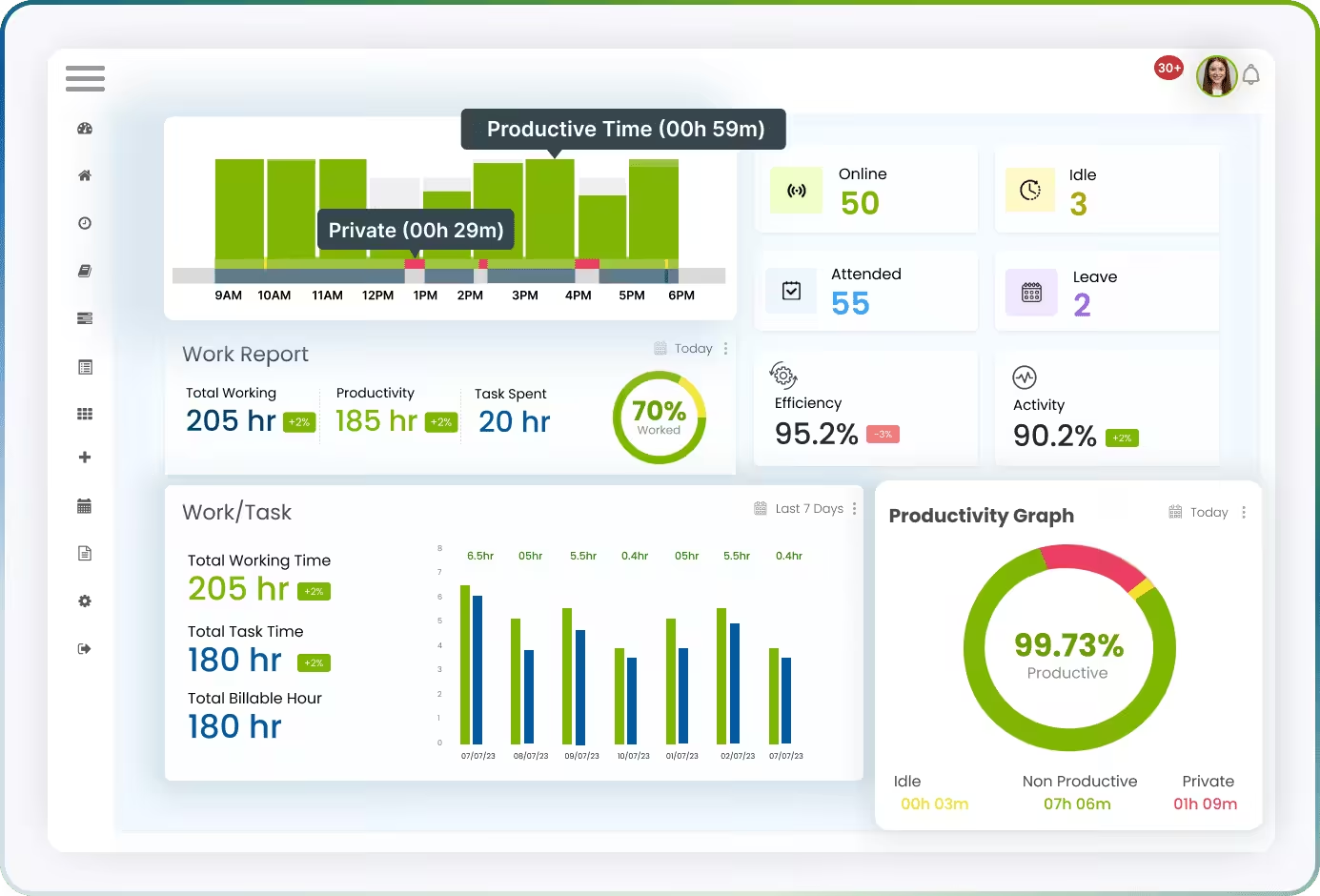
While Hubstaff focuses heavily on employee monitoring and workforce oversight, Desklog takes a productivity-first approach, helping businesses improve efficiency without creating a surveillance-heavy work environment.
Desklog combines powerful time tracking, project management, workforce analytics, and financial tracking tools into a single platform, making it a strong alternative for startups, agencies, freelancers, and growing businesses.
Key Desklog Features
- Fully automated time tracking
- Automated project and task time tracking
- Billable vs non-billable hour separation
- Export-ready work hour and project reports
- Free plan with unlimited users and unlimited projects
- Task & subtask tracking
- Geo-tracking for easier field team management
- Offline time tracking with auto-sync
- Automated timesheets
- Project Profit & Loss tracking
- Project billing and invoicing support
- Recurring tasks automation
- Productivity analytics and workforce insights
- Mobile apps for both Android and iOS
One of Desklog’s biggest advantages is its dedicated free plan, which includes support for unlimited users and projects.
Desklog also provides dedicated Insights and Analytics dashboards that give managers a clear view of employee productivity, performance, utilization rates, project progress, and work patterns. Instead of relying heavily on screenshots and activity percentages, businesses can use actionable productivity data to understand team efficiency and optimize workloads.
Unlike Hubstaff, Desklog emphasizes transparency and productivity tracking over constant employee surveillance. Teams can accurately track work hours, calculate profitability, generate invoices, and analyze workforce productivity while maintaining a more employee-friendly work environment.
For organizations seeking an affordable, feature-rich, and productivity-focused workforce management solution, Desklog delivers a strong balance of automation, visibility, and flexibility.
Hubstaff Not Quite the Right Fit?
Explore Desklog’s automated time tracking, project management, productivity insights, mobile apps, and unlimited-user free plan to see why growing businesses are making the switch.
Try Free Demo TodayHubstaff vs Desklog: Side-by-Side Comparison
| Feature (Available in Free Plan) | Desklog | Hubstaff |
|---|---|---|
| Affordable Pricing | ✅ | ❌ |
| User Timeline | ✅ | ❌ |
| Task Timeline | ✅ | ❌ |
| Unlimited Users | ✅ | ❌ |
| Unlimited Projects | ✅ | ❌ |
| Productive/Non-productive Time Differentiation | ✅ | ❌ |
| Mobile App | ✅ | ❌ |
| Automated Time Tracking | ✅ | ❌ |
| Automated Timesheet | ✅ | ❌ |
| Project Time Tracking | ✅ | ❌ |
| Project Timesheet | ✅ | ❌ |
| Task Timesheet | ✅ | ❌ |
| Idle Time Tracker | ✅ | ❌ |
| Team Management | ✅ | ❌ |
| Activity Tracking | ✅ | ❌ |
Final Verdict
Hubstaff remains one of the most capable employee monitoring and workforce management platforms available in 2026. Its combination of time tracking, screenshots, activity monitoring, GPS tracking, payroll automation, and reporting makes it particularly valuable for organizations that prioritize accountability and operational visibility.
However, its monitoring-heavy philosophy, growing costs, feature-gated pricing, and limited mobile administration may not appeal to every business.
If your priority is workforce oversight and compliance, Hubstaff is a strong choice.
If you’re looking for a more affordable, productivity-focused solution with automated tracking, project profitability insights, and a privacy-first approach, Desklog may be the better long-term investment.