
Introduction
Where do your employees’ working hours actually go? Attendance records show who clocked in, but they don’t explain why projects fall behind, workloads become uneven, or deadlines get missed. Corporate employee tracking helps bridge that gap by bringing work hours, attendance, task progress, and productivity patterns into one clear view.
This guide explores common employee tracking methods, their benefits and limitations, how to choose the right software, and the legal and privacy considerations companies should understand. It also covers practical best practices for implementing tracking to improve workforce visibility, support better decisions, and maintain employee trust.
What Is Corporate Employee Tracking?
Corporate employee tracking is the practice of recording work-related data, such as hours, attendance, project and task time, and application usage, so an organization can understand how work gets done. Its purpose is operational: knowing where time goes, which projects are on course, and who is carrying more than their share. Companies use this information to plan resources, bill clients accurately, and spot problems before they turn into missed deadlines.
How Does Corporate Employee Tracking Work?
A tracking system usually runs as a desktop application, a browser extension, or a web timer that records when work starts and stops. Depending on the setup, it also logs which project or task the time belongs to, when someone clocks in and out, and which applications or sites were in use during work hours.
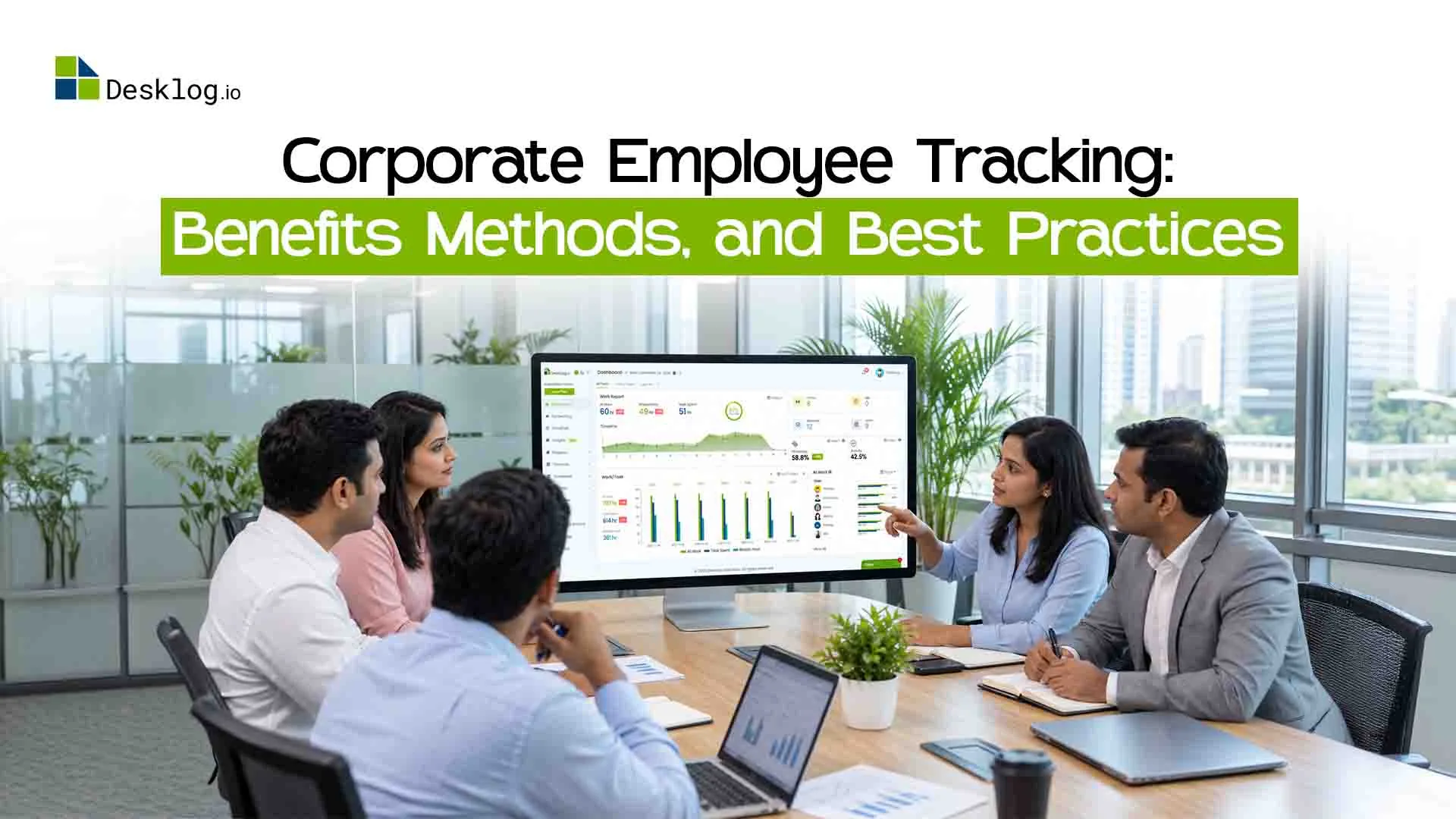
That raw data is organized into dashboards and reports. A manager can open a project view and see that design work consumed 120 hours last month against an estimate of 80, or pull an attendance summary before approving overtime. The value sits in those reports rather than in the raw logs; nobody needs to read every timestamp.
Turn Work Hours Into Actionable Insights
With Desklog, automatically track work hours, manage project and task time, monitor attendance, and uncover productivity insights—all from one dashboard. Less manual reporting, better workforce visibility.
Try Desklog FreeCorporate Employee Tracking vs. Employee Monitoring
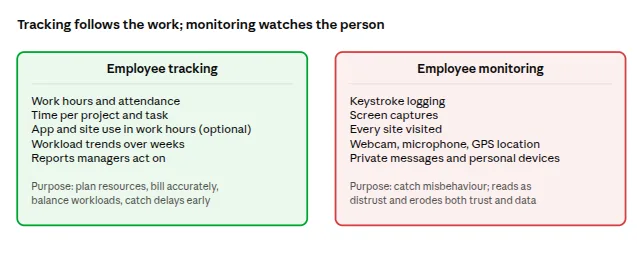
People often use the two terms interchangeably, but they describe different intentions. Tracking is concerned with work progress: hours logged, tasks completed, projects moving toward delivery. Monitoring focuses on individual activity and tends to look for misbehavior rather than for operational answers.
Time, task, and project data give a manager context that activity feeds cannot. A quiet hour might be deep thinking on a hard problem, and a busy one might be unproductive. Companies that treat tracking as a management tool rather than a surveillance tool get better data and far less resistance from their people.
What Employee Tracking Does Not Include
Since the two terms get blurred so often, it helps to be clear about where the boundary sits. Employee tracking, as described in this guide and as Desklog approaches it, records work hours, attendance, project and task time, and, where a company chooses to enable it, which applications and websites were used during work hours. It does not involve:
- Keystroke logging: no record of what employees type.
- Webcam or microphone access: no audio or video capture.
- GPS or location tracking: no record of where an employee is.
- Reading messages or personal content: emails, chats, and files stay private.
- Tracking outside work hours or on personal devices: data collection applies to work time on work devices only.
Where a tool offers optional features beyond this scope, such as screenshots, a company should be able to turn them off, limit them to specific teams, and state in its policy whether they are in use. Desklog's settings let each company decide how much to track for each team, so the default is operational data, not surveillance. Keep that boundary in mind as you read on; it shapes both the legal picture and the trust question that come up later in this guide.
Why Do Companies Need Corporate Employee Tracking?
Companies adopt employee tracking because the alternatives, memory and manual reporting, stop working once a team passes a certain size. Timesheets software filled in on Friday afternoon are rarely accurate, project timelines drift without anyone noticing the exact week it happened, and distributed teams are hard to read from a distance. The result is a familiar set of problems: missed deadlines, unbilled hours, and workloads that fall unevenly across people doing the same job.
Challenges of Managing Employees Without Tracking Tools
- Manual time records contain gaps and rounding errors that only surface when a client questions an invoice.
- Managers can see that a project is late, but not which phase or task caused the delay.
- One employee may be quietly working weekends while a colleague on the same team has hours to spare.
- Status meetings and weekly reports multiply to fill the information gap, consuming the very time they are meant to protect.
When Should a Company Consider Employee Tracking Software?
The right moment is usually earlier than most companies think. Consider it when teams have grown beyond what a manager can coordinate in their head, when projects require time allocation that clients or finance will scrutinize, when remote employee time tracking or hybrid arrangements make progress hard to assess, or when attendance and work-hour records need to be organized for payroll and compliance. If any two of those apply, a spreadsheet is already costing more than software would.
Common Methods of Corporate Employee Tracking
There are five common methods of corporate employee tracking: time tracking, attendance tracking, application and website tracking, project and task tracking, and productivity tracking. Most companies combine two or three of them. The right mix depends on what you need to know, the roles involved, and the privacy standards you have committed to. A software development firm billing by the hour needs project time down to the task; a customer support team cares far more about attendance and shift coverage.
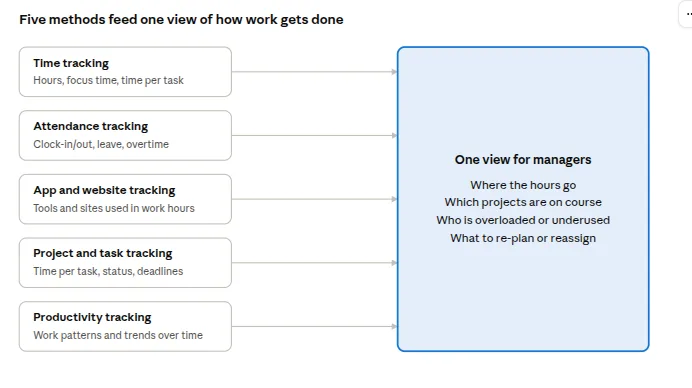
| Method | What it records | Best suited to |
|---|---|---|
| Time tracking | Work hours, focus time, time per task | Billable teams, agencies, IT services |
| Attendance tracking | Clock-in/out, absences, leave, overtime | Shift-based and office teams, HR and payroll |
| App and website tracking | Tools and sites used during work hours | Teams with tool-heavy workflows |
| Project and task tracking | Time per project and task, status, deadlines | Project-driven organizations |
| Productivity tracking | Work patterns and trends over time | Managers planning capacity and workload |
Employee Time Tracking
Time tracking records how working hours are spent, from total hours in a day down to minutes on a single task. Manual timesheets rely on memory and are filled in after the fact automated time tracking starts when work begins and stops when it ends, with no timer to remember. Automated records are consistently more accurate, and they remove the Friday-afternoon reconstruction that nobody enjoys. Desklog's automatic time tracking takes this approach, producing timesheets that managers can approve rather than correct.
Employee Attendance Tracking
Attendance tracking records clock-in and clock-out times, absences, leave, and overtime where applicable. Reliable attendance records help managers plan shifts, ensure adequate team coverage, and resolve disputes about working hours. For shift-based teams, employee shift management software helps managers organize schedules, manage absences, and adjust shift coverage when needed. For hybrid teams, attendance data also shows which days employees work from the office, helping managers plan office space and resources more effectively.
Application and Website Tracking
Tracking app and website usage reveals how work hours are distributed across tools. A company can classify applications as productive, neutral, or unproductive for a given role, so that a designer's time in Figma and a developer's time in a code editor are counted correctly. This method should be limited to work hours and work devices, applied under a written policy, and explained openly before it is switched on.
Project and Task Tracking
Project and task tracking links hours to the work they produced. Each block of time belongs to a project and, ideally, a specific task, so a manager can see current status, time against estimate, and who is assigned to what. Over several projects, this data sharpens future estimates and makes it obvious where delays tend to appear, whether in review cycles, client approvals, or a particular phase of delivery.
Employee Productivity Tracking
Productivity tracking looks at patterns rather than individual moments: how work hours trend over weeks, how time divides between projects, and whether workloads are balanced. It only makes sense when time data is read alongside task completion, project outcomes, and the demands of the role. Hours logged or keyboard activity on their own say very little about performance, and companies that treat them as a scorecard usually end up measuring presence instead of results.
Key Benefits of Corporate Employee Tracking
The main benefits of corporate employee tracking are accurate work-hour records, better project planning, informed productivity decisions, less administrative effort, and fairer workload distribution. None of these come from the software by itself; they come from managers using the reports to change how work is planned and assigned. Here is what each benefit looks like in practice.
Better Visibility Into Work Hours
Accurate time records show how hours are spread across people, projects, and days of the week. A manager can tell at a glance whether the team is consistently running over, whether a new client has quietly doubled its demands, or whether one role is absorbing work that belongs elsewhere.
Improved Project Planning and Delivery
Task-level time data turns estimates from guesswork into something grounded in history. When you know that QA on the last three releases took 30 percent longer than planned, the next schedule can account for it, and the delay that used to surprise everyone in week six is visible in week two.
More Informed Productivity Decisions
Trends across weeks and months reveal workflow problems that no single day would show. A team whose logged hours keep rising while output stays flat has a process issue, not an effort issue, and that distinction changes what a manager should do about it.
Accurate Timesheets and Less Manual Work
Automated records remove the weekly chore of reconstructing time, chasing missing entries, and correcting totals before payroll or invoicing. Finance receives timesheets that reflect what happened, and managers approve them in minutes instead of auditing them for an afternoon.
Better Workload Distribution
Project and time reports make overload and underuse equally visible. It becomes possible to improve workload distribution, move work before someone burns out rather than after they resign, and justify a new hire with data rather than anecdotes.
Pros and Cons of Corporate Employee Tracking
The benefits above are real, but they are not automatic. Tracking is worth doing only when the operational gains outweigh the cost to trust, and that balance is decided by how a company runs the program, not by the software it buys. Before moving on to tool selection, here is an honest look at both sides.
- Accurate, automatic time and attendance records that payroll and finance can rely on.
- Project estimates grounded in historical data rather than guesswork.
- Early warning on overloaded people and drifting timelines.
- Fewer status meetings and manual reports.
- Clean, defensible records for client billing and compliance audits.
- Employees may read it as distrust if the purpose is not explained first.
- Activity data is easy to misinterpret; thinking time, research, and calls can look like idle time.
- Poorly configured tools collect more than the company needs, which creates privacy and legal exposure.
- Reports that nobody reviews turn into cost without benefit.
- Overemphasis on hours can push people to perform busyness instead of delivering results.
Risks to Manage
Notice that none of the cons are technical. The real risks are a rollout without explanation, a policy that lives in nobody's inbox, and managers who treat a productivity score as a performance verdict. Each one is addressed in the best-practices section later in this guide, and each one is far cheaper to prevent than to repair after a team has lost confidence in the system. With that balance in view, the next question is which tool to choose.
How to Choose the Right Corporate Employee Tracking Software
The right employee tracking software is the one that records time with the least effort from employees, ties that time to projects and tasks, and presents the results in reports a manager will actually open. Feature lists are long and mostly similar, so it pays to evaluate tools against the problems you listed earlier rather than against each other. Here is a practical checklist we recommend after years of watching companies choose, and sometimes regret, their first tracking tool.
Check Project and Task Tracking Capabilities
Hours without context are just hours. Make sure the software connects time to projects and tasks, shows progress against deadlines, and supports the way your teams already structure work.
Evaluate Productivity Reports and Dashboards
A good report answers a question in seconds; a bad one is a data export with a chart on top. Look for productivity reports that separate project time from administrative time, flag idle periods sensibly, and can be filtered by team, project, and date range.
Consider Remote, Hybrid, and Office Teams
Some tools assume everyone sits at a company desktop, while others assume everyone is remote. Confirm the software handles both, works across the operating systems your people use, and does not require different processes for different locations.
Review Privacy, Access Controls, and Integrations
Ask how collected data is stored, who can see it, and whether monitoring features such as app tracking or screenshots can be switched off or limited by team. This matters for the legal reasons covered further down, not just for goodwill. Then check integrations with your project management, HR, and payroll systems, because a tracking tool that lives on an island creates double entry instead of removing it.
Best Practices for Implementing Corporate Employee Tracking
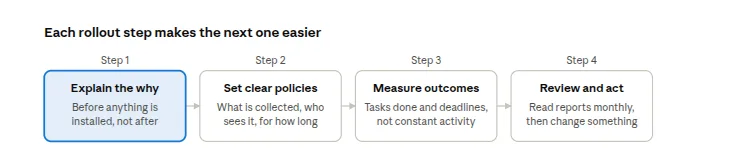
A successful rollout depends more on how tracking is introduced than on which tool you buy. The companies that get the most from it explain the purpose first, write the rules down, measure outcomes rather than activity, and act on what the reports show. Skip any of these steps and the data quality drops along with morale.
Explain the Purpose to Employees
Tell people what will be tracked, why the company needs it, and how the information will be used before anything is installed. An announcement that arrives after the software does reads as a surveillance decision, however well intended.
Set Clear Tracking Policies
Put in writing which data is collected, who can access it, how long it is retained, and what happens when it is used in a performance conversation. A one-page policy that employees can find answers most of the questions that otherwise arrive one by one.
Focus on Work Outcomes, Not Constant Activity
Combine time records with task completion, quality, deadlines met, and goals that fit the role. A salesperson's week looks nothing like an accountant's, and the metrics that matter for each should reflect that difference.
Review Reports and Take Action
Tracking data earns its keep only when someone reads it and changes something: redistributing work, fixing a bottleneck, or adjusting an estimate. Reviewing reports monthly with team leads turns the tool from a record-keeping system into a management habit.
Corporate Employee Tracking and Employee Privacy
Employee privacy concerns are the single biggest reason tracking programs fail, and they are almost always avoidable. People rarely object to the company knowing how many hours went into a project; they object to not knowing what is collected, who sees it, and whether a slow afternoon will be held against them. Addressing those three points directly resolves most of the resistance.
How Companies Can Track Work Responsibly
Collect only the information that serves a stated business purpose, and switch off features you cannot justify. Communicate the practice clearly, restrict access to managers who need it, and set a retention period rather than keeping data indefinitely. Finally, confirm that your approach meets employment, privacy, and data protection requirements in every country where you have staff, because notice and consent rules differ widely by region. The next section looks at what those rules actually say.
Is Corporate Employee Tracking Legal?
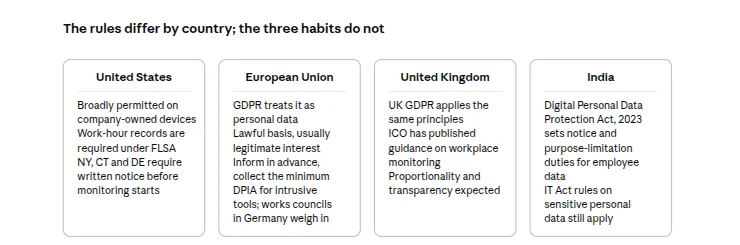
In most countries, employee monitoring law allows businesses to track work hours, attendance, and project time when employees are informed about what is collected, the data serves a legitimate business purpose, and monitoring is limited to work time and work devices. What varies by country is the level of notice required, whether employee consent is necessary, and which types of data are off limits. Here is how the main jurisdictions compare.
United States
Tracking on company-owned devices is broadly permitted, and work-hour records are in fact required under the Fair Labor Standards Act. A growing number of states, including New York, Connecticut, and Delaware, require written notice before electronic monitoring begins, so a signed policy acknowledgment is the safe default everywhere.
European Union
The GDPR treats tracking data as personal data. Employers need a lawful basis (usually legitimate interest rather than consent, since consent is hard to give freely in an employment relationship), must inform employees in advance, collect only what is necessary, and set a retention period. Intrusive features such as continuous screen capture typically require a data protection impact assessment, and in countries like Germany, works councils have a say before rollout.
United Kingdom
UK GDPR applies the same principles, and the Information Commissioner's Office has published specific guidance on monitoring at work that expects proportionality and transparency.
India
The Digital Personal Data Protection Act, 2023 sets out notice and purpose-limitation obligations that apply to employee data, alongside existing IT Act rules on sensitive personal information.
Get the Policy Checked Locally
The three habits in the band above are the same ones from the responsible-tracking section, and they are what regulators in every one of these jurisdictions look for first. This section is general information rather than legal advice, and rules change, so have local counsel review the policy before it goes live and whenever you add staff in a new country.
How Desklog Helps With Corporate Employee Tracking
Desklog brings time tracking, attendance, project time, and productivity reports into one platform, so a company can answer the questions raised in this article without stitching together four separate tools. It was built for organizations that want to understand how work gets done, not to watch every click. Here is how the pieces fit together.
Track Work Hours and Attendance
Automatic time tracking records work hours as they happen, and turns them into timesheets managers can review and approve. Clock-in and clock-out records, leave, and attendance tracking sit alongside the time data, giving HR and payroll one place to look instead of two.
Connect Employee Time With Projects and Tasks
Project time tracking links every hour to the project and task it was spent on. A manager can open a project, see time against estimate, check which tasks are behind, and decide whether to re-plan, reassign, or talk to the client, all from the same screen.
Understand Productivity Through Reports
Productivity reports show work patterns across days, weeks, and projects, so trends appear before they become problems. App and website usage can be classified by role where a company chooses to enable it, and idle time is shown in context rather than as a verdict on anyone's effort.
Manage Work From One Platform
Office, remote, and hybrid teams use the same system and appear in the same reports, which keeps the data comparable and the process consistent. With time, attendance, project progress, and productivity insights together, leadership gets a view of the whole operation rather than a collection of partial pictures.
Ready to Bring Your Team's Work Into One View?
Start with Desklog for free: automatic time tracking, productivity scoring, and full team visibility at zero cost for up to 3 users.
Try Desklog FreeConclusion:
Corporate employee tracking, done well, gives a company a clear and honest picture of where its working hours go, which projects are on course, and whether its people are stretched or underused. The method mix matters less than the intent behind it track work to manage it better, know what you are not collecting as clearly as what you are, write the rules down, check them against the law where your people sit, and read the reports with the context each role deserves.
FAQ
These answers cover the questions companies most often ask when they begin evaluating employee tracking. Each one is written to stand on its own, so it can also be used for FAQ schema markup.