
Desklog – Best Task Management Software
Where Tasks Become Actionable Workforce Insights
Desklog is the best task management software, combining intelligent time tracking with workforce analytics to reveal productivity patterns, uncover inefficiencies, and help managers make smarter workforce decisions every day.
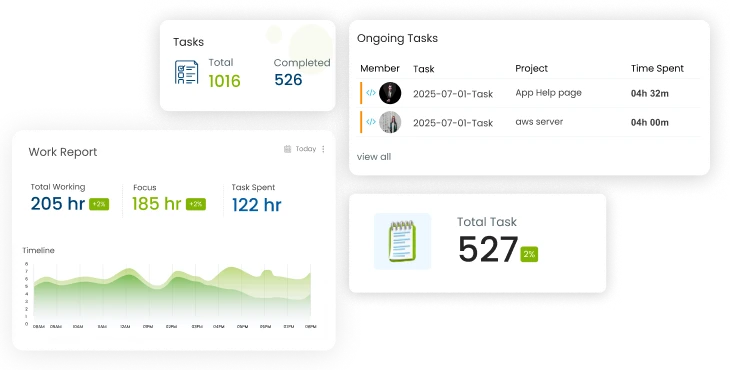



What is task management software?
Task management software is a digital tool that helps teams and individuals plan, organize, assign, and track tasks in one centralized platform.It provides visibility into project progress, deadlines, responsibilities, and time spent, making work more structured, measurable, and easier to manage.
How to improve team productivity with task management software
Team productivity improves when tasks are clearly assigned, deadlines are visible, and progress is tracked in real time.Task management software reduces confusion, eliminates manual follow-ups, and provides insights into workload and time usage.With better visibility and accountability, teams can focus on completing work efficiently and consistently.

Turn Tasks Into Decisions, Not Just Checklists
See how Desklog connects task management, time tracking and workforce insights in one intelligent platform.
what is the best task management software
The best task management software is one that helps you plan, organize, assign, and track tasks efficiently in a single platform.It should offer clear task visibility, collaboration features, time tracking, reporting, and easy integration with other tools.A good solution keeps teams aligned, improves accountability, and turns daily work into measurable progress without adding complexity.
Simplify Task Management With Desklog Workforce Intelligence
From task creation to insights, Desklog supports every stage of work, going beyond traditional employee task management software.
Create & Organize Tasks With Complete Clarity
Start every task with context and ownership
- Create and assign tasks across teams and projects
- Set priorities, deadlines, and ownership upfront
- Organize work using parent tasks and subtasks
- Manage everything from a centralized task hub
Plan Work Smarter With Flexible Scheduling
Plan smarter with flexible views and automation
- Schedule tasks with clear timelines
- Use Kanban or list views to match team workflows
- Automate recurring tasks to save time
- Balance workloads with planned task distribution
Gain Real-Time Visibility Into Work & Effort
See progress and time spent as work happens
- Track task status as work happens
- Automatic time capture is mapped to each task
- Idle detection for accurate productivity data
- Offline tracking with automatic sync
View Task Progress & Gain Accountability
Stay on track with simplified management
- Real-time task progress updates
- Clear ownership and responsibility
- Alerts for delays and missed deadlines
- Approvals for time requests when needed
Reduce Admin Work With Intelligent Automation
Reduce manual follow-ups and admin work
- Automated task scheduling and reminders
- Alerts for deadline slippage and milestones
- Proactive notifications for managers
- Fewer manual check-ins and status meetings
Make Better Business Decisions With Task Insights
Turn task data into decisions
- Auto-generated timesheets and task reports
- Team utilization and performance dashboards
- Export reports for audits, reviews, and billing
- Track project Profit & Loss tied to effort and time
One Best Task Management Software. Total Workforce Clarity.
Manage tasks while automatically capturing the data you need to plan smarter and lead better.
Smarter Task Tracking Starts Here
Fragmented tools slow teams down. Desklog’s employee task management software unifies tasks, time, and insights.
How Desklog Task Management Software Works
1. Create & Assign Tasks
Create tasks, set priorities, and assign owners in one place.
2. Track Time Automatically
Desklog captures time for each task in real time with no manual effort.
3. Review Insights & Take Action
Use dashboards and reports to spot issues and make better decisions.
Ready to Work Smarter with Desklog?
Create tasks, track time automatically, and gain real-time insights, all in one place.
Focuz Line Shipping Co. Ltd
Industry:Marine Logistics & Supply Chain

The Challenge:
With a distributed workforce across regions, tracking hours and productivity was a major challenge until Desklog’s automated tracking brought complete visibility into daily operations.
The Solution:
“I found Desklog to be extremely useful and user-friendly. Instead of simply tracking the employees, it provides insights into the exact productivity of each employee. Desklog's reports have made it easy to make data-driven decisions about appraisals and employee reviews.” — Nizamudeen Ismail, Director, Focuz Line Shipping Co. Ltd.

Mantra Softech India Pvt Ltd
Industry:Biometric & Security Technology

The Challenge:
Desklog helped Mantra Softech improve productivity visibility across departments while cutting down the cost and effort of manual supervision.
The Solution:
“If you want to keep an eye on the productivity of your employees, the apps they use, and the sites they spend the most time on, Desklog might be the perfect solution for you. It is highly economical.” — Nilesh Katakia, Sr. System Administrator, Mantra Softech India Pvt Ltd

RedTeam Hacker Academy
Industry:Cybersecurity Training

The Challenge:
Desklog helped RedTeam simplify daily operations with a user-friendly and customizable interface, ensuring teams stayed focused without complexity.
The Solution:
“I am very much satisfied with the operations of the software. It is very simple and it has got a user-friendly interface. The customization part is really good because we can keep whatever we need.” — Jaizal Ali, CEO, RedTeam Hacker Academy Pvt Ltd
Real Results From Smarter Task Management.
See how teams use Desklog to improve productivity, planning, and performance.
Reviews
View our rating in top platform





Loved by 0+ Teams Worldwide
See what our customers have to say about Desklog
Manager
Manager
Manager
Manager
Manager
Sr. System Administrator, Heckyl Technologies Pvt Ltd
Manager
Director, Focuz Line Shipping Co Ltd, Saudi Arabia
Manager
Sr. System Administrator, Mantra Softech India Pvt Ltd
Managing Director, Sanesquare Technologies
CEO, RedTeam Hacker Academy Pvt Ltd
Join Teams That Manage Work Smarter
Discover why growing teams trust Desklog as their #1 task management software for all businesses.
Who Desklog Task Management Software Is Built For
Remote & Hybrid Teams
Maintain clear visibility and alignment without constant follow-ups.
Field & Distributed Teams
Track work across locations with real-time task and time insights.
Agencies & Professional Services
Understand effort, improve billing accuracy, and boost project margins.
Growing Businesses
Make smarter workload and hiring decisions using workforce data.

Start Making Smarter Workforce Decisions Today
Turn your task management software into a source of real workforce intelligence.
FAQ
How does Desklog track tasks in real time?
What insights does Desklog provide from task data?
Can Desklog handle recurring tasks?
How does task categorization improve organization?
Can Desklog help prevent missed deadlines and burnout?
Who should use Desklog task management software?
Which is the best IT task management software?
Which is the best task management software for a small business?
Best free task management software
Start Making Smarter Workforce Decisions Today
Turn your task management software into a source of real workforce intelligence.
No Credit Card Required