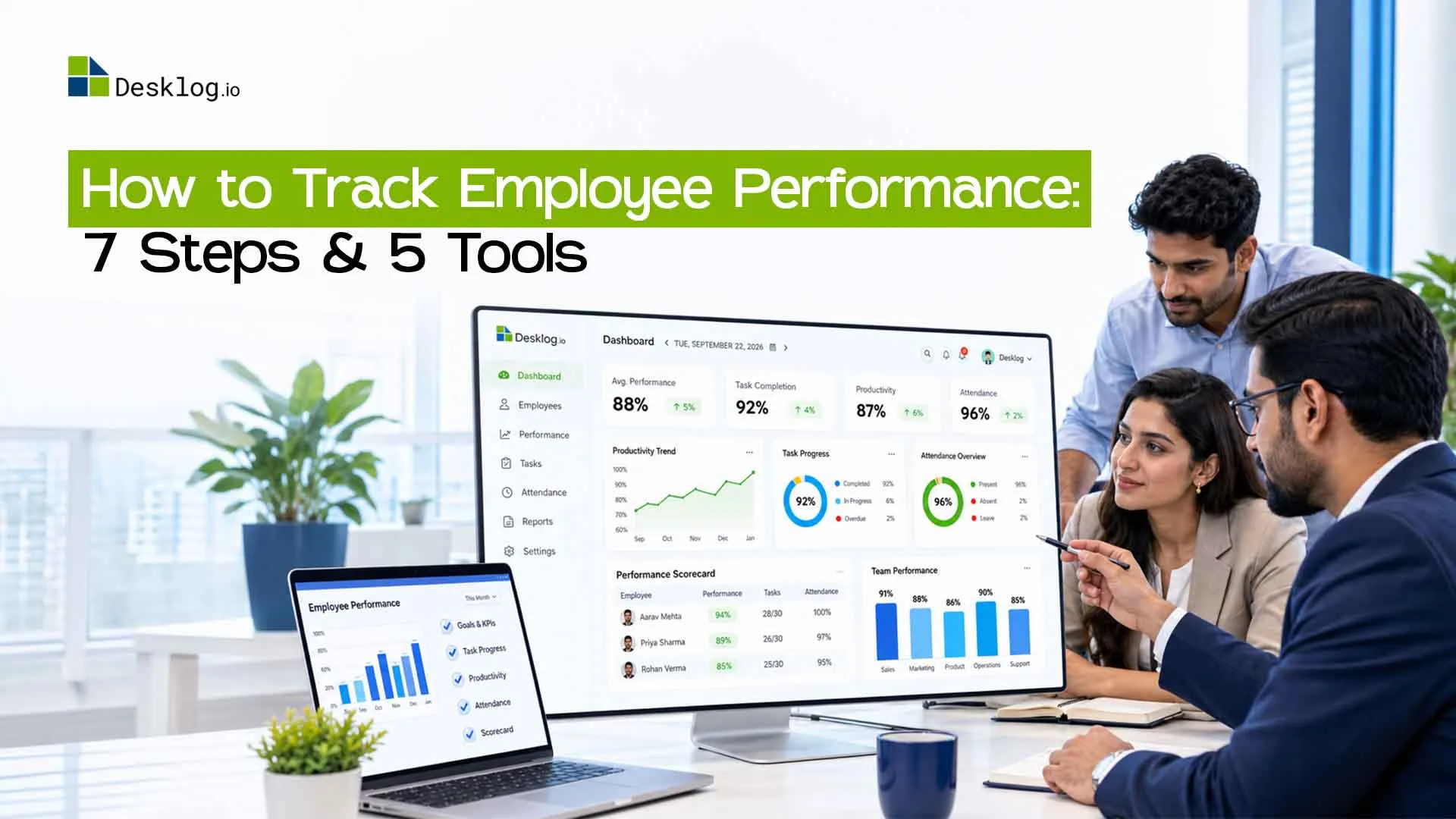

The best way to track employee performance is to set clear goals, measure work quality and results, and review progress regularly. Time tracking software is a valuable tool that shows how time is invested across projects and tasks. Combined with insights on task completion, efficiency, and workload, it gives you a full picture of how your team is doing and helps managers recognize strengths, spot challenges early, and support employee growth.
This blog covers seven practical steps for tracking employee performance, the metrics that matter for different roles, and five software tools worth considering. Whether you manage an office, remote, or hybrid team, you'll learn how to evaluate performance fairly, find opportunities to improve, and support your people without micromanaging.
What Does It Mean to Track Employee Performance?
Employee performance tracking is the ongoing process of measuring and evaluating how well team members contribute to their roles, tasks and company goals, using defined metrics. Those metrics can be quantitative, such as tickets resolved, and qualitative, such as collaboration and work quality. Together, they give managers a balanced picture of both what an employee delivers and how they deliver it. Done well, tracking is not about watching people. It is about creating clarity, supporting growth and making sure good work gets recognised.
See How Your Remote Team Really Works
Less manual reporting. Better visibility for home-based teams. Desklog tracks work hours, project time, and active vs idle time in one dashboard.
Track Your Remote TeamWhy Employee Performance Tracking Matters
Gallup's State of the Global Workplace 2026 report found that global employee engagement fell to 20% in 2025, its lowest level since 2020. Gallup estimates that low engagement cost the world economy about $10 trillion in lost productivity. Managers cannot fix what they cannot see.
Two statements from Gallup's engagement survey make a useful compass: "I know what is expected of me at work" and "In the last six months, someone at work has talked to me about my progress." Good tracking creates both: clear expectations and regular conversations.
When done well, it gives you:
- Fairer reviews, based on evidence instead of impressions or who speaks up most.
- Earlier support, because overload and disengagement show up in the data before they turn into resignations.
- Balanced workloads, so busy people aren't carrying quiet people.
- Defensible decisions on pay, promotion, and performance plans.
- Less micromanagement, because managers can trust a system instead of checking in constantly.
What to Measure: Employee Performance Metrics by Role
Start with outcomes, then add two or three supporting measures. Most roles can be judged across four families: output (how much), quality (how well), timeliness (how reliably) and efficiency (how well time turns into results). Pick three to five measures per role, not twenty.
The table below gives examples. Treat them as starting points rather than universal targets, and adjust them to your business.
| Role | Output | Quality | Timeliness | Time Context |
|---|---|---|---|---|
| Sales and business development | Deals closed, meetings booked | Win rate, average deal size | Follow-up speed | Hours on prospecting vs admin |
| Customer support and BPO | Tickets resolved | Satisfaction score, reopen rate | First-response time | Active vs idle time on shift |
| Developers | Tickets or features shipped | Bugs found after release | Sprint commitments met | Time per task vs estimate |
| Designers and agency creatives | Deliverables completed | Revision rounds, client approval | On-time delivery | Billable vs non-billable hours |
| Operations and data entry | Records processed | Error rate | Turnaround time | Utilization in scheduled hours |
| Managers | Team goals met | Retention, team engagement | Review cadence kept | Team workload balance |
Three Formulas Worth Knowing
These are generic calculations you can run in any spreadsheet or dashboard:
- On-time delivery rate = tasks finished by the due date ÷ tasks due × 100
- Utilization rate = billable or productive hours ÷ available hours × 100
- Error rate = tasks with defects ÷ tasks completed × 100
How to Track Employee Performance in 7 Steps
A simple process beats a sophisticated dashboard nobody trusts. These seven steps work for a five-person studio and a fifty-person agency alike.
- Define outcomes for each role. Write down three to five results the role exists to produce, and share them in writing so nobody is guessing.
- Set SMART goals. Make every objective Specific, Measurable, Achievable, Relevant and Time-bound. "Resolve 90% of tickets within 24 hours by the end of the quarter" beats "be responsive." Keep the goals in a task board next to the work itself.
- Define KPIs that mix numbers and judgement. Pair quantitative measures (sales numbers, ticket resolution speed) with qualitative ones (collaboration, work quality). Keep it to three to five per role.
- Pick data sources and set a baseline. Use the task board for delivery, the CRM for sales, client feedback for quality, and a time tracker for effort. Gather two to four weeks of data before judging anyone.
- Monitor continuously. Move away from a single yearly review. Hold weekly or bi-weekly check-ins, a monthly one-on-one and a quarterly goal review, using shared dashboards so everyone sees the same numbers.
- Gather 360° feedback and context. Collect input from managers, peers, direct reports and clients, and ask the employee first. Several viewpoints add context, but HiBob notes they do not automatically remove bias, so treat them as input, not a verdict.
- Give constructive feedback, then act. Use the SBI method below. Coach, rebalance workload, remove blockers, recognise strong work and document decisions. Metrics that change nothing become noise.
Worked Example: A 12-Person Agency
The numbers here are invented for illustration. A designer has 160 available hours in a month and logs 128 tracked hours, of which 104 are billable. She delivers 18 of 20 assignments on time, with an average of 1.4 revision rounds per project.
| Measure | Calculation | Result |
|---|---|---|
| Tracked share of available time | 128 ÷ 160 | 80% |
| Billable utilization | 104 ÷ 160 | 65% |
| On-time delivery | 18 ÷ 20 | 90% |
| Revision rounds | Average per project | 1.4 |
Delivery and quality look strong, but billable utilization sits at 65%. Before drawing any conclusion, ask how much time went to pitches, internal reviews or training. If those explain the gap, the finding is a scheduling question, not a performance problem.
Which Tracking Method Fits Your Team?
No single method covers everything. The most dependable setups pair one goal-setting method with one conversation habit and one data source.
| Method | Best For | Watch Out For |
|---|---|---|
| KPIs | Repeatable work such as support or operations | Too many KPIs dilute focus |
| OKRs | Aligning teams with company priorities each quarter | Stretch goals misread as failure |
| SMART goals | Individual development and role targets | Goals that go stale unrevisited |
| One-on-one meetings | Context, blockers and morale | Getting skipped when calendars fill |
| 360 feedback | Collaboration and leadership | Needs trust and clear anonymity rules |
| Time and activity data | Workload, focus and remote visibility | Misreading it without context |
Common Mistakes That Undermine Performance Tracking
Most systems fail for human reasons, not technical ones. These are the patterns to watch for:
Measuring Hours Instead of Outcomes
Long hours can hide weak results, and short hours can hide excellent ones.
Tracking Too Many Metrics
Five clear measures beat twenty vague ones.
Comparing Unlike Roles
A support agent and a strategist need different yardsticks.
Introducing Tracking by Surprise
Unexplained monitoring damages trust faster than any dip in output.
Ignoring Context
Illness, unclear briefs and tool outages all move numbers.
Rewarding the Metric Instead of the Goal
When a number becomes the target, people optimise for the number. Pair every quantity measure with a quality measure.
Collecting Data Without Acting on It
Reports with no follow-up conversation change nothing.
Reviewing Once a Year
Feedback that arrives annually arrives too late to help.
Tracking Remote and Hybrid Teams Fairly
When people work out of sight, managers often fall back on proxies such as green status dots and quick replies. Replace them with clear deliverables and a shared record of working time, so a remote employee is judged by the same standard as someone at the next desk. Desklog's walkthrough on how to track employees working from home goes deeper.
Transparency is the non-negotiable part. Tell people what is collected, why, who can see it and how long it is kept. Rules on workplace monitoring vary by country, including under GDPR in the EU and UK, so confirm local requirements with a qualified adviser. This article is not legal advice.
A fair-tracking checklist:
- Publish a short policy in plain language before you start.
- Collect only data that serves a stated purpose.
- Let employees see their own data.
- Limit manager access by role.
- Treat screenshots and app tracking as choices you agree on upfront.
- Use data to open conversations, not to close them.
Top 5 Software to Track Employee Performance in 2026
No single tool covers every part of performance. Activity-based tools show how work time is spent, while HR platforms handle goals, reviews and feedback. This shortlist includes both, so you can match the tool to the gap in your process.
Descriptions come from each vendor's own pages, read on November 2, 2026. Features and pricing change, so confirm details before you buy.
Quick Comparison
| Tool | Best For | Core Data | Type |
|---|---|---|---|
| Desklog | Time, focus and utilization insights | Efficiency, utilization, focus, task completion, attendance | Time tracking and workforce analytics |
| Hubstaff | Detailed activity monitoring | Activity levels, app and URL usage, idle time, benchmarks | Time tracking and monitoring |
| Clockify | Simple hours and reports | Timesheets, detailed reports, time off | Time tracking |
| BambooHR | HR-led reviews | 360 feedback, goals, review reports | HR platform |
| 15Five | Check-ins and OKRs | Reviews, one-on-ones, OKRs | Performance management |
Desklog: Best for Time-Based Performance Insights With Privacy Controls
Best For: Small and growing teams, remote and hybrid managers, and agencies that bill by the hour.Desklog is our product, so weigh our view accordingly. Its strength is connecting effort data to outcomes in one place while keeping tracking transparent.
Key Features
- Automatic time capture: records work hours without manual timers, with offline tracking, idle time tracking and engaged inactivity detection to separate focused work from true idle time.
- Performance Insights: efficiency, utilization, focus and activity, app usage, task completion and benchmarks, on real-time and weekly dashboards.
- Work context: project time tracking, timesheets, tasks, subtasks and Kanban view, so effort links to deliverables.
- Attendance and wellbeing: clock in/out, leave and shift management, geo tracking, wellness reminders and burnout signals.
- Agency economics: project billing, invoicing and profit and loss views.
- Trust controls: employee consent, role-based access, GDPR-compliant encryption and optional screenshots.
Hubstaff: Best for Detailed Activity Monitoring
Best For: Agencies and remote teams that want detailed visibility.Hubstaff suits teams that want granular activity data.
Key Features
- Time and attendance: time tracking, automated timesheets, attendance and time-off tracking, and GPS time tracking.
- Productivity monitoring: activity tracking, optional screenshots, idle time, and app and URL usage.
- Analytics: productivity benchmarks, remote versus in-office comparisons, capacity planning and unusual activity tracking.
- Money side: project budgeting, invoicing and an overtime tracker.
Weighing Hubstaff Against Desklog?
See the two platforms side by side before you decide.
See Desklog vs HubstaffClockify: Best for Simple Timesheets and Reporting
Best For: Teams that mainly need time records and straightforward reports.Clockify focuses on accurate hours.
Key Features
- Tracking: a timer or manual timesheets, billable and non-billable labels, and project links.
- Reports: a detailed report showing time entries, users and duration per project, with views for the current month, current year and last year.
- Time off: policies, requests and approvals, with balances exportable to CSV or Excel.
Need More Than Timesheets?
Desklog adds efficiency, focus and utilization data on top of accurate hours.
Try Desklog's Free Clockify AlternativeBambooHR: Best for Structured Reviews and Feedback
Best For: HR-led teams that want formal reviews.BambooHR's performance module is built for HR-led review cycles.
Key Features
- 360 feedback: self, manager-to-employee, peer and skip-level reviews.
- Goals and one-on-ones: create, track and share individual and team goals, and hold one-on-ones inside the platform.
- Review cycles: pre-built or custom, run by department, location or job title.
- Reporting: performance, review and goal reports, with reminders and completion notifications.
15Five: Best for Continuous Check-Ins and OKRs
Best For: Managers who want a steady rhythm of feedback.15Five is built around regular conversations.
Key Features
- Core: reviews, one-on-ones and OKRs in one platform.
- Focus: aligning individual contributions with company objectives through regular check-ins.
Why Desklog? Performance Insights Built Around Time, Focus, and Trust
Desklog is workforce intelligence and time tracking software. It records work time automatically and turns it into the signals keeps returning to efficiency, utilization, focus time, app usage, task completion, and benchmarks against realistic expectations. They appear on Performance Insights dashboards that update in real time and weekly.
The design leans on transparency. Desklog's site describes employee consent, role-based access controls, GDPR-compliant encryption, optional screenshots, and wellness reminders. Small teams can also pilot the process on a free plan for up to 3 users with unlimited projects before paying for anything.
How Desklog Supports the Seven Steps
| Step in the Process | Desklog Capability | Read More |
|---|---|---|
| Define and assign outcomes. | Tasks, subtasks, and Kanban view | Task management |
| Capture effort data. | Automatic, offline and idle time tracking | Automated time tracking |
| Follow delivery by project. | Project time tracking and timesheets | Project time tracking |
| Review efficiency and focus. | Activity tracking, app and URL usage | Activity tracking |
| Separate focus from idle time. | Engaged inactivity detection | Engaged inactivity detection |
| Check attendance and leave. | Clock in/out, leave and shift management | Attendance management |
| Tie time to profit (agencies) | Project billing and profit and loss | Project profit and loss |
Where Desklog Fits, and Where It Does Not
Feature availability depends on the plan. For example, the pricing page lists app and URL tracking, leave management, Kanban view, and geo tracking under the Enterprise plan, so check which tier matches your needs.
Desklog supplies the time, activity, and task data. It is not a goal-setting framework, a 360-feedback tool, or an HR review system. Most teams pair it with regular one-on-ones and, where they need formal review cycles, an HR platform like those below.
Ready to Put This into Practice?
With Desklog, you can see efficiency, focus and task data for your own team in one dashboard. Start with a free trial, or talk to a Desklog expert to see how it fits your team.
Start Your Free TrialConclusion
Employee tracking works best when it rests on clear expectations, a small set of fair metrics and regular conversations, with data opening the discussion rather than replacing it. That is what separates a system people trust from one they work around. The best way to begin is to start small: pick one role, define three measures, collect a four-week baseline and review the results with the employee. Once that rhythm holds, you can confidently extend performance tracking across the whole team.