
Structure Work. Track Progress. Deliver Projects with WorkPhase
Phases · Milestones · Reusable workflows — project execution built for delivery teams
Plan every stage of your project with Desklog WorkPhase. Create structured workflows using phases and milestones, assign work, track time, and review progress from planning to completion, all within a single workflow.
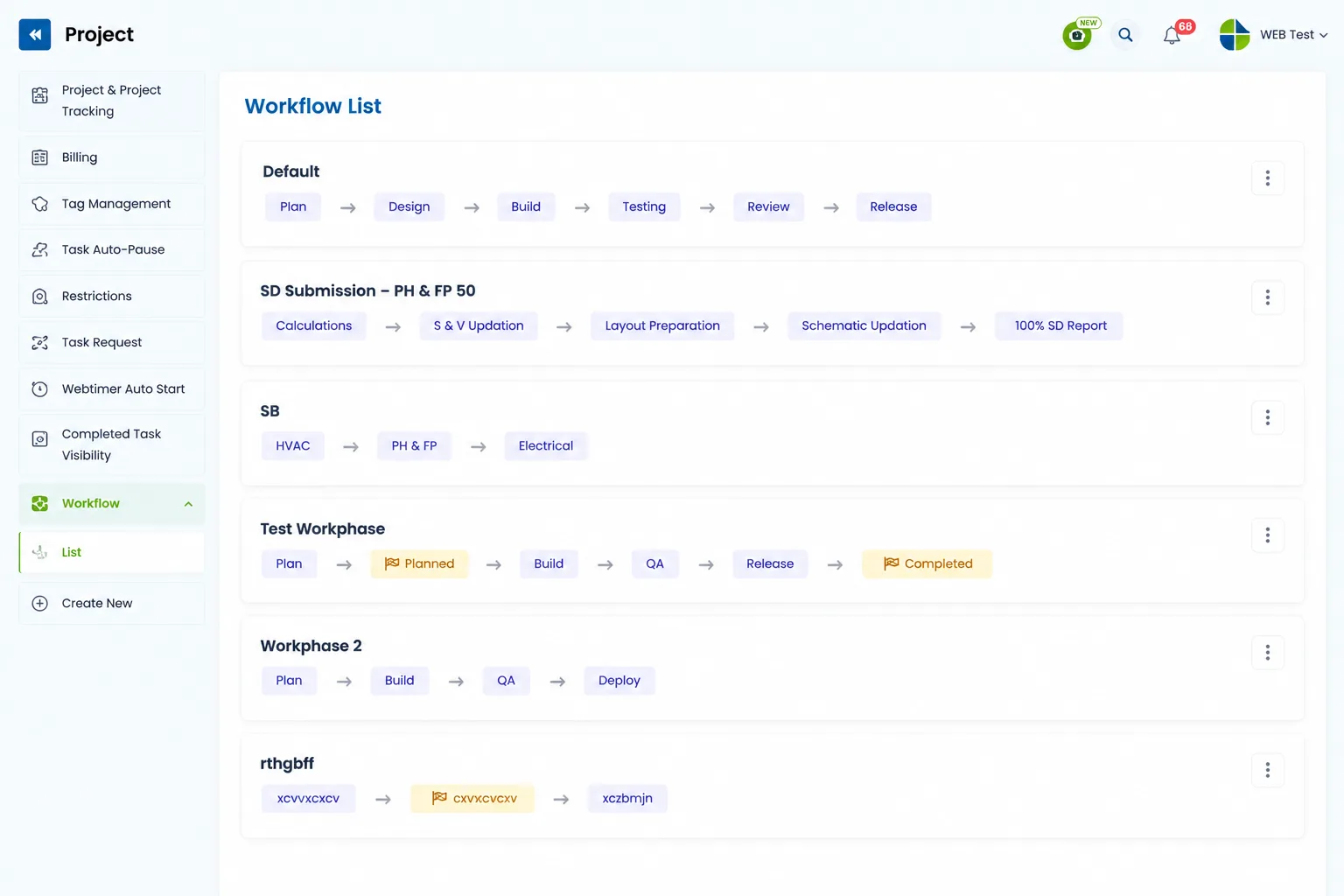



What is Desklog WorkPhase?
Every project follows a sequence, but managing each stage efficiently can be challenging when teams lack a structured process. Desklog WorkPhase lets you build standardized workflows that define how projects progress, from planning and development to testing and delivery.
Unlike traditional task lists, WorkPhase organizes work into logical phases, allowing teams to assign responsibilities, track time, and automatically update project status through milestones.
- Reusable workflow templates
- Phases for active work
- Milestones for business checkpoints
- Time tracking inside every phase
- Agile, Waterfall, hybrid or custom
Why Use Desklog WorkPhase?
Standardize how work moves through your organization, from the first planning session to final delivery.
Standardize Every Project
Build reusable workflow templates that ensure every project follows the same structured process, helping teams maintain consistency, reduce errors, and deliver predictable outcomes across all projects.
Organize Work into Clear Phases
Divide projects into well-defined phases that organize tasks logically, assign responsibilities effectively, and guide teams through each stage from planning to completion.
Track Progress Visually
Get a clear view of project progress with phase-based tracking and milestone updates, making it easy to identify completed stages, ongoing work, and upcoming activities at a glance.
Improve Team Coordination
Keep everyone aligned by clearly defining project stages, responsibilities, and next steps, enabling smoother collaboration, better communication, and fewer workflow bottlenecks across teams.
Save Time on Project Setup
Reuse preconfigured workflow templates for new projects instead of building structures from scratch, reducing setup time while ensuring every project starts with a consistent framework.
Fits Any Methodology
Adapt WorkPhase to Agile, Waterfall, hybrid, or custom project methodologies, giving your organization the flexibility to manage projects using its preferred delivery approach.
Standardize How Every Project Runs
See how reusable phases and milestones keep delivery predictable across every team.
Build Your Project Workflow in Minutes
Creating a structured WorkPhase workflow takes only a few simple steps, helping you standardize project execution and reuse the same proven process across multiple projects.
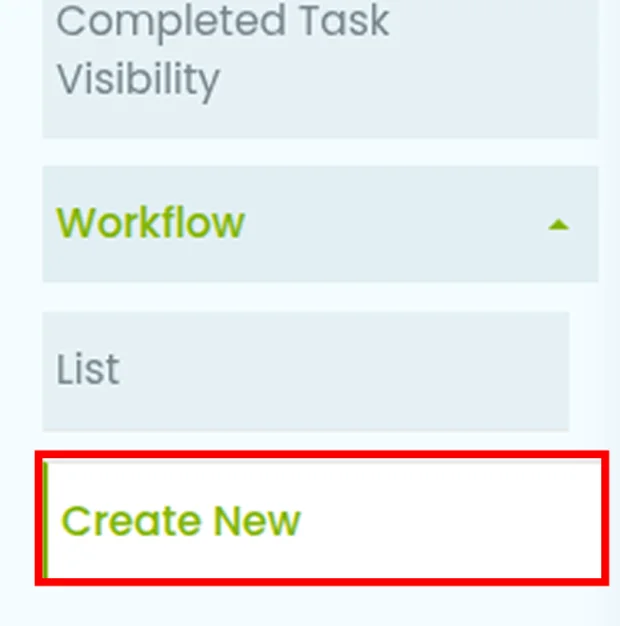
Create a Workflow
Start by giving your workflow a clear, descriptive name that reflects your project methodology or delivery process, making it easy to identify and reuse later.
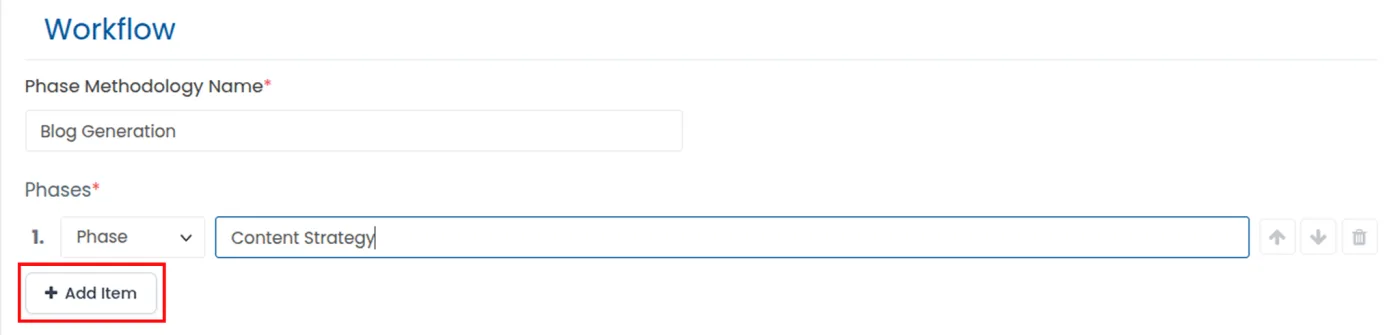
Add Phases
Define each stage of work, such as Planning, Design, Development, Testing, or Deployment, to organize tasks and responsibilities throughout the project lifecycle.
Insert Milestones
Place milestone checkpoints between phases to represent important business statuses, approvals, or project achievements that mark progress without assigning work.
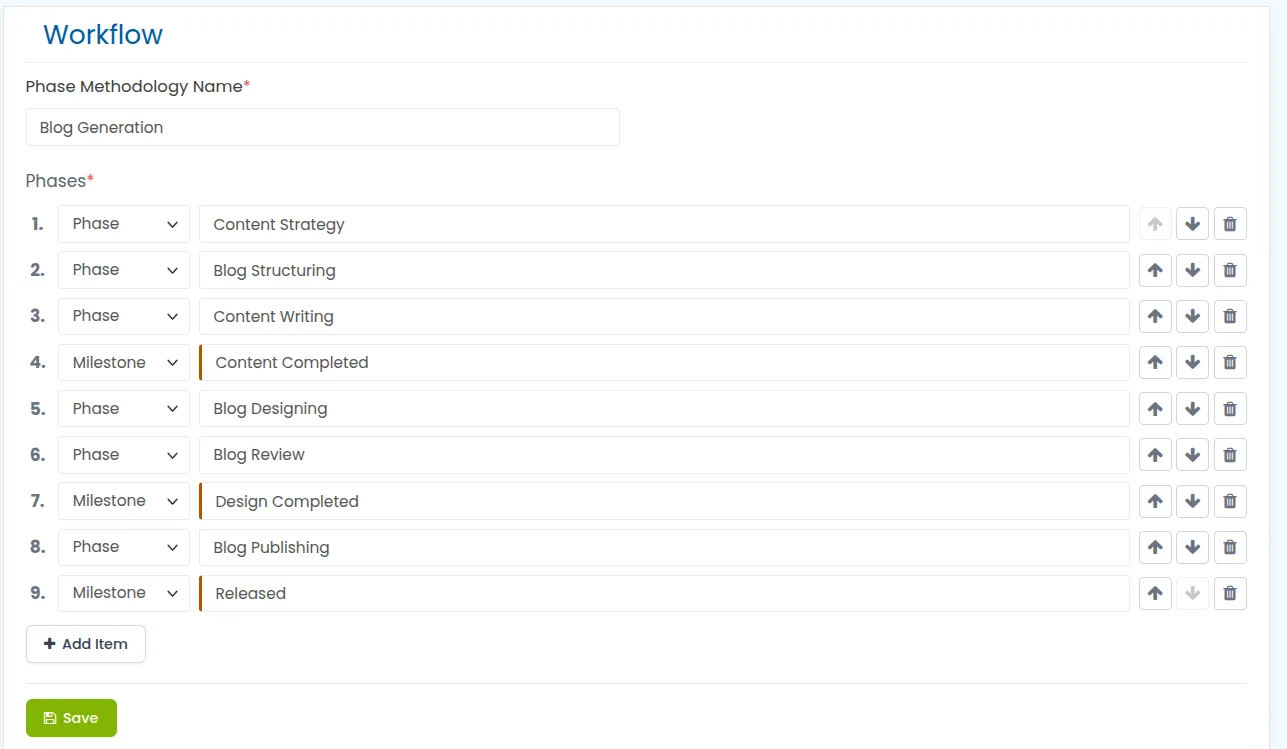
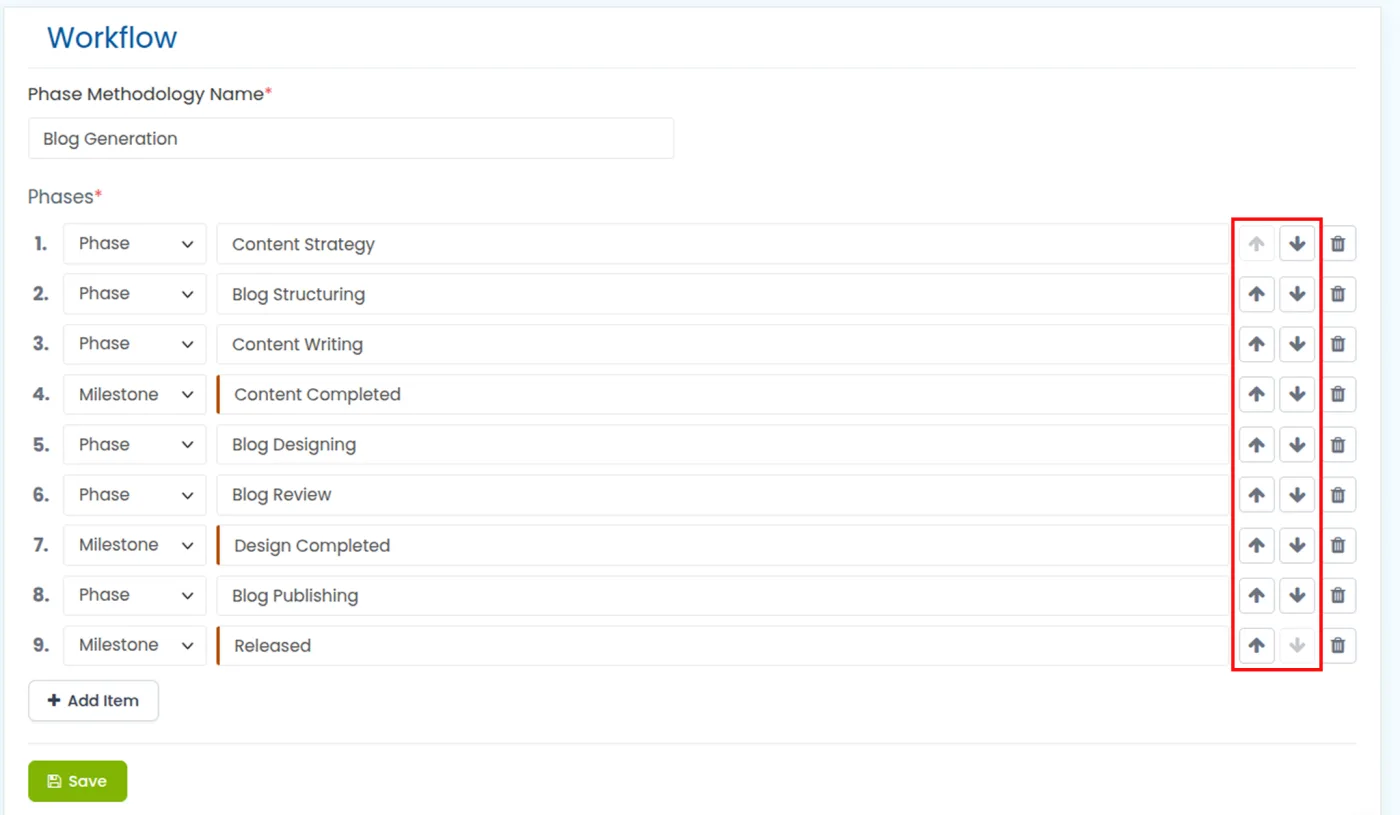
Arrange the Order
Organize phases and milestones in the correct sequence to create a structured workflow that accurately reflects how your team completes projects from start to finish.
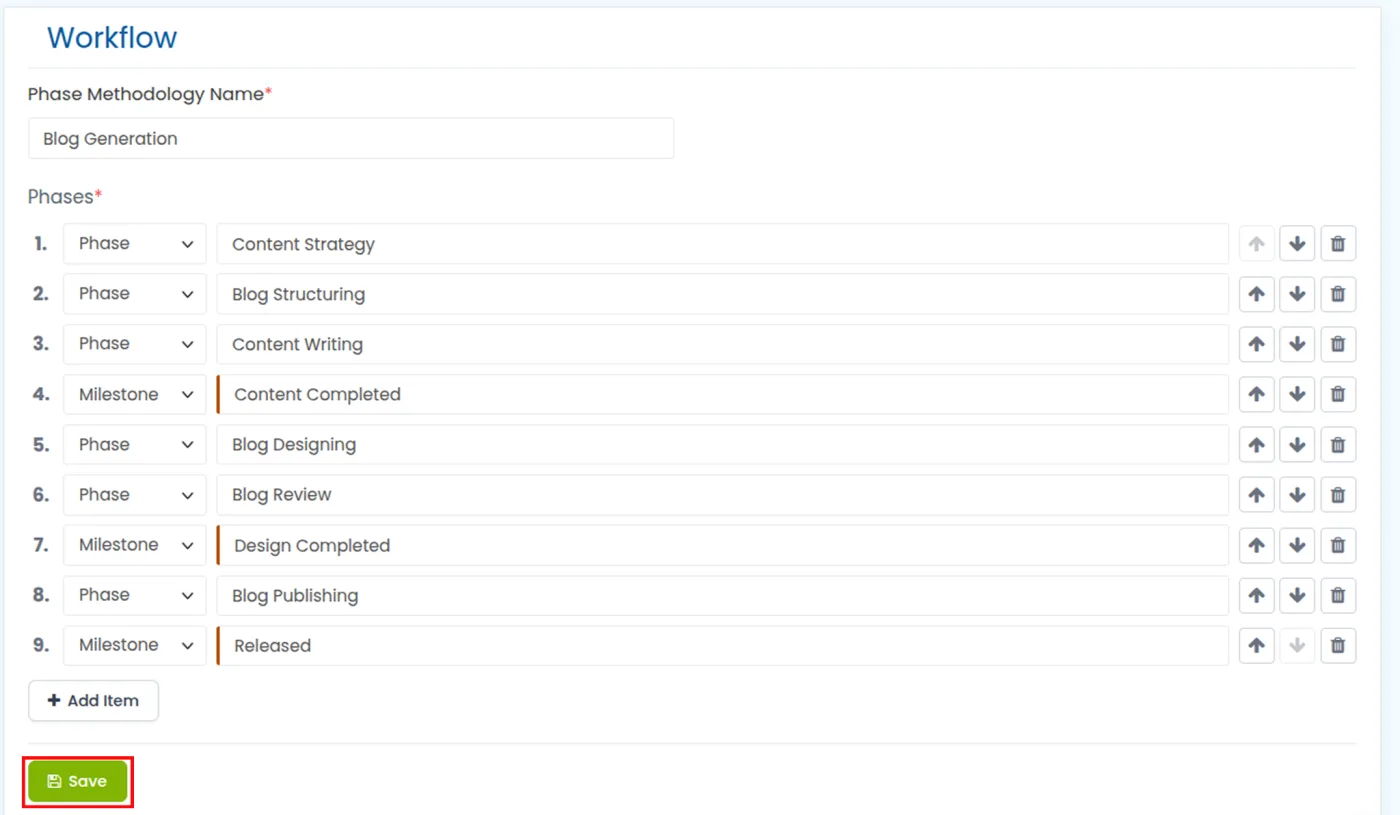
Save & Reuse
Save the completed workflow as a reusable template and apply it to future projects, ensuring consistent execution while reducing project setup time.
Phase vs Milestone
Phases carry the work. Milestones mark the status. Knowing the difference is what keeps a workflow accurate.
Benefits of Desklog WorkPhase
Standardize Project Execution
Ensure every project follows the same structured workflow, reducing inconsistencies, improving process adherence, and delivering more predictable, high-quality results across teams and departments.
Improve Team Collaboration
Provide every team member with clear visibility into the current project stage, upcoming work, and individual responsibilities, enabling smoother communication and better collaboration.
Better Project Visibility
Gain a complete view of project progress by identifying the current phase, completed milestones, and remaining work, helping managers make informed decisions more efficiently.
Faster Project Setup
Reduce repetitive project configuration by reusing predefined workflow templates, allowing teams to launch new projects quickly while maintaining consistency across every implementation.
Increase Accountability
Assign ownership to every project phase so responsibilities remain clear, progress is transparent, and teams stay accountable for completing work on schedule.
Simplify Progress Tracking
Monitor project movement effortlessly through phase transitions and milestone updates, providing real-time visibility into project status without relying on manual tracking.
Improve Time Tracking
Track time within every project phase to understand resource utilization, measure productivity, and gain detailed insights into how work is distributed throughout the project lifecycle.
Support Multiple Business Processes
Adapt WorkPhase to Agile, Waterfall, hybrid, or custom project methodologies, giving organizations the flexibility to manage projects using their preferred delivery approach.
Track time inside every phase and see exactly where your project hours go, from planning through to handover.
View Live DemoWho Can Use Desklog WorkPhase?
WorkPhase is designed for organizations that manage projects through defined stages. Any team that follows a structured workflow can benefit from WorkPhase.
Software Development Teams
Organize development sprints and releases into structured phases while tracking progress and time across the software lifecycle.
IT Services Companies
Standardize service delivery from requirement gathering to deployment, ensuring consistent execution across every client project.
Digital Agencies
Manage creative, design, development, and client approval stages with a clear workflow that keeps projects on schedule.
Marketing Teams
Plan, execute, review, and launch campaigns through organized phases while improving collaboration and tracking project progress.
Product Development Teams
Structure every stage from ideation and prototyping to testing and product launch for better visibility and execution.
Engineering Firms
Coordinate complex engineering projects with clearly defined phases, milestones, and responsibilities across multiple teams.
Construction Companies
Track every stage of construction projects, from planning and approvals to execution and final handover, with greater control.
Manufacturing Businesses
Manage production workflows from design and procurement to manufacturing and quality assurance using standardized project phases.
Consulting Firms
Follow consistent project methodologies from client onboarding and analysis to implementation and project closure for improved delivery.
Architecture Firms
Organize architectural projects into planning, design, approvals, documentation, and execution stages to streamline project management.
Event Management Companies
Coordinate planning, vendor management, logistics, execution, and post-event activities through a structured project workflow.
Enterprise Project Management Offices (PMOs)
Create standardized workflows across departments, ensuring governance, consistency, and visibility for every project in the organization.
Reviews
View our rating in top platform





Loved by 0+ Teams Worldwide
See what our customers have to say about Desklog
Manager
Manager
Manager
Manager
Manager
Sr. System Administrator, Heckyl Technologies Pvt Ltd
Manager
Director, Focuz Line Shipping Co Ltd, Saudi Arabia
Manager
Sr. System Administrator, Mantra Softech India Pvt Ltd
Managing Director, Sanesquare Technologies
CEO, RedTeam Hacker Academy Pvt Ltd
Frequently Asked Questions
What is a Concept Workflow?
What is the difference between a Phase and a Milestone?
Can I create multiple workflows?
Can workflows be edited?
Do milestones require manual completion?
Can I rearrange phases?
Does every workflow require milestones?
Is WorkPhase suitable for Agile and Waterfall projects?
Every Successful Project Starts with the Right Workflow
Create reusable project workflows that standardize execution, simplify tracking, and keep every team aligned from start to finish.